106 comments found.
Hello. I’ve created 4 characters in a video, but I need to create more for the video. How do I add more? Thanks.
Please write an email to support@snowcake.info and we will get back to you. Thank you 
My collegue how bought this item, has send you a message!
We already replied to your collegues email

Hello. I purchased this template through Envato’s Digital Trends Bundle. Needless to say, it is amazing! Can I purchase your Character Builder add-on separately through you?
Hello there, makes us happy that you like our work:-)
I am sorry, the “Character Creator” is part of the update of the “original” version, so you´ll have to buy the pack. Once you buy it you will receive all future updates for free.
The Envato Digital trends Bundle does not provide support or future updates, I am sorry.
Thank you!
Regards Snow
How can I add more scenes? Is there a tutorial on how to do that?
Hello there
Hi I have purchased your whiteboard pack. I have very limited experience with After Effects, is there a tutorial to show me how to install it to After Effects?
Hello there, please have a look at the PDF that comes along with the project, in there you´ll find the link to the online Video Tutorials
I have searched your tutorial and the internet I still have not found how to install it to after effects. All the tutorials show me how to use it after I have installed it, but I dont know how to install it to use it. Is there a tutorial for this?
Hello there,
I am not sure if I understand you properly. You don´t have to install anything, you just have to open this file: CreateYourStoryWhiteboardCharacterPack_V4_CS5.aep with After Effect and you are good to go. For further question please write an email to support@snowcake.info. Thank you and Regards Snow.
OOHHHH!! Duh.. Thank you!!! I have been racking my brain… Thank you! Thank YOU!
Your welcome, always happy to help
Hey there!
I bought this package with the digital trends bundle together. Please, how can I get Package V2, V3 and V4 ?
Thank you very much. Nice work!
Best regards
Hello, I am sorry because it had been sold as part of the bundle you have to buy the project again for the regular price in oder to get the latest and the future updates for free.
Sorry, that´s a little bit of bad practice.. There was no notice for such a handling.. It´s really ok to pay some extra dollars, but not the full price for a project I sold before..
On the contrary, the bundle had been sold with that exact information, that all products within the bundle do not involve future updates or item support. Please feel free to contact Envato, to get that exact same message!
Thank You
can’t open\see your video on videohive
There had been a technical issue, which has been solved now:-)
Hi Snowcake. Very nice template. 1. How many characters are in the pack? 2. Can I duplicate a character, and then change it abit, to create a new character? If so – how? Thanks!
Hello Ofirbn, at the projectsite if you scroll down you will see all the readymade characters (not changeable), things, location and other shapes that are included in the pack. We also create a “character creator” with it you are able to create your own character. Changeable clothes, poses, skin, hair and a lot more. Hope that information helps.
Thx Snowcake. I’ll send an email to your support mail.
You got mail
didnt bought it yet but just a quick suggestion for you guys : what about including some “extreme sports” character in your pack like : skydiver, skaterboard, surfer, skier… i would just get on my knees for that, well actually I am ^^ congrats for the job, i ll buy this soon regards
Hey there xavdaskier, thanks for your “wishlist”
In the next upcoming update our main theme will be soccer. But we´ll consider your suggestions for the next update. Thanks a lot
thanks for you reply , if needed, i ll be glad to help
I love this pack!
Are you going to add more technology elements?
Hi spiralout1988, thanks a lot:-) What kind of technology elements?
How much longer before you add the “DRAWING HAND” update???
A good day for you 2! The Update will come out end of May. Drawing hand? There already is a drawing hand (Update V3) in the package! Regards Snow
Sorry what about pets in objects scpecially dogs?
Hi:-) Have a look here: http://www.snowcake.biz/?p=816
Super! Thanks a lot!
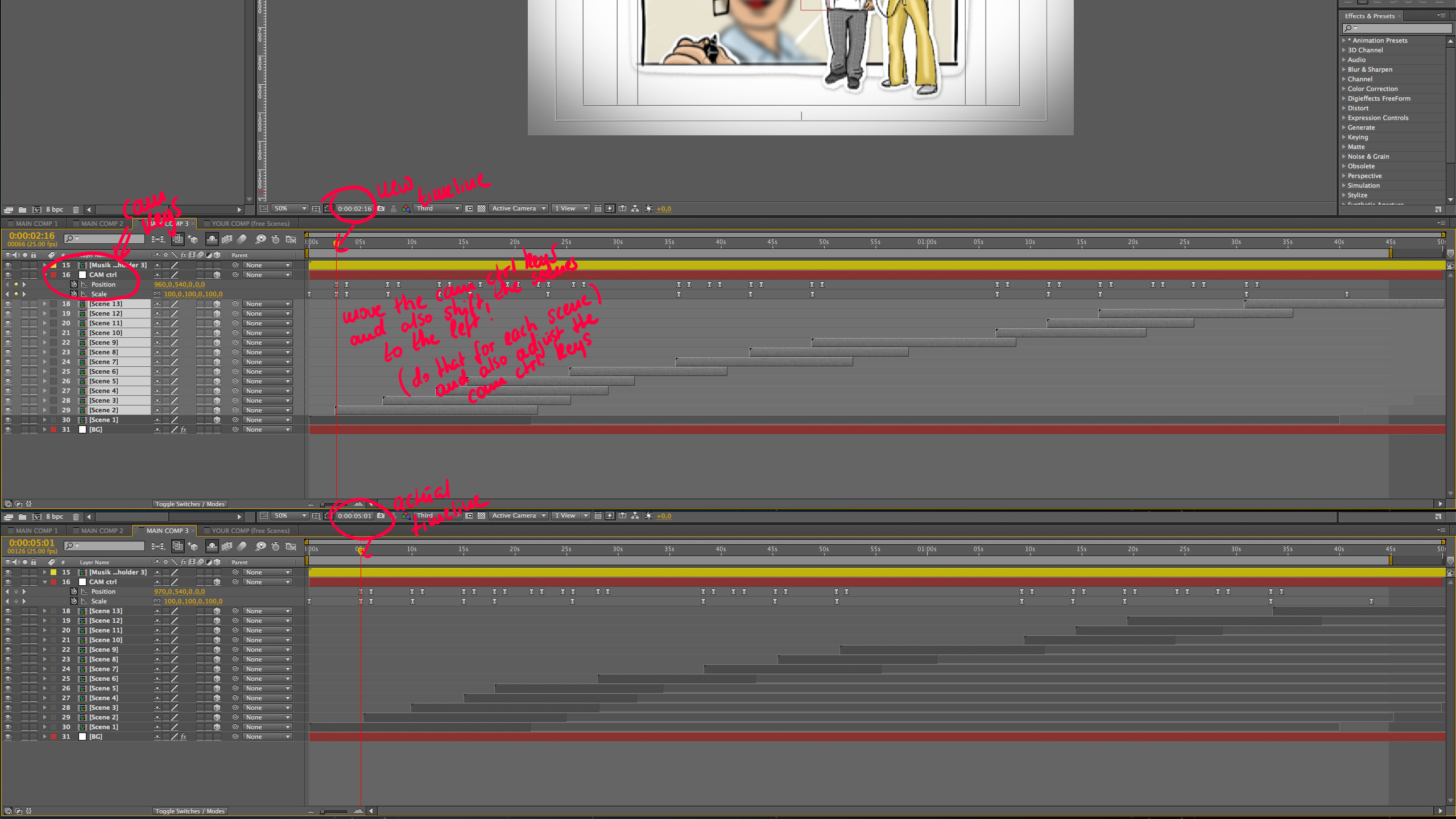
Hi! I’m new to after effects and its the first time I’m using it… You have pretty good tutorials to explain everything but I’m having a small problem… I can’t find any way to decrease the time between each scene… For ex if your template contains “scene1” of 15 secs and I need to change it to 5 secs how to do it… I tried changing camera position and scale and also shifting scene2 towards scene1 to remove the deleted timespace but nothing is working… Its either not showing the characters in the case or the second error that I noticed was that its not performing the transitions and just dragging the characters with the slide and not performing their default pop up tasks, etc… I hope to hear from you soon… Thanks
Hi there
If you want to decrease a single scene or more, you can do it super easy. Let´s start with “Scene 1”. What you need to know is that you do all the important changes with the “cam crtl” keys.
So let´s say we want to decrease “scene 1” from 0:00:05:01 to 0:00:02:16 – So grab all of the “cam ctrl” keys and shift them to the correct timeline (see red marker index). After that grab all the remaining scenes (scene 2 – scene 13) and move them to the left as well.
The “cam ctrl” keys always have an IN and an OUT transition (consisting of two keys for the IN transition and two keys for the OUT transition – the inbetween time is the actual time that we actually use to show the scene.
I hope that make sense and will help you. If you still have problems or questions please write us an email to support@snowcake.info.
Thanks a lot! Regards Snow
Thanks for the help, you`re a genius…
Thanks a lot ...(wish I were…lol)
Hi,
Is it possible to also use the character we create as an image on our website/project? What image format are the characters convertible to?
If I buy version 3. – Are updates included in the price? So I get version 4 as an update?
Hi Teamline,
I ´ll think you can use the characters as an image on your website as long as it is project-related to the video that you´ll create with the template. You cannot just use the characters as standalone´s cause they are part of the template and by that you´ll have to follow the license. http://videohive.net/licenses
For more detailed help concerning this matter pleae contact Envato and open a support ticket: http://support.envato.com/index.php?/Tickets/Submit
You can export the characters as PSD (with alpha channel) and in Photoshop you can pretty much export the image in every file format you want/need.
All future updates are included !!!
Have a great day
Regards Snow
Thank you,
I am familiar with Photoshop, but haven´t used AE before.
1) Is it difficult to use if I only want to change text and some picture in one of the included stories. So in this stage I will not begin with an empty story.
2) You forgot to answer if you come with updates, or do I have to buy next version (v.4) separate?
Hi again
1) It is very easy to change text or images. We have also include a very detailed tutorial which will guide you through the whole process.
2) You may have not seen my answer All future updates are included !!! Which means that you will automatically get every update once you bought the template.
If you have more questions feel free to ask.
We love to help
Regards Snow

Hello, I would like to know how many presentation can I make with a basic license. Are there limits to create stories? Thanks.
Hi there, with the regular and the extended license you can create one Story for one Client. So let’s say you have three clients you’ll need to buy one template for each client. Hope that helps, regards Snow
I purchased and downloaded this awesome tool, but the tutorials are not in the zip file? Can you point me to these please?
Hi there, please have a Look at the “Readme.pdf”. In there you will find two links. One to the online video tutorials and the second where you can directly download the video tutorials. Regards Snow
Thanks! I read right over that part of the read me…I’m retarded, sorry for the bother….lol.
Your welcome
Hi, how can I download the v3 kit? I am on the page but I can’t see the link.
Hi, just redownload the template and you will automatically get the update
I purchased this in the bundle recently. Is V3 included in that bundle? If not, how do I update? Thanks!
Hello there, no I am sorry. If you bought the bundle you will not automaticaly get the update. If you want to have the latest version of the template and all the future updates you´ll need to buy the template “Create Your Story Whiteboard Character Pack” for the original $45. Thank you and regards Snow.
OK. Thanks! Will do. It’s worth it. Great job.
Thank you
Hi Snowcake,
I am loving your toolkit, having loads of fun putting an animation together for a client and looks like I may have another client happy to go with your pack also
I have a question which I have not found answered in the tutorials or here, sorry if you have covered this and I’ve missed it.
Q- I have 6 scenes working well, however, I need to add a new scene between 2 & 3 (of the free scenes comp) can I create a new scene and drag & drop that into place? when I try to do this it seems to muck up the moves, but it’s not a nice thought if I have to start all over again to re-build all the scenes to allow for a new scene to slip in. Please Help
I think the scene transitions are linked to the cam ctrl keyframes, which I have been moving to fit my changing scene durations, but I really don’t know how I would adjust to incorporate a new inserted scene. Thank you
Hi Snowcake,
I am loving your toolkit, having loads of fun putting an animation together for a client and looks like I may have another client happy to go with your pack also
I have a question which I have not found answered in the tutorials or here, sorry if you have covered this and I’ve missed it.
Q- I have 6 scenes working well, however, I need to add a new scene between 2 & 3 (of the free scenes comp) can I create a new scene and drag & drop that into place? when I try to do this it seems to muck up the moves, but it’s not a nice thought if I have to start all over again to re-build all the scenes to allow for a new scene to slip in. Please Help
I think the scene transitions are linked to the cam ctrl keyframes, which I have been moving to fit my changing scene durations, but I really don’t know how I would adjust to incorporate a new inserted scene. Thank you

This item was featured on VideoHive

Elite Author
Contact the Envato Market Help Team