Video

Support for Text Fireworks

Support for Text Fireworks

4.52 (60 ratings) 4.52 stars
Cart 835 sales

Popular questions for this item

I cant see but only black frames, or an “X” sign over the screen…

If you only see black frames, that’s probably because you don’t have the required by the project plugin: Trapcode Particular
If you see a red “X” sign over the screen, that’s because you only have the trial version of the plugin (it’s not registered).
In both cases you can purchase the plug-in here: http://www.redgiant.com/products/all/trapcode-particular/
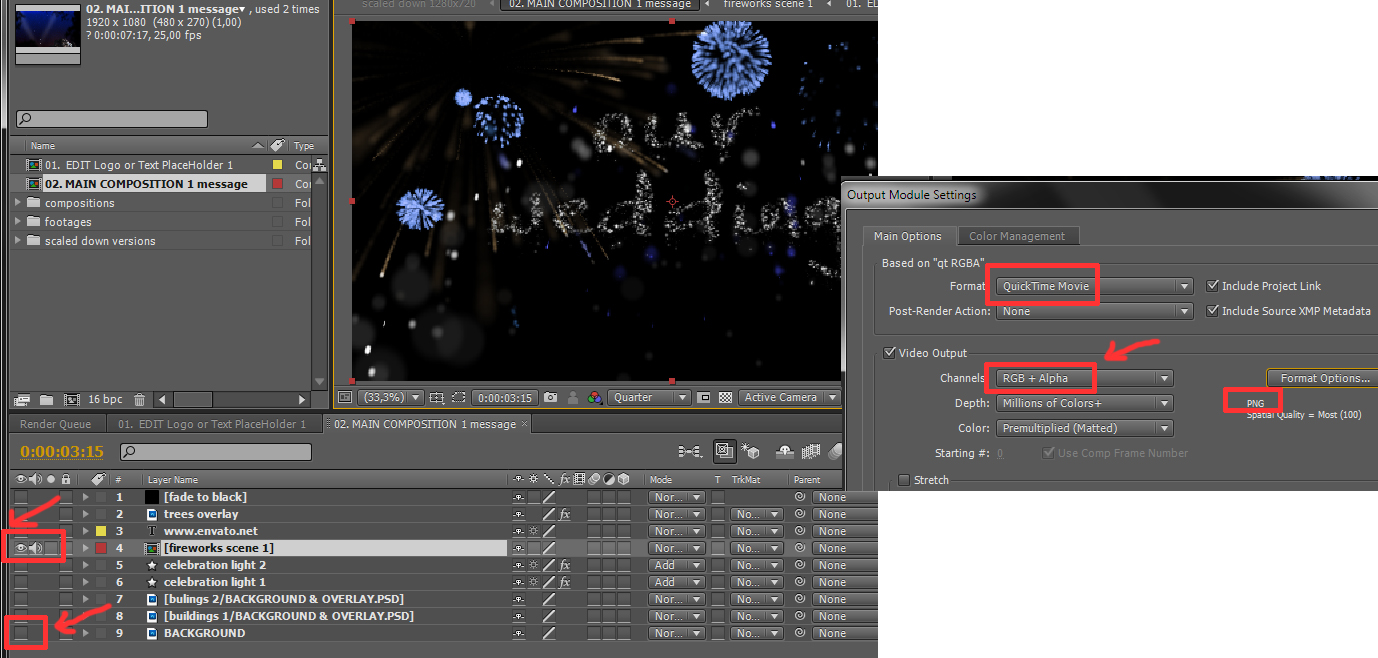
Can I overlay the text fireworks on my image / video?

To overlay the fireworks on your video, there are two ways:

WAY 1: In the “MAIN COMPOSITION message” composition, disable the background layer (last one) and the layers not needed: (buildings trees, etc). Now you can drag and drop your video or image over the background layer (last one) Render normally (RGB).

WAY 2: (Rendering as video to overlay it with an editing softwafe). In the “MAIN COMPOSITION message” composition, disable the background layer (last one) and the layers not needed: (buildings trees, etc). Now render the file in a format (codec) that supports RGBA (VIDEO AND ALPHA MASK) output (like quicktime animation or png, etc.)

Now you have a file ready to be overlayed over your background (photo or video). You can do this in After Effects or your favorite editing software! (Drop it over your video track!)

I’m getting an error: “After Effects error: plug-in “Particular.aex” could not be loaded (126). (48 :: 46)”

If you get this message update your particular plugin to the latest version through the Red Giant site. Also install the C++ redistribituable file: https://www.microsoft.com/en-us/download/details.aspx?id=30679

Can’t find how to export in H264 codec

To enable H264 output in AE CC version: Go to menu: edit / preferences / output & enable checkbox: “Show depreciated formats in output module settings” Now you have the H264 output in your output settings!

To render in H264 format in AE CC2014 and above: Send the composition directly to Adobe Media Encoder from After Effects (Composition > Add To Adobe Media Encoder Queue)

Show more

by
by
by
by
by
by

Tell us what you think!

We'd like to ask you a few questions to help improve VideoHive.

Sure, take me to the survey
