982 comments found.

Thank you for the option to no include audio with the transition with the new update. Totally installing this now! 
You’re welcome
Hi, I love the look of these transitions. I am new to video editing and I’d love to play around with and learn how to use your product. Am I right to understand that I have to pay $49 every time I use the product, in other words after every time I finish editing a video?
Hi! No, you’re talking about previous licensing system. Please read new license rules with multi-use https://replayer.net/promo/Licenses_AE.pdf
Ah, OK. Thanks for you quick response. That’s more reasonable. I’ll still have to think about it as I’m just learning, so I’m limited in what I can achieve in 2 months and a yearly license still seems quite expensive, considering it’s more expensive than the main program (premiere). It’s probably worth it for professional creators.
Agreed, new version with the plugin is mostly for professional videographers. But if we’re talking about average videographer rate in US (which is about 100$ per hour), 16$ per month for an unlimited multi-use in any of your videos… well, it’s a pretty good deal
And it’s way better than previous one https://videohive.net/licenses/standard with one-time-use, that’s for sure.
Hi, I really like your plugin! But, I got a problem in getting the license code. I logged on my Videohive account, then I tried to find License certificate&purchase code on Download button but I could. How can I solve from this problem. please answer me.
Hi. We have very detailed installation manual https://c2n.me/47C63Nm (“ST How to install.pdf”), which is included with the project. Simply follow it step-by-step
So this is just some constructive criticism.
The idea behind the plugin is great. I was with you guys before the plugin existed and I can appreciate what your trying to achieve. But the plugin at its current stage is not well enough developed to make new buyers and old yours happy.
Its really to slow in the time it i look for the effect I want to use and apply it I have to make sure playhead is in the right spot / cut then double click the preview then wait 5 to 7 more seconds for it to apply to the timeline it just not fit for purpose I want to edit faster not slower.
And before anyone ask my computer is New built 2020 AMD Ryzen 24 core costing £5K so its not a crap PC.
All this just to say the plugin is a good idea but for professionals trying to work faster its not better than old way.
But keep it up i look forward to this plugin getting better
Hi Bevon! Appreciate your feedback. Well, with the old system you had to import the entire project file with 1000+ transitions, sound FX and preview videos. And it was 22 Mb project file + 340 Mb of media files, and it really slowed down your workflow (especially if we’re talking about 4K). But this is how all transition packs work in PPro, if they don’t come with any kind of extension.
On the other hand, when you apply transitions with the plugin, you’re applying only that specific transition and your project stays clean and optimized. Also there is no need to disable video layers to prevent sample footage from getting on the timeline.
Not to mention constant issues with locating media files with classic import. It wasn’t the issue of the pack, but it was general issue with the import in Premiere Pro. And making the plugin was the only solution. Since V6 you don’t need to do any of this locating media stuff etc + installation has become much easier.
Plus in the latest update (V6.2) we will add an option to adjust transitions speed. That’s a killer feature for sure! How about that in the old version? There is no way to adjust transitions speed without the plugin, and it was highly demanded request for a very long time.
As for the 5 seconds to import transition: it takes some time because the plugin is processing the timeline before applying transition.
Hi, I am from Germany and I would like to buy your produkt. My english is not so good, so just one question. If I buy yours product, can I use the package from today the whole time, or is it limited for a month? Also can I use it for several movies non comercial youtube movies or just for one movie? Sorry for my bad english and thank you for yours replay. Stefan
Hi. You can use my project for 2 months with regular license or for a 1 year with extended license. Unlimited multi-use in all of your video projects (YouTube, freelance etc) + unlimited technical support are included (+ free updates).
And previous licenses were pretty sad actually https://videohive.net/licenses/standard (without any options of legal multi-use).
Thanks for the fast replay. I will think about it. Best regards from Germany, Stefan
Hello,
How to change accesibility in Win10? Can’t find anywhere
Thank you
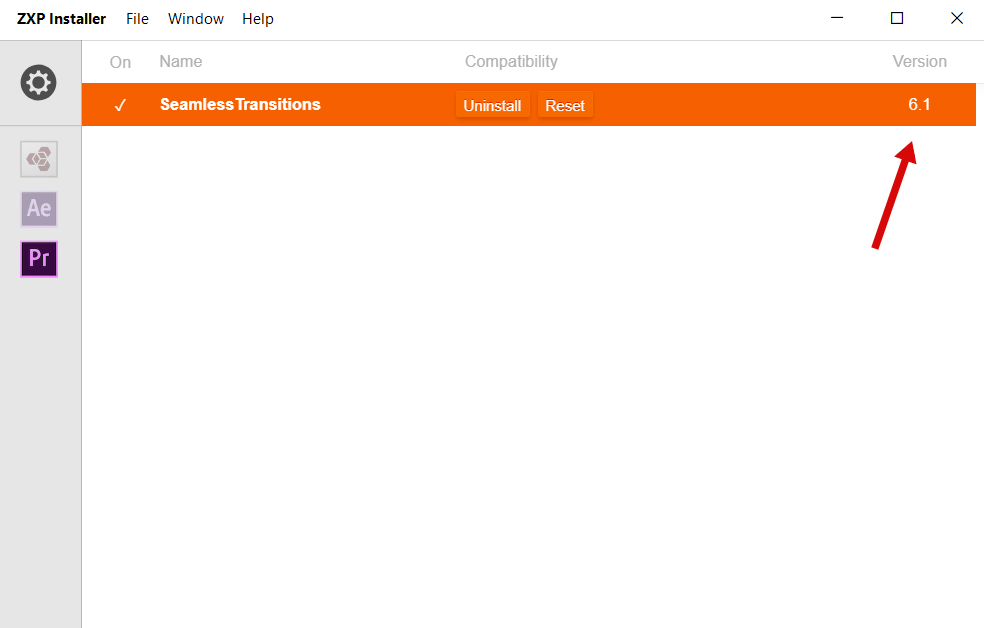
Hi! Please make sure you’re using the latest version (6.1) http://c2n.me/47tayqo.png
Thank you
You can not color footage and use these transitions. It is in no way seamless! Very unhappy!
Excuse me!? You’re bedside manner is horrible. How Rude! I have tried what you sent in your email and it did not help.
Have your read my reply to your latest message? Lumetri effects do work, I’ve made screen capture to prove that.
Why is this still not working in Premiere Pro?! Some issue with the Cliptool. I’ve given all the necessary permissions but still … error!
Hi. Please make sure plugin version number is 6.1 http://c2n.me/47tayqo.png
I’ve purchased. But your tutorial says to locate an install file. there is only one .zxp file which and one .prfpset file. I have a mac. Using Premiere Pro 2020, the .prfpset file says it’s not supported. What is the issue with this?
Hi. Please email me via my profile page to continue this discussion https://videohive.net/user/replayer
replayer, I downloaded the update (I think) and still getting same anti-virus/firmware error.Please advise.
Hi. If you’re getting 404 error, please disable your firewall / anti-virus (it blocks connection to the license server). After successful logging in you can enable them again.
Ok thanks,will try that.
I’m having an issue with a text transition, is this a bug? I made a video to show you https://youtu.be/7qIcWXgrR50
Hi Tom. It seems your text doesn’t fit main sequence resolution, that’s why you have this blank space on the right and left. Plus, if you’ve changed text position or anchor point, it could also cause this. Position and anchor point must always stay by default.
Just updated to the Extension version and it doesn’t work on Premiere 2018
Yes, you need CC 2020 to use the plugin. Version requirements are stated at the project page https://c2n.me/47uTIf9
Older versions of PPro can’t work with plugins, it’s very new technology which become available in CC 2020.
This pack looks pretty cool, but I’m having problems with my upgrade to PR 2020 and can’t get it to work. How do I get a refund?
Hi! If you’re having any issues please email me via my profile page https://videohive.net/user/replayer and I’ll assist you right away.
Crashes premier…
Where is your email address? you write “email me” but you don’t leave your email address??
I’m using Premier 2020 v14, just installed the new Transitions pack version and it crashes my premier. Once using Premier shuts down with an error.
Hi. I believe you’re still using old version of the plugin (6.0). New version works perfectly in PPro 14.1 and there are no crashes at all. You need to make sure that you’re using the latest version via ZXP Installer https://c2n.me/47tayqo
If you need any further assistance, please email me via my profile page https://videohive.net/user/replayer
I will double check the project version and contact you if needed. Thank you.
Hey, this update doesn’t work with V14. How about mentioning in BOLD letters in that email you send out that this latest update doesn’t work with the latest version of premier pro. I downloaded it and only see Lume preset and I get the message that the file format is not supported, what about the rest of those transitions? Am I supposed to pay for it?
Hi. I believe you’re still using old version of the plugin (6.0). New version works perfectly in PPro 14.1 and there are no crashes at all. You need to make sure that you’re using the latest version via ZXP Installer https://c2n.me/47tayqo
If you need any further assistance, please email me via my profile page https://videohive.net/user/replayer
Tried to follow your guide on how to install but it keeps saying “no application compatible with Seamless Transition was found on your computer” what the heck!!
You should have emailed me with this issue before leaving 1 star rating. The plugin works in CC 2020 and above, any older version is not supported.
If you do have the latest version 14.1 and you still get this error, email me via my profile page https://videohive.net/user/replayer
Well, I gave you 1 star review for the same reason, frustrations and waste of my time trying to get this to work. I’ll do have the latest version of this, and even tried the Adobe extension manage and is the same message and some times other saying the application is not compatible. You are a video editor like me and “TIME IS MONEY” and since I was looking to all the possible solutions “due to the late reply and support sometimes developers takes to respond” That’s why I leave a 1 star review.
I’m aware that time is money, but issues could happen even with a good projects. And we always solve all issues as soon as possible (you’ve received my response in 15 minutes). As for your error – never seen it before. I suggest you to email me for further assistance.
We also provide technical support via TeamViewer (if the issue is very unique). So it’s always better to contact me first. We care about our customers and provide support with all possible issues.
i need help with my transition pack please help
Hi. Please email me via my profile page and I’ll assist you https://videohive.net/user/replayer
Hi, I just downloaded the newest version and im getting the following Error message. Error: File import has failed. Please, make sure that your anti-virus software or firewall doesn’t block premiere pro.
Hi. Please email me via my profile page with this issue https://videohive.net/user/replayer
Hello, I bought this pack a week ago now and it looks good but now whenever I import a transition by double clicker them in the extension window my premiere seems to crash everytime. what should I do? I do have the latest version of Premiere
Hi. It seems you’re talking about previous version of the plugin. We had few issues actually in PPro v 14.1, but all issues has already been resolved. Please delete all previous versions of the plugin and download the latest one.
Hello, thanks for updated new version. But mine Pro CC version is 12.1.2 (build 69) click seamless-auto exit premiere. Please check this issue
and how i can download old version?
Hi. I believe you haven’t read about version requirements: CC 2020 and higher. As for the old version, it’s not available for download anymore.
Ok. How i can download old version?