981 comments found.

Hi, I bought it yesterday, its amazing and very great stuff – but my premiere pro cc 2018 crashes constantly every minute since I’ve imported the full hd transitions. What can I do?
Hi! Have you followed my tutorial with re-saving etc? And also please tell me your hardware specs.
Hi there, OK – I think the problem was that I’ve didn’t re-save it. After re-save there was no chrash anymore till now … Thanks
You’re welcome)
hello, with this last update im experiencing issues such as crushing or some transitions dow weird stuff and doesnt work at all. Is there any way I can send you some captures of what is happening? thanks
Hi. Sure, just email me via my profile page https://videohive.net/user/replayer and I’ll reply to you.
Hey there! 
I am super happy with this transition pack! However, after downloading V5 I started getting problems with my main sequence. After reviewing preview of the transition my main sequence stops giving a playback. The only one solution to that is simply to restart PP. This now happening too often and starts to be quite irritating.
Do you know why this could be happening? Thanks!
Hi. Frankly speaking I don’t think my update has anything to do with it. It seems more like Premiere Pro issue. Please tell me what’s your hardware specs?
Also it maybe be related to custom workspace. If you’re using custom workspace please switch to default one and then switch back to yours.
I just wanna thank you for updating it to 1000, and it’s lifetime update….we are so not worthy of you
Hi! You’re more than welcome) Please don’t forget to rate my transitions pack if you haven’t done it before 
as soon as i try to ring the project in the premiere it hangs and then crashes everytime ! bought it months ago i am unable to use it even once yet ! i have ryzen 2700 x with 1070 and 16gb ddrr4 please help!
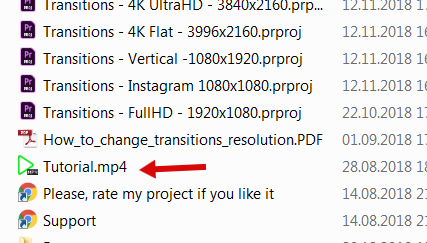
Hi. Have you followed my tutorial video regarding re-saving before import?
I did save my project but how does it even matter when i cant even use this thing at all and it just bogs down my pc everytime ! I am asking is there any way to sort it out like any qay by which i could use it as easily u show in videos ! M i doing something wrong ! I just import it normally n it fucks it up! Ik you work so hard on these tk provide us with the best but for real i am getting frsutated due to this
Got it. Please email me via my profile page https://videohive.net/user/replayer to continue this discussion. I have a solution how to greatly improve workflow in your situation.
is there a way to make all the sfx on the transitions louder? The volume is so low. Currently, I have to do it manually every time I use a transition. Is there a faster easier way to make all the sfx louder in your projects?
Hi. If you’re using transitions with some loud music, SFX may sound not be loud enough, that’s perfectly normal. You can’t adjust all sounds with 1 click, but you can adjust SFX which is used in specific categories, so you won’t need to open up each transition and adjust volume manually for each layer.
If you want to know about this solution, please email me via my profile page and I’ll provide you with the details.
perfect, Just sent you email
hello, I buy this Seamless Transitions package . I got a problem !! every thing is ok , only when I import the project file, It exhaust my CPU and memory, I can’t edit file anymore … I use 2019 premiere pro . I need help plz
Hi. Please email me via my profile page https://videohive.net/user/replayer to continue this discussion.
Hi, it seems that i can figure out why transitions to not show on main vide. After following your video, it still showing the sample clip. Pls help
Hi, please follow this solution https://videohive.net/item/200-pack-cinematic-action-transitions-sound-fx/21797912/faqs/32242
hi buy the pack of transitions but I have the version 2018 12.0.0 do not admit it I have some solution please
does not ask for the return of the money I ask for a solution in which I can have these in my version
Hi. Unfortunately, Adobe made 12.0.0 and 12.1.0 versions incompatible with each other. Please update your Premiere Pro to 12.1.0 or higher.
Hi, I recently purchased this but realised that my adobe premier 2018 version is 12.0.0 and I am unable to upgrade this version hence i am unable to use. Please can I have a refund? 
Hi. You should contact Envato support team and ask them about this.
Hi, How many machines can I use with the extended license
Hi. It’s allowed to use 1 licence on 2 computers.
Hi,
1. its a one time purchase right. so we can upgrade for free. no need to purchase again?
2. this product is for one computer or can be use in multiple computer. because i have 3 computers so.
I’m new to editing and I just purchased the pack and I’m having trouble actually applying the transition to my own video and not the default…help
Hi! Have you watched my video tutorial? It’s included with the project.
i did drop and drag but the it stayed the same
Ok. Please email me via my profile page https://videohive.net/user/replayer to continue this discussion.
lol ok nevermind I’m dense..I got it, also I fell in love with the preview and bought it great job bro
Ok) Please don’t forget to rate my project if you like it https://videohive.net/downloads
done
Thank you. 4 stars is good rating, but it means that you don’t like something. Can you tell me what?
i dont llike how i have to drag and drop a file onto my project ijnstead of just going to effects
Well, since my transitions goes with video previews and sound FX, it can’t operate like regular Premiere Pro presets. It’s just impossible. So it’s a little unfair to blame me for that)
If it would be simple presets, there would be no previews and no sound, also most of the transitions simply won’t work. Oh, and one more: regular presets need to be dropped on adjustment layer before you can use it. So it’s huge loss of time to put effects on layers again & again.
hi my transition doesnt work with my premier what do I do?
Hi. What’s your Premiere Pro version?
is it possible to use it in 2560 X 1080p?
Hi. Yes, you can use transitions with any custom resolution.
Could you please send me the link to the Audiojungle track used in the promo video? I love it and would love to use it in a project. Thanks so much, great transitions!
Hi. You can find link at the end of the project page.
Hey. I just purchased and I want to know how do I use them in premiere pro? Because it is not letting me put them in the effects panel or the project panel.
Hi Eddy! Please watch my video tutorial, it’s included with the project https://c2n.me/3ZcDFRt.png. Also you can look into FAQ section https://videohive.net/item/200-pack-cinematic-action-transitions-sound-fx/21797912/support.
And if you’ll encounter missing media error, simply send message via my profile page https://videohive.net/user/replayer and I’ll provide you with the solution.
Can we adjust the speed of these transitions?
Hi Jack. Well, if you experienced Premiere Pro user – that won’t be a problem. I have short video-manual how you can adjust transitions speed. But Premiere is very manual and it’s not like After Effects, and if you’re a newbie, adjusting speed will be hard for you. That’s why I created speed variations, so you won’t need to spent time on making transitions faster or slower.
Hi there! Im 2019 premiere pro user, while adding the Transitions, I encounter a ’’missing media for these clips’’ problem, Thank you
Hi! Please email me via my profile page https://videohive.net/user/replayer and I’ll provide you with the solution.