977 comments found.

just bought this but it says “this project was saved in a newer version of adobe premiere pro and cannot be opened in this version” PLEASE HELP I didn’t think this would be that much trouble ….
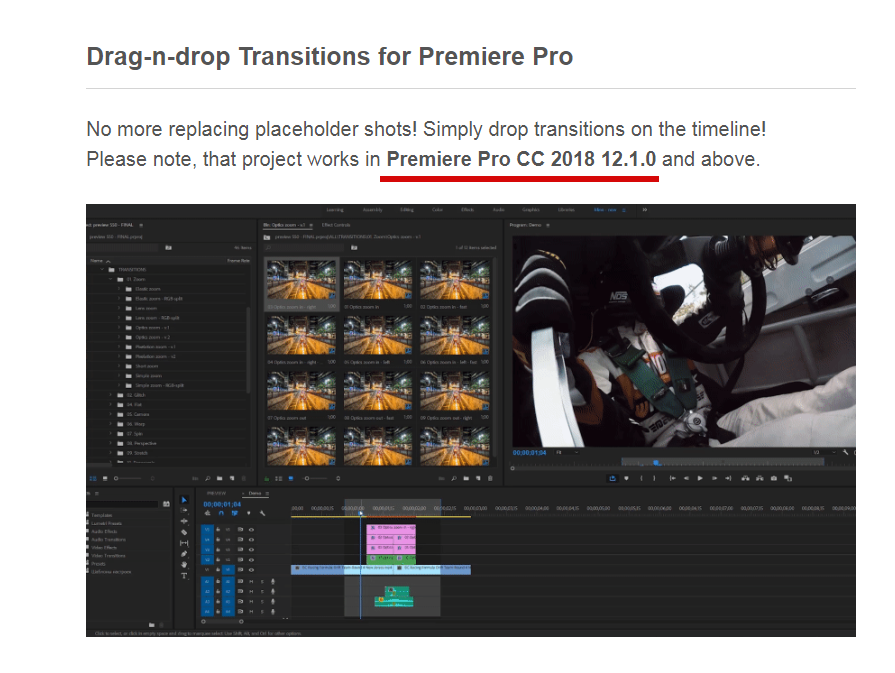
Hi. There is no trouble at all. Version requirements are mentioned at the very top of the project page https://c2n.me/3XjhNrT.png. Just update your Premiere Pro to the latest version via Creative Cloud.
ok sorry will try now thanks
Hi! When I try and import the files into premiere pro, it says the media is missing. I know you made a support comment about this issue but I still don’t understand. I run on a MacBook Pro and I don’t know how to extract a zip file on here. I may have done it I’m not sure because I have a “Premiere” folder. When I click on the .prproj I want, it opens up in Premiere Pro but now I don’t know what to do. How do I resave this file? And once it’s reserved how to I import it as a preset so it is there for good?
By reserved I meant “resaved”
Hi Kevin. Resave means this: open up any of my project files (for example, FullHD) and save it with different name (FullHD – resaved  . After that you can import that resaved project file into your project.
Hi, do you want me to rename it in my downloads section or in premiere pro? Because in premiere pro, I cannot rename the whole file I can only rename certain transition folders.
Nevermind, I figured it out! Thank you so much for Eugene for your help! Your quick responses really show your character and that you carry about people succeeding.
I’ll make sure to ask you if I need help with something in the future, but again thank you for the product!
You’re welcome, Kevin)
Please don’t forget to rate my project if you like it https://videohive.net/downloads 
Hey. I am considering buying your product. It looks super cool. But I’m in doubt about the license. I cut many different movies for different paying customers. If I would like to use the effects in this package, should I buy them every time I get a new customer?
Hi! I don’t mind if you use my project multiple times with regular license. So you don’t have to buy new licence every time you get new client)
Thanks for the quick reply. It helped me choose whether to buy.
It seems I am having the same problem the other customer capsnet is having.
The footage is still missing, even though I have followed your guide to fix it.
I have followed the instructions of saving then importing but it still isn't working. I am using the other presets and love them. Just can't get the rest of them to import properly.Can you help me?
Hi! Sure thing, I’ll help you) I guess you’re having “The importer reported a generic error” issue. It happens sometimes without any reason. But it can be easily fixed. Please email me (support@replayer.net) and I’ll send you instructions.
HI, I’m having the same problem as everyone else in here ! can’t locate the files LOTS OF THEM ! i tried all what you told the guys up there still when i open any project it gives me the same error msg, missing files and can’t locate them ! i’m running on Mac, HELP pls thanx
Hi, I have upgraded to the latest Premier and now it’s working fine.. thanx
Hi, it’s interesting. What version was before the update?
I believe I have the most current update which is 12.0.1 when I try and import it gives me an error message saying “This project was saved in a newer version of Adobe Premiere Pro and cannot be opened in this version.” In adobe creative cloud has any updates available
Hi. 12.0.1 is not the latest. Please update to 12.1.1 or higher.
Hi my media keeps going off line. I dont no what you mean when you show how to fix it, is it possible you could make video on how to locate the media
Hi Max. Have you tried solution with re-saving: https://videohive.net/item/200-pack-cinematic-action-transitions-sound-fx/21797912/faqs/31986?
yes that still is not working
I see. Please make video of the issue you’re having. If you don’t have any screen capture software feel free to film the video on your smartphone. That would be the fastest way to understand what’s going wrong.
Please make video in FullHD and send it on my email support@replayer.net
hi i cant take a video. but i was wondering if you could make a video on it to show what do di when that happens.
Max, I don’t have the issue you’re having, so can’t do video. Also I can’t help if I don’t see what’s problem you have.
I guess you have smartphone, so making video shouldn’t be a problem)
hi i dont have a smartphone. when i try to extract the files there is an error. So I cant do that. When I import it it will have every file go missing and I am a little frustrated right now.
Ok. Can you at least make a screenshot of that error?
ok. I did that
Send it on my email please support@replayer.net
Email has been sent
I try and import but get a error message saying “This project was saved in a newer version of Adobe Premiere Pro and cannot be opened in this version.” Its already up to date.
Hi. It appears you have version older than CC 2018 12.1.0. Please update to the latest one.
I have to say, you are great. Thanks a lot. Can’t wait for mirror and shape transitions.
You’re welcome) Please rate my project if you like it https://videohive.net/downloads
Thank you for the review) Appreciate it.
Hi, i would like to buy your work but ” GPU acceleration ” is inevitably necessary if i want to work with only transitions ?
Hi. Yes, GPU acceleration is required for most transitions.
Please can I have some transitions for example who don’t use GPU accelaration ? Because I would very like to buy this even if I can’t use all effect
I never tested it without GPU acceleration, sorry. I guess flat and some others can work ok, but I don’t have special demo version for that.
Hi. What is the best way to change the speed of transitions?
Hi. Please email me via my profile page with this question https://videohive.net/user/replayer. I’ll provide you with short tutorial video.
Hi there just downloaded your package
First Issue: Unable to locate Media Files (Large number of them)
Observation: It would seem as though the project is still showing your computers folder path F:\Work 2018\Templates… etc etc. I thought okay, let me “locate” these files of the unpacked content on my local drive. I can search and locate all “exact word” fiel replacements however upon attempting to locate them i get an error
Error: “File import Failure”... The importer reported a generic error.
I then found the FAQ solution of your support page showing to open your project of my respective resolution, locating media (im guessing) which i ran into again. And then resaved this on my local drive and tried to import.
I have tried:
Still unable to locate those files. Can you assist please?
Screenshots:
Thanks,
Matt
Hi Matt. First of all, thank you for such detailed comment and problem description.
You told me you’ve found FAQ, but have you tried re-saving https://videohive.net/item/200-pack-cinematic-action-transitions-sound-fx/21797912/faqs/31986? It helps in 99% cases with missing footage error.
Also my guess is you’re on Mac, am I right?
Please reply on my email support@replayer.net to continue this discussion.
Update: This has since been sorted. I have to say Eugene has been awesome with the support in getting this issue sorted
In short: For some reason my Premiere, or pc had issues locating the media (even though it was packaged). He provided me with alternative formats of the same files which i replaced in 1minute and it located all the files fine again.
Thanks,
Matt
Matt, thank you for such detailed replies with instructions and additional info. That’s pretty rare. Please rate my project if you like it and support given https://videohive.net/downloads
So far I only see a few useable fx as most either crash the latest premiere or take forever to render just to try them.
Hi. That’s really odd, because most of transitions render really fast: for example warp, panoramic, zoom. Please tell me what is your system specs? CPU, RAM, graphic card etc. Also please tell me what transitions you’re using (FullHD, 4K, ...).
Awesome
hi is there a way to make this work in premiere pro cc 2017?
Hi. Unfortunately there is no way to downgrade project version to CC 2017. Please update using Creative Cloud.
Hi please do this and report back to me as it’s not working for me. The transitions apply no effect. Sorry if this has been mentioned before.
I am using MAC Pro 4,1 with GTX780 card.
I have 2 clips at 1920×1080. I apply a camera transition. Works fine.
I complete my video and all is good. I then apply my .png graphic to the bottom corner across the entire video.
Now my camera transitions don’t play at all.
Please tell me if this happens to you.
P>S. I can work around by pre-comping the sequence inside another sequence and applying the .png in there. But this took me ages to work out.
Hi. My transitions are tested with video footage. But if you put some extra layers with transparency or maybe other adjustment layers with additional effects, it may cause trouble.
Please use my transitions how it was shown in the tutorial and you’ll have no issues at all) In case you want to use extra png-graphics, nesting is the only way.
When I try to import the pack, everything just goes offline. How do I fix this?
Hi! Please try this solution: https://videohive.net/item/200-pack-cinematic-action-transitions-sound-fx/21797912/faqs/31986
Thanks. Is there a possibility to save them in premiere as presets or something? Or do I have to import the files everytime? For me, Premiere Pro gets very laggy once I import the files. Is there a way to fix this? Last thing: Kyler Holland sent me here, he said I was going to get free luts when I purchased. Can I get them? Thanks.
Hi Robert. My transitions is already works as presets, there is no way to make it more simple. Such complex transitions can’t be saved in .prfpset file. Also if it was .prfpset there would be no previews, no sound FX and you’ll need manually apply transitions on adjustment layers. So as you can see, my version is way more comfortable and easy to use)
Regarding color presets. Please email me via my profile page https://videohive.net/user/replayer
Scared to purchase this. I purchased your AE 1500 Seamless Transitions pack and totally wasted my $50. It kept failing rendering most of the time. Looks great but I cannot make another purchase from you and waste my money like the AE pack as that still is giving me issues. I wish I did not waste my money on it. These products LOOK great but unless they actually work then that is no good.
Hi! 1500 Handy Transitions for After Effects is not my pack, it’s videolancer’s pack. My project has no rendering issues, and just the opposite it has outstanding performance optimization. Please look into customer reviews to dispel any doubts you may have https://videohive.net/item/200-pack-cinematic-action-transitions-sound-fx/reviews/21797912
And if you’ll have any questions after the purchase, feel free to email me support@replayer.net
Some transitions warn gpu acceleration error, I have already selected cuda in setting but still get error.
Please send me the video of that issue on my email support@replayer.net. If you don’t have any screen capture software, feel free to film the video on your smartphone. Thank you.
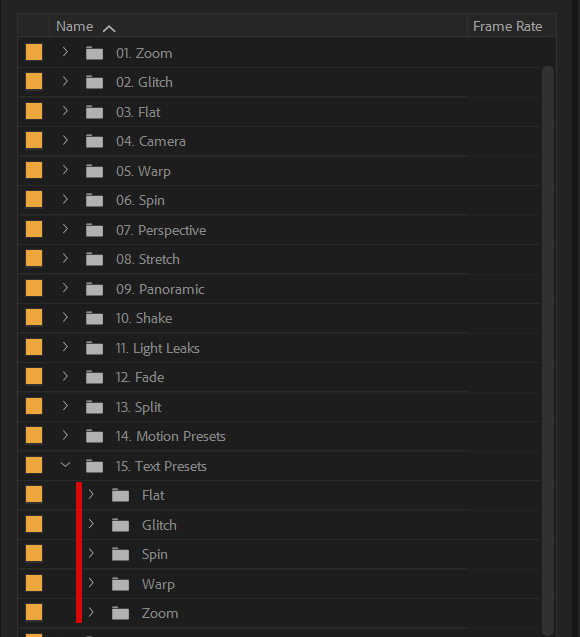
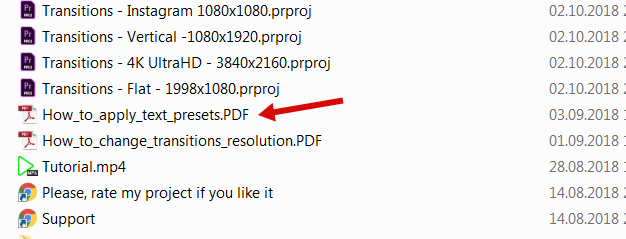
I didnt find text presets nor any instructions about it in download files.
Hi. Here is text presets https://c2n.me/3XciAhG.png and here you can find how-to-use instructions https://c2n.me/3XciLbw.png
I found it thanks
You’re welcome)