

977 comments found.

You saved many lifes 
Hi! Well, maybe it’s not exactly life-saver, but definitely makes editors life much easier Please rate my project if you like it https://videohive.net/downloads 
Hi replayer,
I downloaded Seamless Transitions but I can’t use it – the program said it was created in a recent version of Premier.
I’ve updated my Premier and After Effects and the same message appears. I have the 2018 version now.
I would love to use this pack. Any solution?
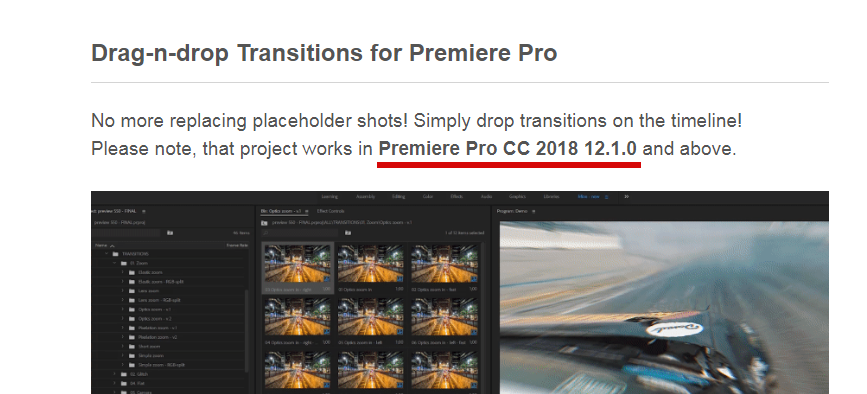
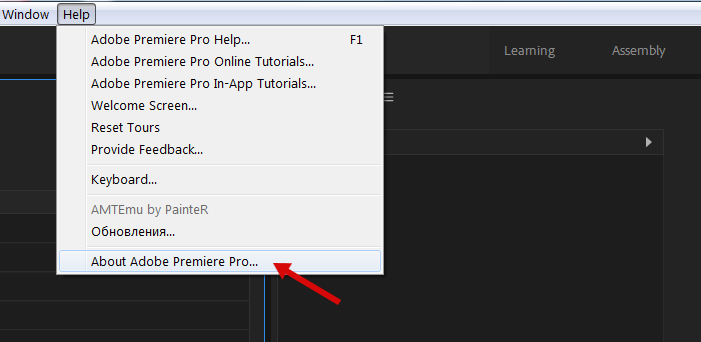
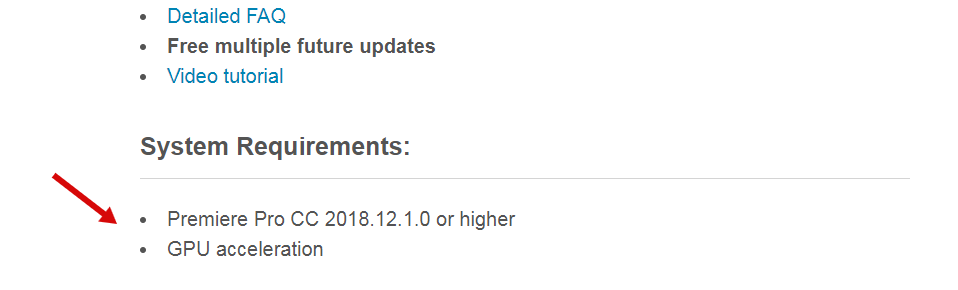
Hi! Version requirements are mentioned at the very top of the project page https://c2n.me/3X9cbEA.png. And you can check your version by clicking here https://c2n.me/3X9cj7t.png.
Thank you replayer. Unfortunately I can’t use it  I have 12.0 version
I’ve already payed it – if you can imagine any solution please help me to tiagoseverino_@hotmail.com
Regards!
Replied on your email.
great package sorted everything out…After downloading some others your’s has been the easiest one to use keep up the great work can’t delete comment so id leave a positive one lol
Hi! Glad to hear that problem has been resolved) Please rate my project if you like it https://videohive.net/downloads
Problems: every single transition has green glitch on it and cannot be used. Please kindly advise
https://imgur.com/xCCBBRtHi. Please re-download the project, this problem will go away.
Hi, I have downloaded and uploaded the transitions into my project. however, when I add the transition to the timeline, make sure the insert sequence as individual clips is grey, and turn off track 1, the transition just shows up as stock images, not my footage. does that make sense? Have I set it up wrong?
Hi, please send me the screenshot from Premiere Pro on my email support@replayer.net
This pack is totally DOPE AF!!! The transitions come with included sound effects(a nice touch). A real time saver and adds POP to your videos for sure!! Thanks replayer!!
Hi! Thanks for kind words) Please rate my project here https://videohive.net/downloads, much appreciated!
Link doesn’t work, here is correct one https://videohive.net/downloads
Thank you for the review, Thom. Appreciate it)
Of course, no problem… your Transition Pack is truly amazing, I was editing a family video last night, and it just gave my edits such POP!!! You have a new fan here in CT!!!
Can’t wait to see more of your work,
Thom
Glad to hear) More updates are coming ahead, don’t miss it)
Please help. I purchased your pack and love it. but it keeps stalling my timeline..
1. I have a 2015 i7 core macbook pro, pretty powerful computer, and it spins every time I play the timeline.. taking me hours to lay out a simple timeline because of the spinning..
2. Can I layer the effects? obviously, it’s already backlogging on the spin.. so it will be hours to do a 15 second clip !!
any tips!???
Hi. Please film the video of the issue you having, because I don’t really understand what’s going wrong. On Mac you have built-in screen capture software so it won’t be a problem to make a video. Or you can use your smartphone to film the video, it’s up to you (please make recording in FullHD).
After that send the video on my email (support@replayer.net).
Hi, Will this work with Premiere CS6? where I dont have the Essential Graphics option?
Hi. Unfortunately, it won’t. Premiere CC 2018 12.1.0 is required.
Please update to CC 2018 12.1.0 (or higher), my transitions totally worth it
Running Premiere 12.1.2 on MAC PRO 2013. Followed ALL your instructions. Projects will not import nor open project as a standalone (to re-save as per instructions) Progress bar stops half way trying to find elements and crashes Premiere APP every time. What else is there to do?
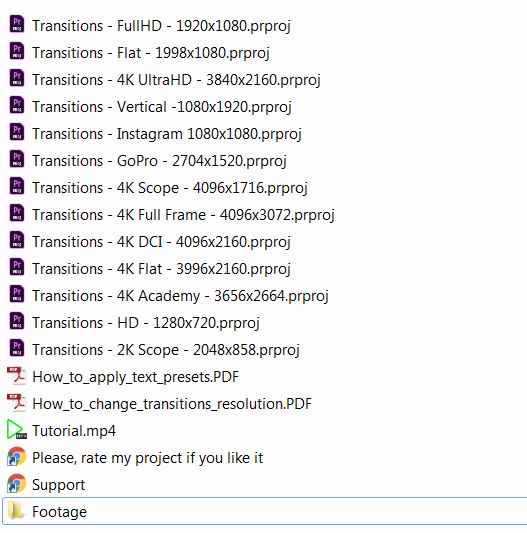
Hi. Very obvious question, but still have to ask: did you unzip everything? That’s what you should have in your project folder https://c2n.me/3WYUcKu.png.
The issue you’re having is super odd, never faced it before. Would be helpful if you could send me the video of that issue on my email: support@replayer.net. Please make video in FullHD.
Also please provide me with the screenshot of these settings in Premiere http://c2n.me/3WQ6fNh.png – http://c2n.me/3WQ6gH9.png.
Please download latest update https://videohive.net/downloads. This issue shouldn’t bother you anymore.
I Downloaded the Transitions pack and followed the tutorial but every time i import the files it shows up as missing media
Hi. It’s well known Premiere Pro issue. Please follow this solution: https://videohive.net/item/200-pack-cinematic-action-transitions-sound-fx/21797912/faqs/31986
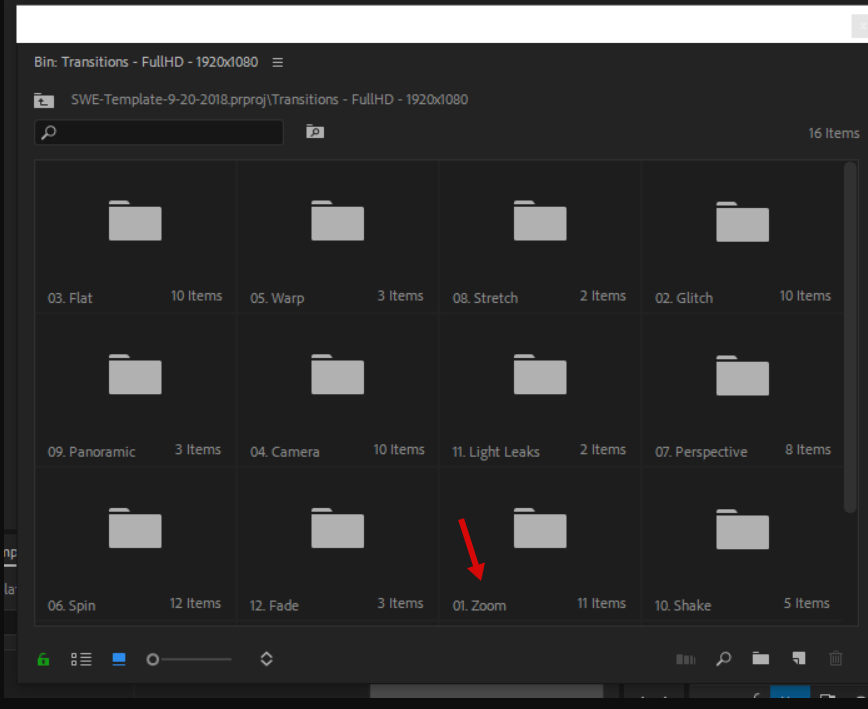
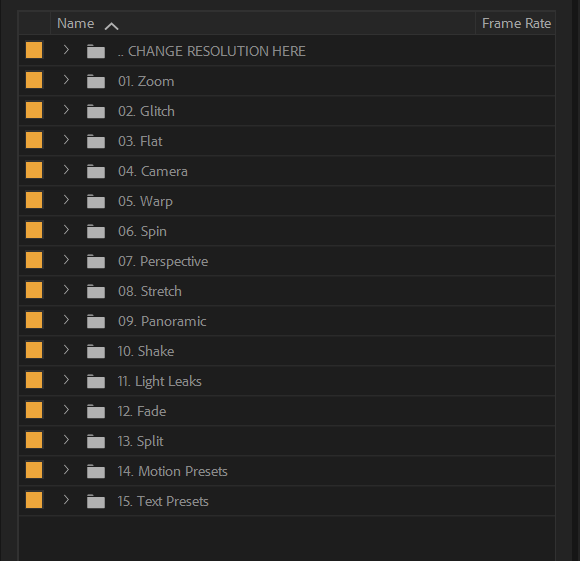
Hi. Folder #1 is right there https://c2n.me/3WVU4uv.png
Oh lord. I’m blind. Haha! Thanks!
You’re welcome) Btw, list mode is better to view folders https://c2n.me/3WVU1Ux.png.
I forgot about list mode. Thanks 
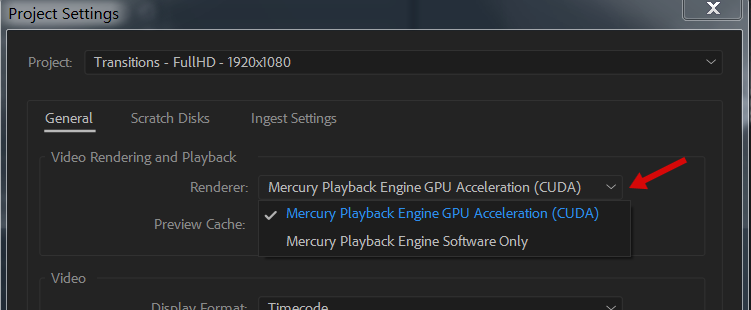
What about effect show “This effect requires GPU acceleration” ?
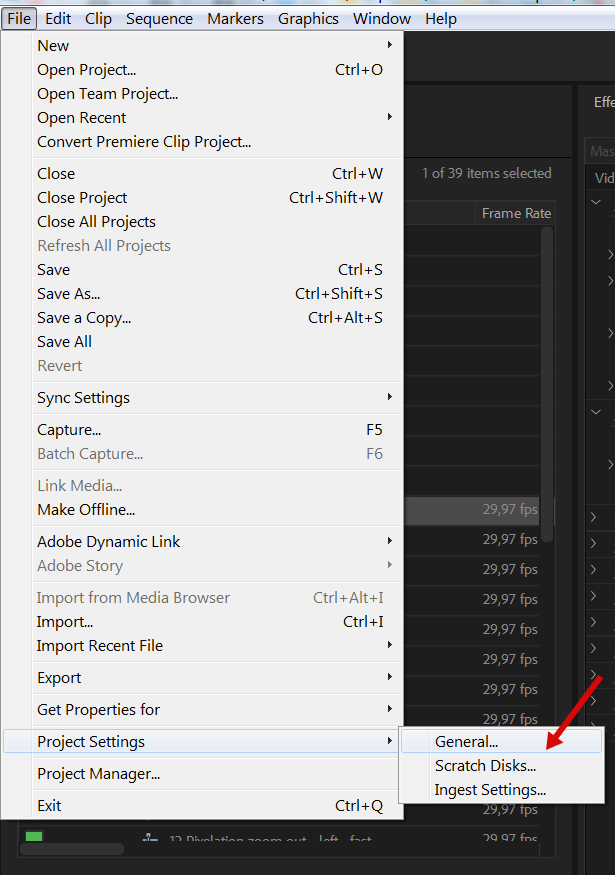
Oh I Fixed that Choose File > Project Settings > General.
In the Video Rendering And Playback section, select the appropriate renderer: Mercury Playback Engine GPU Acceleration or Mercury Playback Engine Software Only.
Well, yes, GPU acceleration is crucial and it’s mentioned in system requirements https://c2n.me/3WVEQtA.png. Thx for letting me know that you solved this issue.
p.s.: usually GPU is used by default in Premiere, that’s odd that in your case it wasn’t.
Thanks , I practicing to be a good editor , wahaha
Running into the same issue as Carder123. I’ve downloaded the file twice now, and unzipped it. Try opening up the projects and it can’t replace the missing files. It replaces some of them. But for over 600 of them, I can’t locate the files for replacement even though they’ve been located. Just won’t load.
Instead, I get a “File Import Failure” and “The importer reported a generic error.”
Hi. So let me get this straight: you’re getting these errors without importing my project into yours? You just open up any of my project files and Premiere can’t locate media files automatically?
Hey. Unfortunately, that is correct. It locates about 100 of the files, but can never locate about 500 or so even though it is finding the files. I can email you a link to a screen capture, if needed. I’m baffled. I’m using Version 12.1.1 (Build 10) – which I believe is the most updated version.
Yes, it would be very helpful to see screen capture of that issue, thank you. Usually, when 1 file is located correctly Premiere locates other files automatically. Please send me link to the video (FullHD screen capture) on my email (support@replayer.net).
Also please tell me are you on Mac or PC?
Please download latest update https://videohive.net/downloads. This issue shouldn’t bother you anymore.
It still remains an issue.
It only processes 89 of the 652 media files that it’s trying to find.
So far, I’ve got it recognize 199 out of the 652 media files. The folders creating the most problem seem to be “Flat,” “Glitch,” and “Perspective” so far.
That’s really odd, other Mac users reported that this error has gone. Replied on your email, let’s continue discussion via email.
Hi. Same issue as havlaz. Glitch pre and post render at beginning of transition or throughout transition, depending on the trans I am attempting to use.
My edit sequence is 1920×1080 and I’m using the 1920×1080 transitions sequence.
Any ideas?
Hi. Please send me video of that issue. You can use your smartphone to film the video if you don’t have any screen capture software (please make video in FullHD).
After that you can upload it on Dropbox or Google drive and send me the link on my email (support@replayer.net).
Also please send me screenshot of these settings: http://c2n.me/3WQ6fNh.png – http://c2n.me/3WQ6gH9.png.
doesen`t work!!!!!! Premiere show me mno media file!!!! SOLVE OR SEND MY MONEY BACK!!!!!!
Hi. Please follow this solution: https://videohive.net/item/200-pack-cinematic-action-transitions-sound-fx/21797912/faqs/31986
Nice pack, but lots of the preview clips weren’t recognised and wouldn’t link. I had to spend a lot of time re-encoding them to something Premier would see them but even that didn’t work. I just get red clips, and offline all over the place, so I stopped trying to use it. Shame.
Hi! Obviosly you don’t have to re-connect missing files manually. There is very simple solution to solve this: https://videohive.net/item/200-pack-cinematic-action-transitions-sound-fx/21797912/faqs/31986
Hi replayer. Thanks for the link, but that’s the first thing I tried. Maybe it’s just Premier.
Hm, so the problem with the missing media appears without importing? I mean when you just open up any project file it can’t locate media files?
If yes, please try downloading archive again. Few times this issue happened before because of some kind download error.
Hi replayer. It’s still not working for me. The update doesn’t even open at all now. Any suggestions would be really welcome.
Hi Carder123. Please send me the video of that issue, that would be the fastest way for me to understand what’s going wrong. Sometimes users have issues with import, but I’ve never seen issue like yours.
Please film the video in FullHD (you can use your smartphone to film the video if you’re not on Mac) and send it on my email (support@replayer.net).
Will do, thanks
Hi! Please tell me what’s the resolution of your footage, the sequence you working in and transitions resolution. Also please tell if you use “scale to frame size” option.
the footage is 1920×1080@60fps , the sequence is 1920×1080@30fps and the transitions resolution is the Full HD ones, 1920×1080. and no, i dont use scal to frame size.
Thanks for the info. It’s really odd that you having this issue. Please upload short part of your footage on Dropbox or Google Drive and send the link on my email (support@replayer.net). I’ll run few tests with your footage and optics zoom transitions.
ok. will send to you.
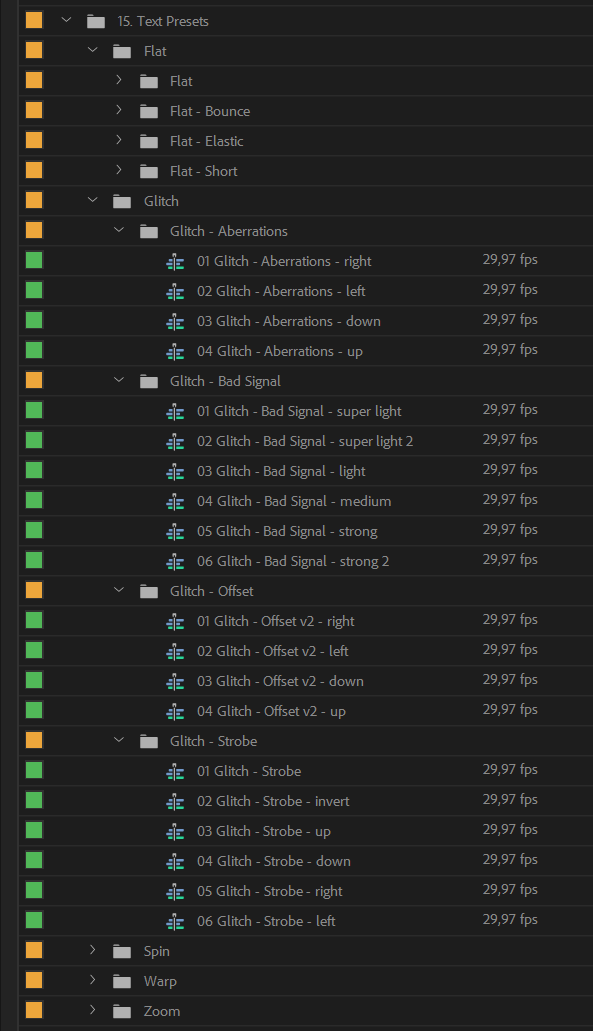
Just purchased the product. The product description says “80+ Text Transition Presets”, which is the main reason for me purchasing, but I only see nine
https://i.imgur.com/n1EfBLv.pngHi. Hm, this is really odd. When you open up project file you should see this https://c2n.me/3WLAxFB.png (much bigger amount of text presets). Please try opening the project without import and send me screenshot of what you see in that case (you can send it directly on my email: support@replayer.net).
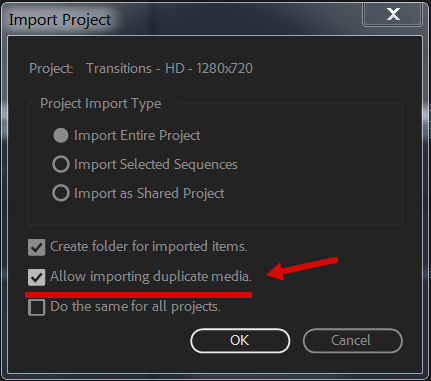
And if this issue appears only after importing my project into yours, please select “allow duplicate media” when you import the project https://c2n.me/3WLAN9P.png.
opening the project without import shows all the files correctly.
I then imported into my existing project using “allow duplicate media”, and that worked.
But now after testing them out, im wondering, what is the difference between text transitions and the regular transitions?
The difference is in the transitions settings. If you apply regular zoom or flat transitions for text layers (not from this category https://c2n.me/3WLPLwm.png), transitions won’t work. Also I’ve very precisely selected text presets, so they works best with the text and that’s why I have these 80+ text presets in separate category. For example, flat diagonal transitions looks really bad with text and you will never find them among text presets.
ahhh I get it now, thank you!
You’re welcome) And thank you for the review
In the demo you can see that the effect can be added by simply dragging it to the timeline. It does not work like that … Then one element is added, not several, as in the demo.
Hi. As far as I understood your problem, when you drop transitions on the timeline you get it as a sequence and not as separate layers.
Please follow this solution: https://videohive.net/item/200-pack-cinematic-action-transitions-sound-fx/21797912/faqs/32242
The button which pointed with red arrow must be gray. When it’s blue transitions won’t work.
Wow!! Great job!!!





,)