

64 comments found.

You are awesome bro!
Looks nice!  – Great project!
Hello, I would like to buy the bundle:. is it compatible with AE CC 2019? Thanks for the reply.
Hello! Yes, of course
thanks!
Very interesting project!
Hello, I was buying a template and writing it well. By the way, when you upgrade to cc 2017, the file does not open. Please tell me how to fix it. I would appreciate it if you could send the cc2017 version file to sbmlll@naver.com.
Sended
Hi, question: can I replace photos with video?
Oh, I’ve just solved my own question. I just drop in the footage and it works! 
How do I delay the animation of the 3D icons to show up later. I was able to delay all else by sliding them on the timeline, except the orange icons cannot be shifted?
BTW, I’ve looked over 500 templates and yours is the bestest!!!
> How do I delay the animation of the 3D icons to show up later. I was able to delay all else by sliding them on the timeline, except the orange icons cannot be shifted?
It’s easy to do. Just open the composition where you can replace the icon and shift the layer here.
Thanks a lot with you feedback!
Hi! Can you give me a quick tutorial on how to render single items with tranparent background please? like I need just 1 bar for example
Hi! I would like to single out a bar graph for example and make it bigger. Can’t seem to drag ‘n drop and scale it up.. Sorry bit of a newbee here but really love your work! Awesome stuff!
Hello! You can only scale up all compositions with the graph. Just drop it into new comp, set “cont.rasterize” on and scale it up: https://image.prntscr.com/image/5b7bab54277f4955a550875cddce2c94.png
About background. 1. Open any comp. 2. Turn off the hidden laters. 3. Turn of the background layer. Render https://image.prntscr.com/image/d8f59661986841b0be15758863b50ebc.png
Hi! I am working with the double pie graph slide “05 pie graph 2 (2 graphs)” and I cannot figure out how to change the size of the pie graph bars? I was easily able to change this in the bar chart i used, but can’t figure this out for the pie graphs.
Here is what I am adjusting, but the only change I am seeing is the number inside the pie graph (the percentage)
Inside graph comp: Value Controls - effects - – graph 1 value 1 - – - slider > then adjusting the number setting in the “mode” column.
PLEASE help!!! Is there a bug or error here, or am I just not doing it right?
Thank you!!
OMG!!!! haha. so I was going to take a screenshot to show you, and after hours of messing around with it, it’s suddenly working!! I guess we can just call this a user error? Not sure why it didnt change for me earlier. Thanks anyway
Ok, it’s still a little issue actually, but I figured it out. Its changing only for the original graph. If I change the values on the copied comp i was originally working with, then the value of the colored circular bar doesn’t change. Only the percentage in the center. what is the correct way to duplicate comps? Maybe I did something incorrect?
Hello!
You cannot just copy any comp and work with. There is the problem, becouse you copy comp without all comps inside:( easiest way to get a dublicates is in your working comp import another copy of the project and use dublicates as you wish.
Also, you can use this script (http://aescripts.com/true-comp-duplicator/) to dublicate any comp correctly. Just an alternative
How do you remove the 3d effects on the icons on like composition “10 Icon Title 2.” Wanting everything to be flat.
Hello, simple turn on hidden layers and turn off the 3d depth layers: http://imgur.com/a/imw0U Turn off the bevels if needed.
I use AE CC 2017 version. How can i open it? please help.
I tried to open this project in CC2017 and it’s works perfectly, can you send the message on b33@ukr.net and i will send you CC17 project file. Maybe this helps.
Hi there! thanks for your job! I do actually have the same problem than a persone told you on the thread. In fact, regarding the timeline, my pictures are getting duplicated – I triend to change it by applying your explanation but it doesn’t work ! can you explain it again please? thanks? Also, I want to delete one part of the timeline and I couldn’t do it? Last thing, I also tried to change the colors by the render But guess I couldn’t find the right workspace / dashboard? please advise… thanks!
Hello, please send me a message on b33@ukr.net and i will help you with screenshots attached. Thanks!
Very nice template! Progressing really well in using it for our company, but 1 question: how or where do I change the color for the icon used in “09 Icon Title 1” ? I tried to change the color in the ‘inside’-file and the icon itself, but it stays white. Could you please give a hint or tip on how to do this? Thx!
Hello, thanks for your feedback!
By default color there can’t be changed, sorry. Can you send me the message on b33@ukr.net, and i will send you a quick fix back with color icon composition?
Thanks, fix worked like a charm!
Awesome work! Quick question: on the center goal slide, I’d like to flip the orientation so that there are 2 circles above, and one below. How would I do this?
Hello, sorry but i haven’t access to my pc now. I’ll be online in 2 days and help you with this project. Thans for using my projects!
Hello, please send me the message on b33@ukr.net and i will send you a edited scene. Thanks
How can I remove the orange glow behind the animation?
Hello, yes.
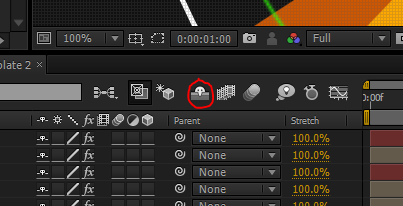
Open some composition, turn off the hidden layers and switch off the visibility of glow layers. There is a scr:
http://oi63.tinypic.com/kb1stk.jpgAhh so easy! Thanks!
Can I change the background?
Hello, there is a way to do that: open the background comp in “Complete Presentation Inside” comp (you have to unlock it first) and edit Ramp effect on solid inside.
Thanks!
ok. Is it possible to change font color title? and all other colors
Yep, go to ”- RENDER – Presentation Premade” comp, 1st layer (Global Color Settings), press F3 to reveal effects panet and here it is
Hello! Thanks for this bundle. I’m having an issue with extending the length at which specific shape layers are on the screen. The issue is with 11 What We Do and 11 What We Do Inside. I’m able to manipulate color, position, etc with no problem in 11 What We Do Inside, but when I want to make the orange boxes stay on screen longer, it shows them still on screen in Inside, but when I go over to 11 What We Do, they are not there. And when we extend the Inside comp within the 11 What We Do, it has no effect.. The comps were extended significantly on both, so that’s not the issue on why they’re not appearing. Where can we go to extend their duration?
Hello. Here is a way to fix that.
1. Go to “11 What We Do Inside” and extend boxes here.
2.(!) In “11 What We Do” turn on hidden layers (http://4.bp.blogspot.com/-bioChFlHabI/T5lYcJ4gNAI/AAAAAAAAA3Q/0Om3fLP3Cnw/s1600/shy.PNG) and extend all layers which appear and don’t forget about camera layer.
3. Done
Thank for using this project!
I want to purchase this but I really need an Australia map… any chance I can get one?
Hello, you can find this pictures easily, here is an examples: https://www.google.com.ua/search?q=australia+map+png&rlz=1C1GIGM_ruUA660UA660&espv=2&biw=1920&bih=1055&source=lnms&tbm=isch&sa=X&ved=0ahUKEwiZnYrHgbbKAhUH1XIKHaPGCJIQ_AUIBigB
hi; how do you add extra values and line for the line graph? great work thanks man
Hi, thanks for your feedback. It’s not easy to do without some advance AE skill. Send me the message on b33@ukr.net with info about which graph do you need to edit and i’ll send you the fix.
Just Wonderful ! 
Thanks!





)