16 comments found.

Hi! Is it possible (easily) to add scene in order to get a longer video? THX!
Hi, this cannot be done directly, as the project is set to a certain length. That said this can still be doe very easily using a simple technique. You can do this by customising and rendering the whole video as it is, then open a new “explorer” template, add the new images and text, and render that as well, (you can render only the part you want to use again, not the whole video). Following this you can then open a new AE project and import the 2 rendered videos and stack them after each other, this way you will end up with a longer end video.
Hello! Thanks for your beautiful project! I’ve purchased it! May I ask a question? I tried to hide some of the text, but it will still remain an animated line on the video, could you teach me how to hide the text perfectly?
Thanks a lot for your wonderful project again!
Hi, thank you for buying the template. I am very glad you like it!
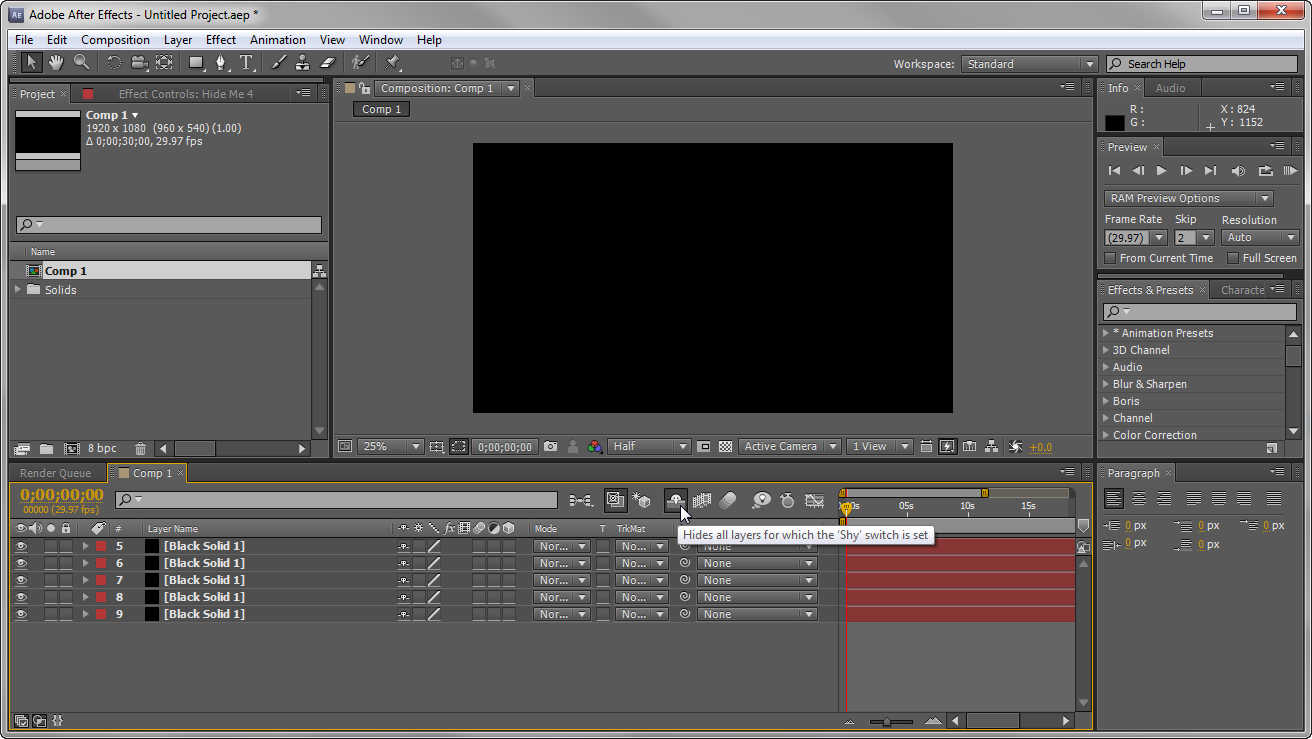
As for your question. As you said once you remove the text you’ll still have some animations running. To remove these what you can do is go to Main Comp, and toggle the ‘shy’ switch. This will show all the hidden layers in that composition.
Now lets say you want to remove text 3 and 4. You will need to scroll down until you find the layers named ‘Place your text here 03, and 04’. To remove them just delete any layer named like that and also delete the Shape layers which are next to them (the blue layers). These are the layers holding the animation.
You might need to search a bit for them, since there are a lot of layers in the comp.
Hope that was of help to you. Below you can find a link to show you where the ‘shy’ switch is located:
http://robertsproductions.net/v3/wp-content/uploads/2012/06/shyicon.pngOnce again thank you very much for your purchase, I would really appreciate a 5* rating if you like the template. If you have further questions don’t hesitate to ask! 
Thank you so much for your quick reply! I am able to disable the shape layer now! Thanks a lot!
You’re welcome! Im glad it worked great.
Beautiful project, Like!
thank you very much for your comment. Im glad you like it
Nice One Friend !
Thank you Pixart! Glad you like it
Amaz`ing job !!!
thanks
Great stuff mate. I like it. +1
Thanks Madli! You’ve got a really nice portfolio yourself! Really like your work
Perfect job my friend!!! Wish you happy sales
thank you eugene
Great Stuff NeuronFX! + 
Thanks!
Cool!
Very nice! I like it