Video

Support for Drones Technology

Support for Drones Technology

Cart 78 sales

Popular questions for this item

Can I replace the city behind the rooftop at scene 3?

Yes there is a special composition where you can choose one of the 7 images available, or drag and drop your own city. You will need an aerial photo of about 4k resolution: 3840×2160 Included video tutorial will guide you through!
I have the new plugin FORM version 3. It asks to migrate settings.

No need to do something by yourself. Just open the project version ready for form plugin v3

What if while opening the file I get “missing media files” error message and instead of the footages I find color bars. Is this normal?

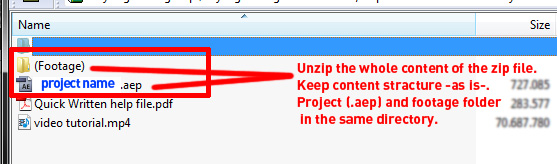
No, if you get this error message, this means you have not decompressed the file right, or you have separated the project file (.aep) away from it’s directory.
All After Effects templates projects must be in the same directory with the “footage” folder too. So unzip the file as is – do not separate the contents!
Check this image to see how a normal directory should look like after unzipping:


Also here is a video tutorial on how to fix the missing files error for all projects (not only templates): https://www.youtube.com/watch?v=hptLKZmi1qc
:)

IF this did not work, then there’s another 2 possible reasons for the error:
1. The file got corrupted during download (Solution: Redownload from http://videohive.net/downloads)
2. Your quicktime installation is corrupted or missing (Solution: Redownload & install quicktime from https://www.apple.com/quicktime/download/)

by
by
by
by
by
by

Tell us what you think!

We'd like to ask you a few questions to help improve VideoHive.

Sure, take me to the survey
