147 comments found.
nice draw!
Thank you Roman!

hi ,
i but this but i can’t set it up by myself. So i am looking for someone who can set it. THX
Hi, Thank you for purchasing! Have a look at this service http://bit.ly/2AHGp2g I think it is just what you’re looking for.
Hi, awesome project !
Just a question about compatibility : is it compatible with After Effect CC (2015, 2016 and 2017) ?
Best Regards 
Yes, but I only have access to a PC for testing. Can’t be 100% sure it will be compatible with those versions on a Mac. Thank you for asking!
Hi! Awesome looking promo. I am wondering if it is compatible for mac?
Hi! Thank you for asking. Yes it is compatible with Mac
Thanks for this great template. I am happy that i can purchase this. Could you please let me know how to cut out certain sections ?
Hi, Thanks for purchasing! I’m glad to know that you like the template.
I have emailed you the instructions to make the change you want.
But here’s the short answer: Turn off the visibility of the layers you don’t want to see in the Main Comp and adjust the keyframes on the Camera control layer to reveal only the sections you want to see.
Best Regards, Micaela
This is a great template in a lot of ways, but it takes up to 10x longer to render than others I’ve used. Is there something I’m missing? No settings I change or unused elements I delete seem to help. Do you have any tips? (Cs6, mac). My computer renders other templates of a similar length and seemingly complexity within an hour, but even on draft quality this can take 5 or 6. Please help.
Hi Thank you for purchasing! Sorry to hear that you are having trouble with rendering. I would suggest turning off motion blur for the Main Comp or at least the hand layers http://bit.ly/1JpZoZm. I added it to make the hand motion look a little more realistic, but I think you’ll get good results without it and cut down the render time significantly. I hope this helps. Please let me know if it doesn’t solve the problem, or if I can help with any thing else. Best Regards.
Thanks! That seems to have really helped. I appreciate the fast response too.
Glad I could help
I just purchased the meet mike and mary template. When editing in AECS6 the text that I type show up as random letters and numbers. For example if I type out BOB it displays as @@M. Am I doing something wrong?
It sounds like a glitch, I would try restarting AE. Also, are you using the Dennes Old Handwriting Font ?
Hi There, We are interested in getting couple of videos done, can you please tell how much will you charge? Cheers Abhy
Hi Abhy, Thank you for contacting me! Please send me a message from my profile page http://videohive.net/user/motioncraver (bottom right) and tell me a little more about the videos you would like created. Best Regards!
Hi I want to buy this product but I need to know, ‘Could I change the images of this product’. Because I need to use my own images on my project.
If I can, I would love to buy it. Best
Hi Thanks for asking! Yes you can use your own drawings instead, this video will show you how https://vimeo.com/63871750 Best Regards
Very useful! Thanks!
Thank you
I am using the Meet Mike theme and After Effects CC 2014 with windows 8. When open the theme it is automatically converted to updated AfterEffects. When I render the project it renders from the middle and doesn’t show the slides at the beginning.
Hi, Thank you for purchasing!
Make sure that you are rendering from one of the Render Comps in the “Render These Comps” folder, or that the work area (as seen here: https://cdn.tutsplus.com/ae/uploads/legacy/511_secrets/3.jpg) starts at the beginning of the timeline in whatever comp you are rendering from.
I hope this helps. Please let me know if you have more questions or if this isn’t the answer you needed.
You can contact me from my profile page here: http://videohive.net/user/motioncraver (bottom right) Cheers!
I’m interested in purchasing this awesome template, but I wanted to know if I can create and and use my own characters and if so how would I go by doing this in terms of size etc.?
Thank you for your interest in this template. Yes you can. Your characters should be vector files. This video will show you how to add them to the template: http://vimeo.com/63871750. However I would recommend my latest Whiteboard template if you’d like to use your own artwork. It would be much easier, and you can use any file format you want. You can view that template here: http://videohive.net/item/whiteboard-wow/7241824 Regards!
Hi, I downloaded your app promo video theme “Meet Mike/Mary Whiteboard Promo”. This is my first time ever using Adobe After Effects, I followed the steps in the video (as much as I could as my software was slightly different in the rendering format menu, perhaps because I’m using a mac), but when it finished rendering I played ithe video in quicktime and it shows all the scenes happen on the same background, so they’re very small and zoomed out. It doesn’t zoom in and transition scene to scene like it is supposed to. How can I fix this? Thank you!
Thank you for purchasing. I’d be happy to help you trouble shoot the issue. Are you rendering from one of the render comps?
My AE trial ran before I finished my video? I tried another name & email but still prompts my trial is over any suggestions. Thx
Hi, Thanks for purchasing! If you have access to another computer, you should be able to install another copy of the trial version there using the second name and email you created. Best Regards!
Ok will do Thx!
Very good template! Excellent attention to detail!
But i have a question: how do i stretch the video i have?
It’s 30 seconds long, but there is not enough time to display it in the template.
Thank you for the positive feedback, and for purchasing! Here is a tutorial video on how to extend a slide: http://vimeo.com/60870014 if you have any questions or run into any problems please send me a message from my profile page http://videohive.net/user/motioncraver (bottom right) and I’d be happy to help. Regards
Thanks for the reply. I figured it out, and even managed to remove a section and add a longer section – couldn’t have done it without your excellent videos! Thanks again!
Glad to help. I’m happy that you were able to make the changes you needed. Thank you for the kind words!
The tutorial video is the best I’ve seen on VideoHive. I learned a lot about After Effects in the process of watching the vid. Great product, and great support. Thanks!
Thank you very much! I’m really happy that you are pleased with the template and help video, and even happier that you were able to learn a few things in the process. Best Regards!
Hi motioncraver, great video. I was just wondering if you have the option to put £ in place of $ ?
Hi, Thank you. That option is not already included, but it is a quick fix. If you send me a message from my profile page http://videohive.net/user/motioncraver (bottom right) I’ll send you a version with the £ in place of the $. Regards!
thanks
Hey there,
Do you know how did they convert this video? http://www.youtube.com/watch?v=OntxNuVZqf8#t=24 Main issues: 1. Hebrew fonts 2. Writing from right to leftDo you have a solution?
Thanks,
Tamir
Hi Tamir, Thanks for asking.
1. I’ve used the built it font Comic Sans in the past with Cyrillic text. That might work for you. But you can find free Hebrew fonts online.
2. Check out this tutorial: http://www.sternfx.com/tutorials-he/49 and These scripts: http://aescripts.com/textreverser/ http://aescripts.com/typewriter-rtl/ (not for CS6)Hope this helps.
Cheers!
Thanks a lot. Not sure I understand, in order to adjust the video to my message, do I have to purchase AE?
Hi again, You can use the trial of AE but you would need to purchase the script from the link I provided. However, the tutorial is supposed to show you a free work around, unfortunately I only speak English so I can’t follow along with it to be sure.
hello sorry to bother you, but when I open the project and want to edit the hand, I can only see color bars and not see the hand, the image of the colored bars moving around the first text that says MEET MIKE, how can I fix this ?
Hi, It’s no bother Thank you for purchasing!
After Effects needs to be told where the hand.png image is located. This can happen if everything isn’t kept together in their original folders.
To fix it just select the hand.png image in the project window in After Effects.
It is located in the following folder path: Other Comps (Editing Optional) > Design Elements > Hand Image
Then right click and choose Replace Footage > File.
Now you will need to locate and select the hand.png image on your computer.
It is located in the folder you downloaded and unzipped. It’s folder path is: MeetMike&Mary > Footage > Other Comps (Editing Optional) > Design Elements > Hand Image
Once it’s selected click open and the problem should be fixed. I hope this helps.
Please send me a message here: (http://videohive.net/user/motioncraver (bottom right) if you have any other questions, need further explanation, or would like visual aids.
Have a great day!
Questions:
How to edit the CIRCLE Underline on the 56
and how to take off the “TAPE” on layer 40/44/47
Hello thank you for purchasing! Not sure if I understand, but if you want to edit the circle of lines on layer 55:
1. Select the layer and click on the yellow mask controls to edit the shape.
2. Or, click the eye icon to the left of the layer to turn off the visibility.
To turn off the tape layers:
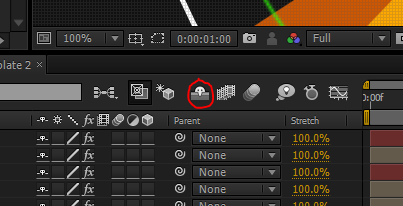
1. Toggle the shy switch http://4.bp.blogspot.com/-bioChFlHabI/T5lYcJ4gNAI/AAAAAAAAA3Q/0Om3fLP3Cnw/s1600/shy.PNG2.Click the eye icon to the left of each of the Tape Comp layers.
I hope this helps.
If you have any other questions please send me a message here (http://videohive.net/user/motioncraver (bottom right) for a faster response.
Cheers!



)