48 comments found.

If I sent you the audio file to use and the logo along with text to change to website is this something you could do and send me a finished product? Thank you, Ricardo
Hey Ricardo! I sent you an email! Cheers!  Steve
Steve
Hello! In which program can you edit this video? This I can do myself or only professional designers?
Hello! Yes you need software “Adobe After Effects” version CS4 or newer. You can always use the free trial version (works for a month) but you still need some basic skills on the program. The included help file will guide you through. But if you do not have After Effects skills then better hire a local freelancer to help you customize it! You can always contact me through my profile page for help or advice ( www.videohive.net/user/steve314 ). Best Regards Steve
Hi Steve,
My team is thinking about buying this for an international cooking show open. Curious how long the broadcast show open is and is it easy to modify the opening run time?
Thanks Octavio
Hello Octavio!
The current duration of this project (Show & Intro) is about 11’’ to 12’’ seconds.
Modifying the duration can easily be done by dropping the final composition in a new one, and then stretching using the stretch or duration column.
You may stretch it up to about 18’’ seconds with smooth results.
Here is a quick video tutorial I made on how to do this procedure (It works for all After Effects compositions): https://www.youtube.com/watch?v=gq20vry_ht0
Let me know if you have any more questions.
Cheers! Steve
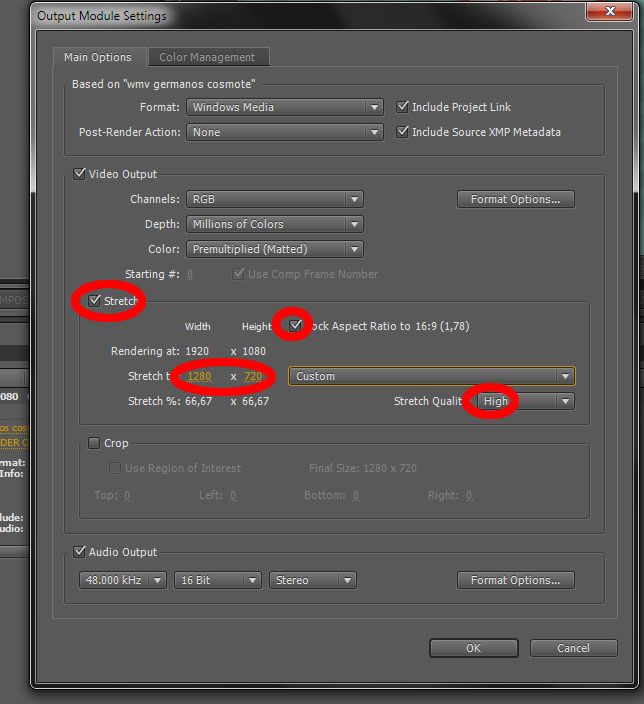
Hi, I have your great travel intro and are happy to use it, but now I wonder if there are any easy way to scale the composition to other dimensions.
Of course, just before going to final render, in the “output module settings” panel, click the “scale”(sc5 or above) or the “stretch” (cs4) checkbox and choose your resolution to downscale the final video. Keep the “lock aspect ratio” checkbox on and the quality to high. I hope this helps!
Here’s a print screen for your guidance: http://i29.photobucket.com/albums/c252/steve314a/stretchAE_zps9ba4152d.jpg
Thank you for your purchase!
Cheers! Steve
Hello everybody! This project was updated! Now it’s easier to replace a city (or even all of them)! Also, there is an option to add an airplane & (or) a cruise-ship at the end of the animation! If you have purchased the file before the 7th of August 2013, go to your account/downloads section & re-download! Thank you!
Hi there,
so, so great! Is it possible to edit the sky?
Thank you!
Thank you for your kind comment! All the project is layered, so if you have some After Effects skills, you can add any background you like behind the cities and replace the ramp sky! If you need help doing this, just let me know! Cheers! Steve
I do not understand the license, i will make pictures around the world and i want to use it as a intro for each video i make. Let’s say i make pictures of eifel tour, i will make some animation and use YOUR intro as my intro for the video created, i am alowed then to use the intro AGAIN in another video where i will mount pictures from Rome for example ?
Hey mybetinfo! As far as I understand from the license details info, for every single end product a new license is needed. If this is one series show, it would only need one license. (An extended one if it’s broadcast) But I really am not a license expert! It would be better for you to ask Videohive’s support to get a valid answer! Thank you for your interest! Good luck in your Show!
Well we will broadcast only in youtube channel, and we will use on every video as an intro, so i guess it should be ok as is not different projects, is one project …
Yes, I think for youtube a regular license is ok!
Hi, before buying I have a question. I’m working with Mac OSX 10.8.4 and Final Cut Pro 7. What else do I need (Aftereffct Program > free) or could you send a link? Would be great full. By the way, I work for a big airline in Germany (Marketing) and would introduce this sight to them. But first of all, this Logo is for my private holiday films. Isn’t there a way, that one could send you a logo and you could fit it in and send the film ?  Would be an idea for some of these logos in video hive…
Hey creative64! Yes you can use the free AE trial to render this file.! Download link: https://creative.adobe.com/products/aftereffects If you’ll need help replacing your logo please mail me thought the contact form in my profile: www.videohive.net/user/steve314 Cheers! Steve
Hi Steve,
I now purchased your absolutely awesome work. Amazed of the ideas you have and can emagine how much hard work you’re putting into this. keep it up my friend
Big thanks Creative64 for your purchase and your kind feedback!
Hi
Is it hard for beginner please? Customize the picture
Thanks a lot
It’s very easy to replace the Logo. The included video tutorial will help you a lot to replace some of the World places, but still it needs some basic After Effects knowledge… Thank you for your interest!
I know some basic like clone/ fly/ texte dynamic ,:)
All the picture have to be thesime size please?
Yes, if you need to replace images, they must be of the same resolution. If you prefer, you can prepare your images in Photoshop before importing in Ae! You can also contact me through my main profile page, to send you the help file for preview. Cheers! -Steve
Great Job just purchased it and look forward to make it on my style… but im basic user of after effects… can you please help me with the colour adjustments of the Background? Thanks in Advance
Thank you for your purchase. In the help file, you’ll find directions on how to enable the alternative background. But if this one doesn’t look good for you, you can select the layer, press F3 and the effects panel will open. You can edit the colors in the ramp effect, or even add another color effect, like “Tint” or “Hue” to make your own choices! Check this image for directions:
http://img850.imageshack.us/img850/3739/colorizebackground.jpg
Let me know how this worked out. I can make a Video tutorial if you still need it! Just e-mail me through the contact form in my profile page. Cheers! Steve
Love this one…however I’m looking for one a bit more road trip related. If you do one, please let me know. Thx!
Sure! Thanks for your comment anyway!
Great job!
Excellent detailed package and instructions!
And if you still don’t get it? A phenomenal support, unlike any other!!!
I mean it!
Thank you,
Ates
Really big thanks for your feedback Ates!
Hello: very original project, also perfect in my case for a video presentation of a trip. The lowerthird is an extra, that maintains a perfect unity with the intro. Greetings!
Pizcolindo, really thank you for your wonderful feedback! Enjoy!
Love it! Got it now, but how easy is it to extend it to say 20 seconds?
You may drop the final composition in a new one, and then extend it via the extend or duration column! Of course you will have to edit the audio to match the new duration… Check this photo for help: http://img850.imageshack.us/img850/441/extend.jpg
Drop me a mail through my profile page if you need more help!
Cheers! Steve
Amazing Idea Steve! Fits In Any Occation !!!
TY !
Excellent work. Not only that, but Steve personalized it for me at a very reasonable price.
Very happy with the purchase.
Thank you Eduardo for your purchase & your feedback! Pleasure working with you!

Fantastic Idea Steve ! Congratulations
Thanks Vineet!