

68 comments found.
wow another blockbuster project,,,,,best wishes mate
Thank you for the kind words and well wishes 
its my pleasure:)
wow another blockbuster project,,,,,best wishes mate

Hello there, I’m very pleased with your work! I am just getting to learn AE and I am only using a few of the slides at a time, can I just select certain ones to render instead of having to render the entire movie?
Thanks!
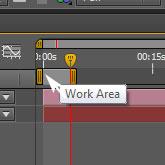
Hello! Thank you for purchasing! I’m very happy to hear that you a pleased with the template. Yes you can In the Render comp of your choice go to the point in the timeline that you want the video to start and press (b) then go to the point where you want the video to end and press the (n) key. This will set the Work Area (see here http://d3gphd0pfuxn95.cloudfront.net/511_secrets/3.jpg)
and determine how much of of the project is rendered. If the slides you want to use are not together in the animation, in the Main Comp you can solo (see here http://www.joelstutz.com/Images/after%20effects/solo.jpg) the Slides you want to use and click hold and drag those Slide layers together to change the order of the animation . I hope this helps. If you have more questions, or if I misunderstood the question please email me here: http://videohive.net/user/motioncraver (bottom right) and I can provide you with more info. Thanks!
That works just fine, thanks!
Great Cheers!
Very nice work,mate! 
Thank you 
Hello! Can I change the slides places?
Hi! Thanks for purchasing! Yes you can. In the Main Comp click to select the Slide layer that you would like to replace. Then open the Other Comps (Editing Optional) folder and the sub folder called Slides. Click hold and drag while pressing the Alt key the new Slide you would like to use into the timeline and hover over the Slide you would like to replace, then release. This will swap the 2 slides. I hope this helps. If you have more questions please send me a message here: http://videohive.net/user/motioncraver (bottom right)
This is awesome!!
Thank you very much!
Hello! You made very interesting project! My respect! There is a question: in the project which I bought, animation of titles looks differently than on preview and in a help video (titles just on a paper, without cartoon animation) of at project on (0; 00; 08; 08, 0; 00; 10; 21, 0; 00; 22; 15, 0; 00; 25; 14 e.t.c) Titles are very beautifully shown at prewiew video that i looking on which I and bought your project. Help to correct it please. Thanks!
Hello! Thank you for purchasing! There are two project files included, a Full version and an Easy version. You have opened the Easy version. The animated titles are in the Full Version, so you’ll have to use that file to get the result you want. Please let me know if you have any other questions http://videohive.net/user/motioncraver (bottom right) Regards!
I find it! thank you!
glad to hear it! You’re welcome
Hello,
first of all let me say you’ve done a great job with this template.
We are loving it and it’s exactly what we need. I have just one question for you. when we render the video, it starts from the middle. How can we fix this little problem? We are not so expert of Adobe AE  Thanks
Thank you for purchasing! I’m so glad to hear that you like the template. Make sure that you are rendering from one of the render comps in the Render These Comps folder and that the work area (see here: http://bit.ly/19gKkia) covers the entire timeline. If it doesn’t, go to the start of the timeline and press (b), and then at the end of the timeline press (n). I hope this helps, let me know if you have any more questions http://videohive.net/user/motioncraver (bottom right) and if you haven’t already, and you get a chance, please rate in your download section. Thanks!
Thanks for your quick answer. Just two more questions and we will done! We are having problems activating the female character and activating the “green,grey & balck” color combination. We had no problem with other features. We are using the “easy version” for fast editing. We don’t know if is it possible (but it would be great) but… can you send us a easy version with female character and green,grey & balck color combination both activated? Thank you so much!
No problem. Please send me a message and let me know what problems you are having http://videohive.net/user/motioncraver (bottom right) Just in case, you can find the instructions at 28:15 for the character controls and at 29:05 for the color scheme. There are check box controls for both changes on the Character Controls and Color Controls layers. Best Regards.
hello,
Can I change all words in video? Thanks
Hi, yes you can change all of the text. Thanks for asking!
hello,
Can I change all words in video? Thanks
very nice & needed!
Thank you! Glad you think so
Great Project! Good Luck with Sales!! :))))
Thank you very much!
I’m loving it! Fantastic video. Do you also do small customizations? Cheers!
Thank you very much! Please send me a message here: http://videohive.net/user/motioncraver (bottom right) and let me know what you had in mind. Cheers!
Cool work man! Good luck with it!
Thanks bboykoma!
Very Professional work. As Always, I wish you many sales.
Thank you!
it always stopped in 71 % , please help me!
already past 24 hours but no support replying, 
I’m sorry to hear that. Hopefully someone has helped you by now. If not, it is possible that support will return after the weekend. Please be patient, support will help you asap.
hi mate, really great video, i’ve paid, and i can’t download the video. it stops and won’t download , where i should complaining ?
Your Style Is Awesome , Many Likes Buddy!
Thank you so much!
Awesome! Im really newbie on after effects. Can I edit the video easily?
Tks!
Hi! Thanks for asking. Yes it is easy to do a basic customization, especially with the included Easy Edit version shown at the end of the preview. The Help Video will show you how to add your content, change text and colors, and render a final video step by step. Hope this helps. Cheers!
Bought it and Im lovint it, even if Im in the hard file . Its not that hard really
Now here comes the newbie part. How do I turn this project to a video to put in Youtube?
Tks in advance!
PP
Thank you for purchasing! Glad you like it. At the end of the video I go over the steps for rendering a video for the web. But here’s another video just for rendering tips http://vimeo.com/24027726 Please don’t forget to rate
Awesome work mate, wish you many sales!
Thank you. I appreciate the support!

This item was featured on VideoHive

Elite Author
Contact the Envato Market Help Team



)
)