153 comments found.

Awesome template Moriscopy. Super useful and a massive time saver! One problem I have ran into though seems to be related to the project’s 29.97 framerate. I’m working in PAL and get some weird glitches with character movement. ANy chance you can do a 25FPS version?
When the composition in the toolkit is changed to 25 fps, various errors occur. If a little timing isn’t a problem for you, use the toolkit’s compositions (29.97) by drop them into your 25fps composition.
A new version for the current update is working on a 24 frame basis. But you will have to wait a lot. Thanks a lot!
Thanks Moriscopy! I worked out that the issues I was seeing were actually able to be solved by purging media cache etc so al good! Keep up the good work!
Good product! Bravo. Btw, Do you have premade sheet for arabic women for sale?
No. This toolkit cannot embody clothing that covers the neck, such as a hijab or hood. Thank you.
I have a big issue about the render. Everything’s okay in AE project but when I’m trying take export eye’s positions are changes. Something like this: https://i.ibb.co/sRRb7n6/Untitled-1.jpg
Try it. Edit-Purge-All memory(& Disk Cache) and restart AE. Thank you.
doesn’t work… help me please…
hello! I love it but I wanna ask a question: can I change the background object’s color?
Yes, but AE does not support changes. They are ai files, so you can change them if you have editing tools. Thanks!
Hi , Few question before purchase. It look like I can’t adjust the body so do you have plan to add new body shape ?
Hi, I am pushing for a new plan with 1000 sales. The plan may be added to this project or a new one yet. Please follow me.
Is there any way to create a conference table with about 4-5 people and one is giving lecture? Like a presentation screen??
In the Background #05(conference room), place 1 presenter and 4-5 people side or back. This seems to be similar to your composition. Thanks.
Understood but Actually need to show like a conference(would be good with a big table), 2-2 or 3by3 people sitting around the table. Is it possible?
If you have images for reference, please send it. Moriscopy@gmail.com
Does this run off of the Legacy ExtendScript engine or can I use javascript?
It runs on the Legacy Extend script engine. Thanks
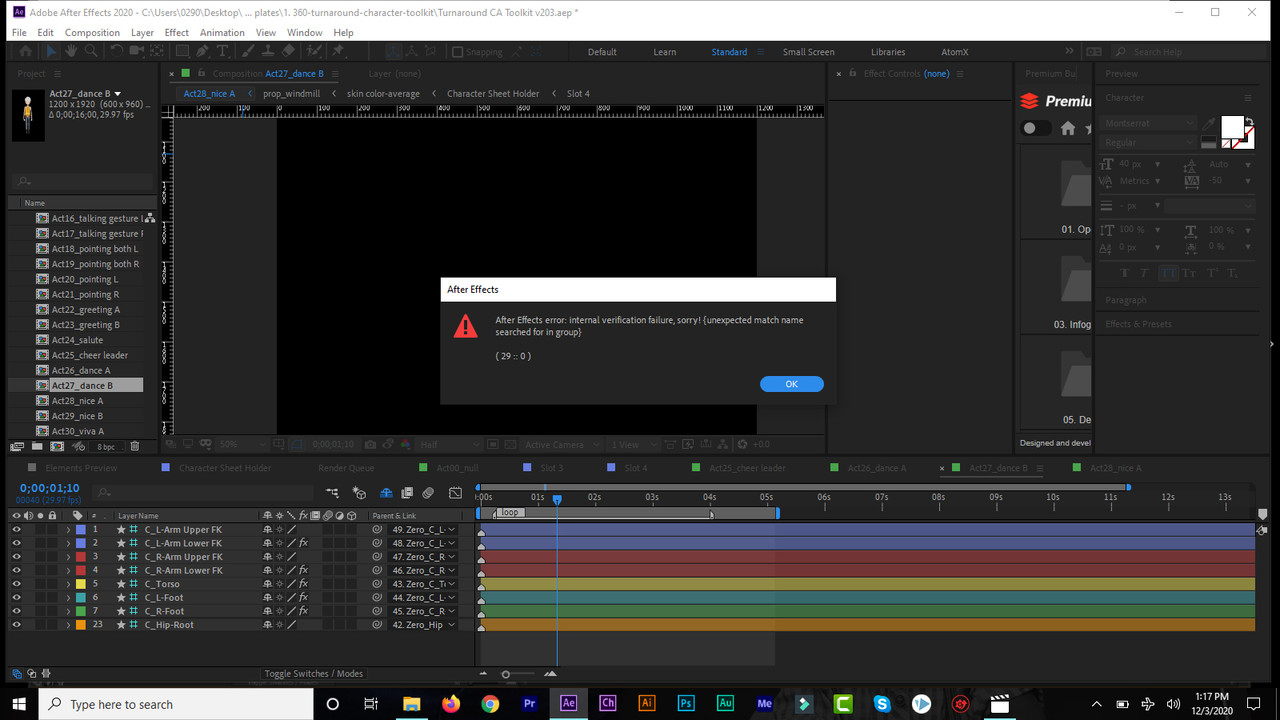
Nice project.. I love it.. However some premade actions show internal error when i select them.. This is the error i get https://i.postimg.cc/cHGkZvBm/interner-error.jpg.. Thanks
Thanks for your report. These are errors not found in my AE. I think it’s a general After Effects error. If you are using a script or plugin recently, that may be the cause. Moriscopy@gmail.com
I am using some extensions and plugins and using the 2020 AE.. I will have to see how else to solve this because i need those extensions for other works so i cant remove them.. Please is there any way to bring in new faces or nose or hair style and create a new character with it? I just want to be able to create some more African men and women with African hair styles to fit some of my projects.. Thanks
You can create any character you want using the provided presets and [Character Sheet Builder] aep. You can also make your own characters into sheets and use them in this toolkit. Try creating a sheet using [Blank Sheet PSD] files in the [Help Documentation] folder. Thank you.
Got it.. I will give it a try.. Appreciate this..
Hi, I am using AE cc without the DUIK plug-in. When I open the character sheet, the whole character is glitched, and AE said 1877 files are missing…... What should I do here ? Please help. Thanks !
Never mind, I didn’t unzip it, please ignore my question…. Sorry _
Not sure if this was an oversight but the darkest character in the mockup section is listed as “Prisoner.” Can that be changed?
Yes, the mockup image changed immediately. But the preview video takes time. I’ll schedule it as soon as possible.
I have no control layers in my effects panel to use any of the rigs. Controls did not show up to make character sheet changes either, I had to go into the composition and select the setup# Please help, thank you.. (I have read all comments on Effects control, they do not solve my issue.)
Are you looking for?
Thanks for your speedy reply! I had the control panel inspector up it was not showing any options. reboot of computer solved it…it must have been an Adobe glitch
Hi Fellas, Love the product but colour changer for legs doesn’t work..all other colour changers work…please help, i’m on a project deadline 
If the shape of leg is connected to the shape of torso, the color can be adjusted in torso. Find the color picker in Torso. Thank you.
Thank you! this worked
Hi Guys,
Love your product! I recently also purchased DUIK IK to use with your project. I correctly downloaded and installed the plugin, but when I launch the project it still says “DUIK two layer IK missing”... Any thoughts on how to fix this? Thanks in advance!
Bas
https://github.com/Rainbox-dev/Duik-15/releases
If you are using AE cc version, I do not recommend the old version. Even if it is not a duik script, there is no problem using this project.
Thank you!
Hello author: I am a buyer from mainland China. Your Turnaround Character Animation Toolkit project is currently full of download links on the Internet in China, and it is almost the same as the genuine one I bought. You have no product protection mechanism, similar to authorized technical methods. ? This makes users who pay for genuine licenses feel very unbalanced, and they think why they should buy genuine licenses
If you know the link, let me know by email. It can’t be reached with Google search. If I know, at least I can take action. Thanks for your report.
Moriscopy@gmail.com
The information has been sent to your mailbox, I hope you can help me too
Hi. All the characters look the same, with just clothes change. Is there a way to make them look different people? With different facial structures, different weight (fatter or slimmer) etc.? Changing face like this: https://gyazo.com/0d327655f7201229eb203b08ddb33ee1
Can I make the character fatter or slimmer?
No. It has an 8-way turning option, but the rig structure is limited. Thank you. Studying the ideal character structure is steadily in progress.
Hi, I’ve been using your characters for a little while and it’s mostly been going well. I’ve started to experience a problem, though, one that I can’t seem to fix. When exporting from After Effects (and via a dynamic link in Premiere Pro), a lot of the characters have strange glitches. Many have one eye that disappears, others will mess up when turning (i.e. just the mouth will turn when it’s supposed to be the whole head, or vice versa). Have you heard of this problem from other users of the toolkit? And do you have any ways to fix it? Thanks.
Hi,
I already know of similar issues you have have. Please send screenshot of the bug scene to my e-mail. I will be able to help you via e-mail with images or videos. This issue has been improved and will be updated as soon as possible. Moriscopy@gmail.com
Hello, in the character sheet holder, i have only 10 slots, but for my works I need a 20/25 slots, how I can resolve this? Thank
Hi, 10 slots are maximum. If you need more, just render the actions of the characters to be used with mov+alpha and place them into your scene. Thank you.
Hello Can you provide a figure for a woman in Islamic dress? Can I add a woman who wears the hijab with the possibility of applying the same features that the project has on her from making a movement to the arm and wow? Thank you so much
Hi, unfortunately, Hood covering the neck, Hijab, Long dress is difficult to implement due to the structure of this tool. Thanks.
If only the scalp cap can be made, this is sufficient
Can you do that?
What is hijab that doesn’t cover the neck. Also, if you have any images for reference, please send me. Moriscopy@gmail.com
HELLO MY FRIEND
I sent a message to you on the private email, but now I have not received a response from you. I want to buy the product, but I am dependent on this matter.
Hi, The image you sent is completely covered with the head and neck. Due to the structure of this tool, it can’t be helped. Thank you kindly.
Love this toolkit. I’m having a problem with the Act11_turn back and the Act14_look around modules (all the look arounds). Even though I change the mouth to closed mouth, after rendering the file there is an open mouth showing up at the back of the head. How do I fix that?
Edit – Purge – All Memory & Disk Cache
Once this is done, some errors can be fixed. or Try changing the value of [Emotion-Mouth] in the frame with the error.
Thanks.
Perfect!!!! Worked like a charm. Thank you so much for putting this awesome toolkit together. Also purchased the presentation Amy with office wear. Can’t wait to see what else you do.
Thanks a lot!
No show duik message. What is duik version?
https://github.com/Rainbox-dev/DuAEF_Duik/tree/master/Release/Duik/Duik%2015
Thanks.

Elite Author
Contact the Envato Market Help Team