981 comments found.

Just downloaded today is there an update coming for preimre 2020? i keep getting freezes and cant use it
Hi. There is no difference between using my project in CC 2019 or 2020. And other clients don’t have any specific issues in 2020. If you’re getting any errors (like MPEGImporter error for example), please email me via my profile page https://videohive.net/user/replayer to continue this discussion.
1. if i have 3 client i need buy the 3 license ? / 2. if i 1 client and create 2 video = i need buy the 2 license ? write anwser overhere please
Already replied on your email.
There is any chance to get shake zoom tranistion?  ?
?
Hi. Maybe it will be added in the next updates)
Hey yay replayer, how it’s going?
I really enjoyed your work and was on the “500+”-version of your file a now… wow 1-0-0-0! THX for your work and effort.
However, I actually have two questions: 1. How many Ram do you need / use when using the 1000+ pack? -> I use ~48GB and ya… it crashes based on 97-99+% ram used
2. As I have this issue (and as I can read in the comments some other too) might it be possible that you can split the 1000+ into 500-500 ?
This would save my Ram-ass
Thx for you reply and enjoy your day
Greeetttzzzz
Hi black8! Well, I can provide you with a solution which will improve your workflow greatly Please email me via my profile page https://videohive.net/user/replayer, so I’ll be able to send you video in reply.
Hey my friend. I bought it and loving it. The problem is that, everytime I open a closed project that has a pack imported, it gives “A low leve exception … ImporterMPEG” error, and the program closes. I had to discovery a way to open and not lose the project. If I drag the pack to the project, it runs just fine. But if I close and re-open it, it gives this error. I can send you a print screen. Also, can you help me how to use the LUMA FADE transistions, please?
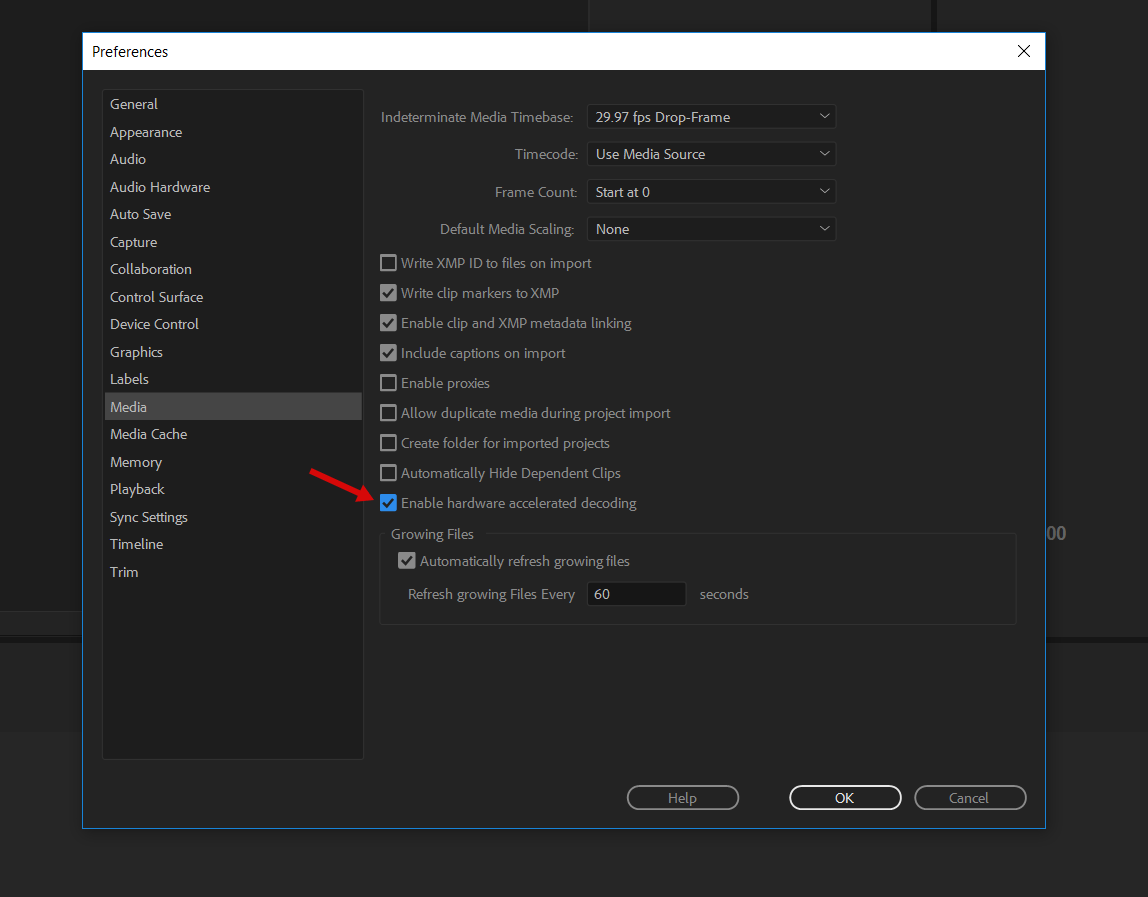
Hi! This ImporterMPEG error is well known Premiere Pro and there is very simple solution to fix it: simply disable this http://c2n.me/435Rqwe.png before opening my project.
Luma fade works a little different, so please follow PDF manual which is located here: ”\Premiere\Help and additional tutorials\How to use Luma fade transitions.PDF”.
Great! Thanks for the support! Everything’s working!
You’re welcome) Please don’t forget to rate my project here https://videohive.net/downloads , if you like my support and the project itself 
Hi do you have any updates for this products? still 1000 transitions.
Em… when any update will be released, you’ll get email notification. And you’re not on a subscription here, so I don’t really understand your attitude about updates.
So only those subscription person can ask the question? Im not arguing Im just asking… almost 2yrs been buying your products anyway thanks for your response #rudereplayer
I’m not rude. Updates are free bonus, which is pretty weird actually. Just an example: for any of Red Giant products you’ll need to pay for the updates, but here you get all updates absolutely for free. And big update is on it’s way already.
You told that “for 2 years been buying my products”. I have only 1 product, this one.
Hi i’m getting a lot of crashes when opening these in a project (as per the instructions) and also when applying them. I’m using the latest Premiere 2020
I initially get a message to say “A low-level exception occurred in ImporterMPEG (importer:8)
This is well known issue of Premiere Pro and it has nothing to do with my project. Simply disable this http://c2n.me/435Rqwe.png before opening my project.
Thank you for getting back to me so quickly. That seems to have fixed it!
You’re welcome)
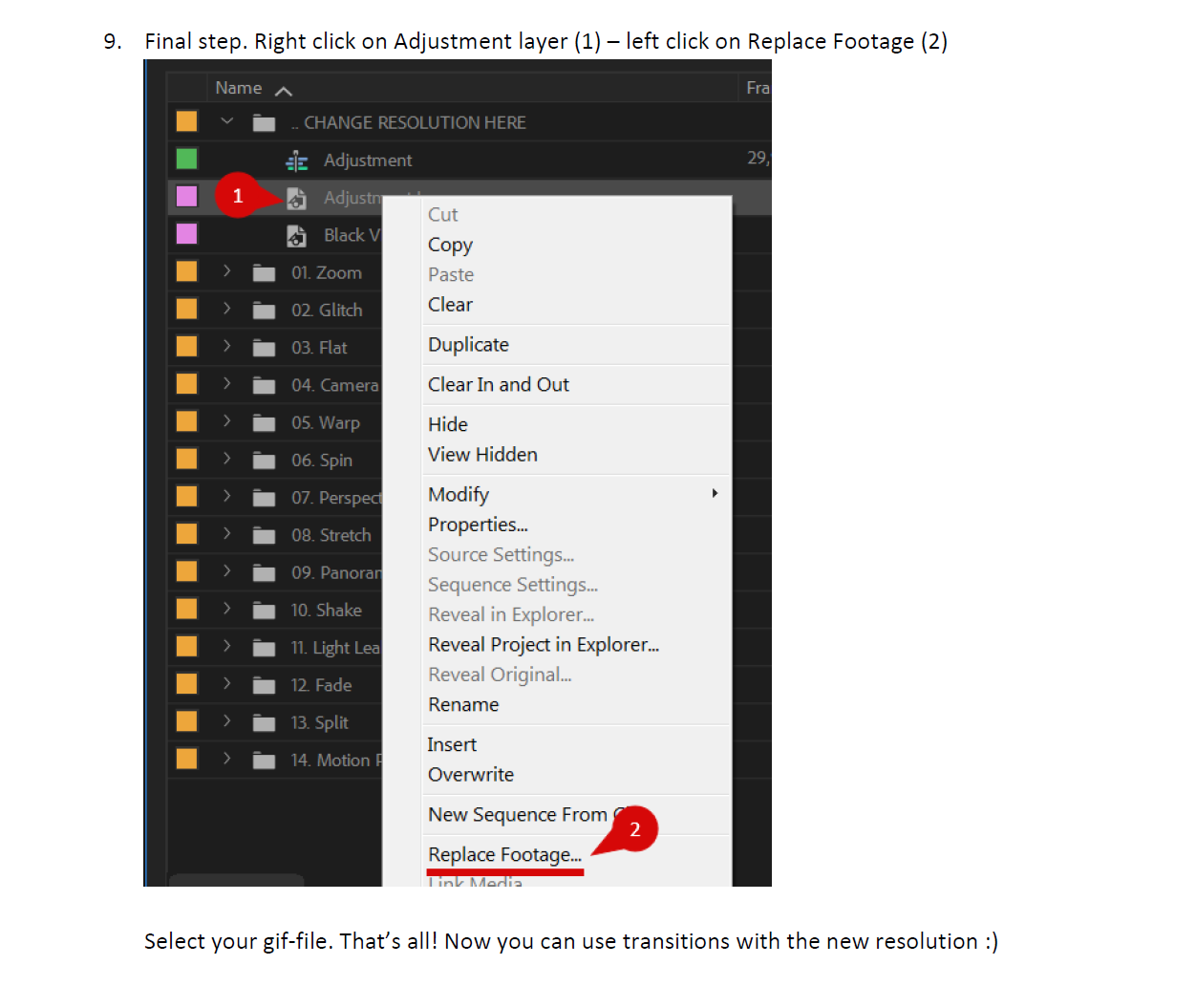
OK, so I purchased your product in order to enhance my video project. I noticed that my resolution was 480×268. So I followed all your steps that appear in the PDF How to change transitions resolution. But I do not understand step 8. You want me to create gif-file in Photoshop with the 480×268. I know how to do that but where does the gif file go. Then step 9 says right click on adjustment layer. Where do I find the adjustment layer you are talking about. I am stuck. I need to get this project done, but I cannot move forward without some answers to the questions I pose here.
Hm, have you seen this text bellow the image on step 9 https://c2n.me/44Vp1Ql.png? When you click “replace footage”, you just simply need to select this gif-file and that’s all
I do not think you understand me. I have spent a lot of time looking for adjustment layer. There is no adjustment layer in my premiere. There is the word adjustment under CHANGE RESOLUTION. But it is not a layer. I will send a screen shot to your email. I took the 1920×1080 gif that was under CHANGE RESOLUTION and I edited it in photoshop to make it 480×270. I am not sure if that is what I was suppose to do. But after that step 9 did not make any sense because I do not see adjustment layer. I said this in my first correspondence.
Hm, this is super odd. Let’s continue this discussion via email (you already emailed me before) and please attach screenshot of that missing layer.
hello, I have been using ur pack for one year, love them! How can I use them for instagram stories(480×852)? It didn’t work with vertical 1080×1920 option, Thank u!
Hi. Please email me via my profile page https://videohive.net/user/replayer with this question.
can I use it for multiple videos on single youtube channel or it is restricted to use on single video
Hi. Already replied on your email.
Thanks for responding , Your package is extremely good but I feel it is not good move from videohive to use only on single video and license part is tricky
I just brought this pack a few days ago and i love it how easy it is to use . There wa one thing i could not work out, so I emailed the creator and he got back to me with around half hour which I was amazed and sorted the minor problem out in seconds…user error. So I will be buying from RePlayer again. Keep up the good work.
Thank you for the kind words, appreciate it) But can you please post it here https://videohive.net/downloads – https://c2n.me/44ShjiD.png , so everyone could see your review in a special review section
Hello ! What is the music you used in the video demo please ?
Impossible to import, a lot of errors. What a pitty ! I work with Premiere 2020. Please help me to found solution. Thanks. http://speleophoto.fr/localisation-problem.PNG Note at 09:53 AM : I transfer folders and files in “my documents” folder and it seems work well for opening. Thanks.
Good to know issue has been resolved) In case you’ll need any further assistance, simply email me via my profile page https://videohive.net/user/replayer
Hey…..i love this pack sir, real nice work you have done. The only problem I have with it is that I cannot find the 80+ text transition presets to write something on my video’s…...can you please help….thank you in advance!!!
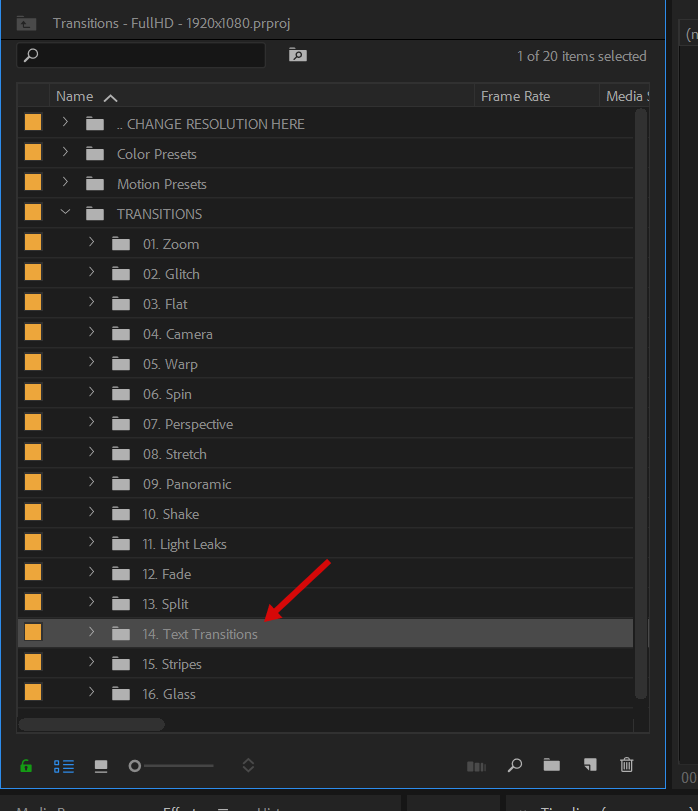
Hi! The very same question is above)) I guess I’ll move text transitions in the separate folder But for now you can find them here https://c2n.me/44QV6pU.png
Hm, image server doesn’t work for some unknown reason. You’ll find text transitions in the main “Transitions” folder (folder #14).
Ok….I will try now sir!!
I have tried again….there is only Flat, Zoom, Glitch, Warp and spin…no texts
Here they are https://c2n.me/44QV6pU.png
So, Is there a way i can get these titles as it was really that that i really liked as i have transitions already but liked your pack but really wanted the titles.
Well, you can import only text transitions into your project (instead of importing the whole project with 1000+ elements). Please email me via my profile page https://videohive.net/user/replayer and I’ll provide you with video manual.
Hi replayer I just bought your seemless transition pack and I really love it, but I just cant find the text preset folder I hope you can help me but I download it twice and its still the same. Thanks
Hi. Text transitions are right here https://c2n.me/44QV6pU.png
I just bought it and i love it!
Hi! Thank you for the review, appreciate it!)
i m using 3840*1920 sequence what should i do
Hi. You can find step-by-step manual here ”\Premiere\Help and additional tutorials\How_to_change_transitions_resolution.PDF” and change resolution as you want. In case you’ll need any assistance, simply email me via my profile page https://videohive.net/user/replayer
hI! i love this project but i cant download ver 5.1, where is it?? in my download page just see 5.0 ver and i just want to try luma fade transitions.
Hi! Version 5.1 is the latest, there is no option of downloading previous version.
Hi, I bought this but I can’t find (21:9) aspect ration transitions! would you please let me know if it will be available later?
Hi. You can find step-by-step manual here ”\Premiere\Help and additional tutorials\How_to_change_transitions_resolution.PDF” and change resolution as you want. In case you’ll need any assistance, simply email me via my profile page.