979 comments found.

Hi! Do you have the same pack for Final cut? Have been using this with premiere for a while now and I’m super happy! But I’m starting to record in apple propres so i need to jump to final cut…
Hi! Unfortunately Final Cut Pro is too limited for such complex transitions.
Hi I purchased the pack but when extracting it shows errors and I dont see the 1920×1080 Full HD project file. Please advise.
Hi! Please email me via my profile page to continue this discussion.
I use open 4k files but resolutions in transition 1080?
Hi! Please ignore sequence resolution. If you imported 4K transitions they are actually 4K.
do we have new update incoming? any change will have teal and orange color grading lut?
Hi. New update will be in June. And didn’t understand your question about luts…
luts i mean color presets. wow new update this june! cant wait to check them out. can you add color presets teal and orange look and moody brown color? 
I believe I already have orange and brown presets in my pack)
I just purchased the pack, and i see black spaces on the edges, how can i fix that?
Hi! Do you see these spaces in preview window or you see them on final render?
i see them on final render :/
Got it. Please email me via my profile page to continue this discussion.
Where can I download the font?
Hi. My pack doesn’t include any font’s, it’s not typography pack. But if you’re wondering about what font I’ve used in previews – it’s Montserrat.
Where can I download it? Montserrat? Please give me a link. Thank you. spthdgus@gmail.com
“replayer” I keep getting the “low level exception” mpeg message whenever I reopen an active project. Any resolution to this? Otherwise this transition pack is useless to me.
Hi! It’s 3 AM here and I’m writing from my smartphone right now. The issue you’re talking about is not related to my pack in any way, it’s Premiere Pro bug. However I’ll provide you with the solution tomorrow, please email me via my profile page to continue this discussion.
I have a question The program I use is version 2019, and it has been updated recently. I made a purchase but can not apply it. Where can I find detailed application instructions?
Hi! Link to the tutorial video is included with the project. Or you can find it at the very top of the project page https://youtu.be/CnJEirVOlUk?t=32
Good work…
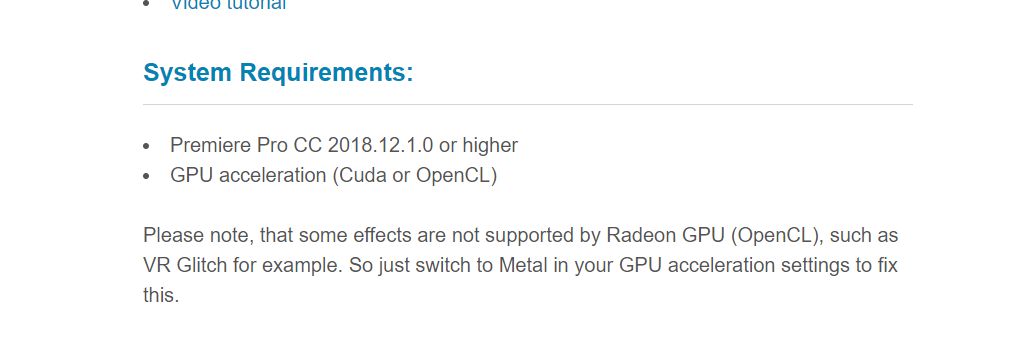
Hello! I’m using a CC12.1.1. on a IMAC mid 11 with 2,5 GHz Intel Core i5 and 24 GB of Ram. Would my computer be able to support
Hi! Yes, it will work perfectly. CPU could be a little better, but you have 24 Gb RAM which is just great. What video card do you have?
AMD Radeon HD 6750M 512 MB
Unfortunately, Radeon is not great choice. It has a lot of limitations in Premiere (that’s Adobe mistake). Here you can read what exactly limitations are https://c2n.me/41yWSg9.png
Hi… can it be used on 1920×816 25fps? Thx.
Hi! Sure, you can adopt transitions to this resolution. And FPS doesn’t matter at all, because transitions always use your sequence FPS.
how can i apply a profile colour?
Hi. Color presets also operate via drag-n-drop method (like transitions).
I have a question about the license.
Should I purchase an extended license for use to generate revenue for YouTube?
And can it be used only once? Can I continue to use it?
(I currently purchased a regular license.)
Hi! Please email me via my profile page with this question.
Hello Eugene. I am using the latest version of Premiere CC and since the latest update, every time I open your transision project (using the latest build from Feb. 2019), it shortly crashes with an low level mpeg exception message. It seems to have something to do with your embedded video preview files. Do you got the chance to reproduce this issue or got an workaround? Any help would be appreciated.
Hi! Please email me via my profile page to continue this discussion.
07 Flat Short Left – x1 shows as black video on first clip I have not figured out how to change it. Any help?
Hi! Please email me via my profile page to continue this discussion.
I can not locate the file
Hi. Have you followed my tutorial step-by-step https://www.youtube.com/watch?v=CnJEirVOlUk&feature=youtu.be regarding re-saving etc? Transitions file my be re-saved before the import, otherwise you’ll get missing media error.
Hi,
Just got the package and works perfectly, thank you. I would like to ask you, how to permanently have all the transitions, effects, etc in premiere ?
From the tutorial I understand that I need to open them every single time I create a new project? Or how does it work to have them in premiere automatically when opening any new/old project.
Thank you very much
Hi! Since my transitions are not regular presets they’re cannot be imported once and for all, sorry (because of preview videos and sound FX). So transitions can be imported only as separate project files.
Btw, you can import only the category that you need and not the whole project (it improves workflow greatly). I can provide you with the solution if you’re interested.
Do transitions work fine with photo/pictures too?
Hi! Yes, transitions work perfectly with any photos.
Can I use this if I am using adobe premiere CS6??
Hi. No, you can’t. Please update your version to CC 2018 12.1.1 or higher. CS6 is way too old and doesn’t have a lot of effects. Plus Premiere Pro doesn’t have option of downgrading for previous versions.
Just purchased the pack, and imported it to one of my project, it slows down the PC and also Premier Pro got crashed 4 times already.
Hi. Please email me via my profile page and I’ll provide you with the solution. There is a way to improve your workflow even if hardware specs are far from great.