387 comments found.

Can I change the speed of the transition?
Hello. Please send a message to boris@videolancer.net and I’ll explain in detail. In the message, provide a link to this comment.
I’ve been used to find my purchased transitions showing up in the softwares transitions folder (e.g. from fxfactory) – do I have to “import” your transitions set to every new project the way you describe it? Is there a way to add them to the standard set of transitions?
Hello! Unfortunately, at the moment they cannot be used as standard Premiere Pro presets, since these transitions are used on several layers and contain a sound track, and also in some transitions footage is used.
I want to use photos as a slideshow, is it possible to use this transition on still images? I want to use this for my Facebook video cover page. Thanks!
Hello! Yes of course. Any content that is under the transition layers will be transformed.
Hi, I just purchased the package and I cannot get it to work. When I drop it in my timeline the transition footage shows up and does not effect the footage I need it to.
Hello! Please check this step: https://videolancer.net/content/handy-transitions-for-premiere-pro/help/#configuring-the-project-sequence
It still doesn’t work.
Can you send a screenshot or video capture of the screen so that I can visually determine the cause of the problem? Please send your message to mail@videolancer.net
Nevermind! Got it!
Look like Premiere 2019 is not working with this pack – the super slow loading problem coming back when I import the project and can not move my mouse at all and Premiere crash shortly after…. It works for me in 2018 for a hot second but I need to use 2019 for my project.
If this does not solve the problem, please tell me the name of the transition that does not work on cc.2019.
My CUDA is on – I use 1080ti – can you confirm updated to latest drive will solve the issue? The latest 1080ti drive has issue and latest Premiere actually and crash my display – so I prefer now to upgrade if not necessary.
Can you send your project to mail@videolancer.net so that I can check how it will work? I also have 1080ti. There is no need to include media files.
Actually I am talking about the project download directly from here. Just the 1080P one. I open the Premiere file and it will be really really slow – and eventually crash. So any of my project trying to include your project file in it will suffer the same issue. If I delete your project – everything back to normal. How strange..
Which version of the graphics card driver is installed on your system?
At the moment I have version 416.34 and there are no performance problems
How can I get this working on my iMac with Premiere CC 2018 1.2.1. with Motion Bro plugin? I can get to work with the files themselves but havign Motion Bro would be GREAT. I had to instal it manually in my /Library/ yet it still doesn’t show up in extensions.
Hello! Unfortunately, currently the Motion Bro extension only works in After Effects. You can use it via Dynamic Link, as shown in this video: https://youtu.be/NpeQlrZzrvI
transitions are causing crashes on 2019 premiere, is there an update?
Hello!
Unfortunately I could not verify whether you are a buyer of this product.
Please send your message via the feedback form my profile page from the account in which the purchase was made. I hope for your understanding.
I bought from a different account, I am asking if it has been updated because it currently crashes on premiere pro 2019 on a iMac 5k
For MacPro (Radeon 555) users the render option is GPU Open CL but with Premiere Pro 2019 13.0 most of the effect sequences don’t work. The Flares are working fine but when trying to add media to V1 it won’t do a thing. Should simply placing the transition sequences on top of my videos move/affect the content below? I am not taking the preview clip with me to the timeline.
Hello! Are you using these transitions for the first time, or have you previously used them in CC.2018?
Actually no. Just upgraded Premiere to 2019. I can do a screen recording for you of how I see things.
Yes, I would appreciate if you record the video. Please send the file to mail@videolancer.net
hello! After updating to Premiere Pro 2019, the transition pack does not work. Is there any solution for that? or Do you have any updates planned?
Hello!
I checked and indeed some effects requiring GPU acceleration didn’t work properly. It turned out that in CC.2019 I had the GPU acceleration disabled in the Project Settings. I updated the NvidIa drivers and then turned on the GPU acceleration in the Project Settings:
After that, the problem disappeared.
Please let me know if this solution does not help.
Can i use this plugins to create a video for a client and get paid with just buying the standard licence?? I’m confused with standard and extended licence since this product is a plugins and not a template
Hello! This is not a plugin. Perhaps you are talking about this product?
woah never knew there’s a script for this preset too, ok so if i buy either one of your product can i use the preset to make a video for my client and get paid??
Please send your message to mail@videolancer.net
Amazing project! 
I really like the transitions, but when I apply a transition to a clip color graded with lumetri, the color below the adjustment layer changes a good amount, which makes the transition look less seamlessly. Is there a solution for that?
Hello. Thanks for your feedback. Send me a screenshot where you can see the problem and your project without media files in the mail boris@videolancer.net
hello, I am now using adobe cc 2018 v12.0.0, why can’t I import the hst file? have any solution? thanks
Unfortunately this does not work in the version lower than CC.2018 12.1.1 and Premiere Pro does not have the option to save in older versions.
Please install the latest updates using Adobe Creative Cloud:
https://helpx.adobe.com/creative-cloud/help/creative-cloud-updates.html
Hi! Why some sfx of glitch or whoosh sfx can’t hear or no sound even the settings in effects control> volume> set to max dB.
Hello! Thanks for feedback.
Could you send me a screen shot of the sound layer for which this problem occurred?
Please send your message to mail@videolancer.net. In your message, provide a link to this comment.
can i use this in Premiere Pro CC 12.0.0 ?
Hello! Unfortunately this does not work in the version lower than CC.2018 12.1.1.
how to fix it ?
PIC : http://www.kinaddhatyai.com/wp-content/uploads/2018/09/cats-crop.jpg
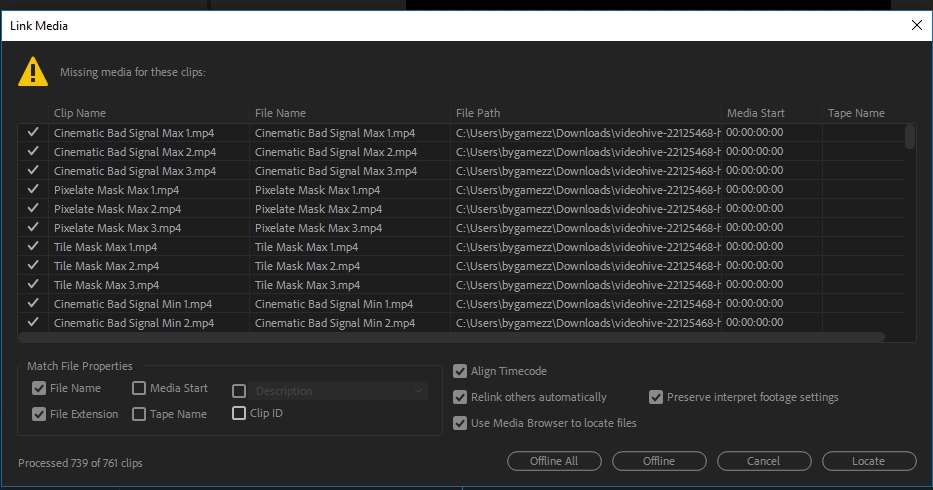
Hello! Please take the very first step in this guide: https://videolancer.net/content/handy-transitions-for-premiere-pro/help/#fix-warning-missing-media If the problem remains unresolved, send your message to boris@videolancer.net. In your message, provide a link to this comment.
Hi,
Is this a single use product/license? I’d like to use it for my small business as well as my day job… two different computers in two different locations. Is that possible or would I have to purchase this twice?
Thanks for your help.
Hello! Please send your message to mail@videolancer.net.
Thank you.
When I add this in its alters the color of my footage, any way of not allowing that?
Hello! Previously, we did not encounter a similar problem. Could you send a file of your project to mail@videolancer.net, so that I could try to find the reason?
Theres footage missing in the download file.
Please take the very first step in this guide: https://videolancer.net/content/handy-transitions-for-premiere-pro/help/#fix-warning-missing-media
If the problem remains unresolved, send your message to boris@videolancer.net. In your message, provide a link to this comment.
Solved! Thanks for the quick response.
Any plans to add Text Transition Presets? Any plans to add more transitions from your after effects version, to the premiere pro version?
Hello! I apologize for making you wait a long time for an answer. Regarding text transitions – so far there have been no such plans, but why not. Now we are working on a current update, and next time we can try to do it. Regarding the transitions from After Effects, there is a problem with this. Since Premiere Pro is extremely limited in the effects and tools for this, because this program is not intended for effects. We are working to replenish the collection with new transitions, but with these limitations in mind.

This item was featured on VideoHive

Power Elite Author
Contact the Envato Market Help Team