36 comments found.
Very cool work !! 

Can I use this with After Effects CC?
Need a little help. Followed the video tutorial, dropped in my logo, added it to the “your logo here” layer, adjusted the size, added to render queue, enabled the audio and rendered the video only to have the output come out as my logo on a plain black background with no effects and no music. The only thing I can think is that, when I first open the .aef file, I get the following error:
After Effects: this project must be converted from version 8.0×247 (Macintosh Intel) and will open as an untitled project. Standard Definition pixel aspect ratios will be updated for compatibility and improved accuracy. The original file will be unchanged.
Thoughts? Help?
The message that you got upon opening is normal. It means you’re using newer after effects version than CS3 .
Sounds like you rendered the wrong comp. You need to open the final comp called “Final output 1080p” and then add it to the render queue and render it. Looks like you’ve rendered the placeholder comp where you dropped your logo.
I have a problem. No matter which format I import my logo, it’s always blurry or not very sharp. I’m importing high res ai, pdf, psd…it doesn’t matter. It’s always blurred. It also doesn’t have any shadows like the one in your tutorial. I’m new to AE cS5, what can I do to sharpen logo and add shadows?
it shouldn’t be like that. Besides shadows are added automatically. It seams that you don’t put your logo in the right place. Please get in touch with me through my Profile page and send me your logo.
I found what i was looking for.
Thank you !
Hello !
I have little problem, maybe somebody can help me. In the tutorial when you open the panel “Effect Controls”, in my version of AE stands: “Effec Controls: None” and there is nothing inside.
How can i do it to have all that parameters inside (lightness, extrution, etc…) ?
Thank you
You have to select the right layer before. Effect panel shows effects that are applied to each layer. If no layer is selected or if you select layer that don’t have any effects applied to it the outcome is as you described. When you select (click on) correct layer, the effect panel shows all those effects.
Thanks for the free project ! merry christmas too you 
I keep getting a border around my image. How can I get rid of this??
See screenshot: http://i890.photobucket.com/albums/ac108/GWAVE-23-xDoWx/ae_flaw_box.jpg
It looks like this frame is already in your image. It could be as tiny as just 1pixel line, but when you import it in the project it gets processed and with all effects applied it gets visible. Try to draw mask around your image in “your image here” comp. that should remove the frame. if that still doesn’t work – please send me this project with your placeholder image and I’ll check it. you can get in touch with me through my profile page
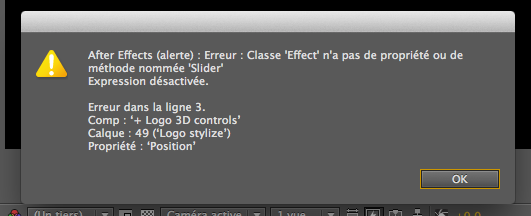
I have a error :
http://img75.xooimage.com/files/5/8/1/capture-d-cran-20...15.40.53-2fbba09.png (I’m french)It open this error when i change my logo or advance in the time thank you in advance
It’s because you’re using French version of After Effects, but it’s created in english version. Here you can read more on why it happens and how to fix it: http://aeteacher.com/how-to-fix-expression-language-error-in-after-effects.html
Just wanted to say thanks for the freebie, great work!
Great project. Thanks!
Thanks! Best regards.
Amazing! Congrats for be the file of the month!
Thanks !!!
My company logo is in JPG (high resolution) format. I don’t have an AI file. Does your project still work?
It takes all image formats that are supported by After Effects. The thing is – JPG files don’t have transparency channel. So your logo would have background frame around it. this can be fixed by cutting out your logo. if the background is plain white – use Effects->Keying->LumaKey Set it to “Key out brighter” and adjust the Threshold parameter.
I’m a newbie of Adobe After Effects. Your self-help MP4 file is very good !
Do all your video projects include such kind of self-help MP4 files? Thanks.
Not all, usually it’s mentioned in Item description if project comes with Video tutorial. However every project comes with at least written tutorial where I’ve explained customization process step-by-step.
love it! but i have my logo in PNG not .AI? =(
You should be fine. Project accepts all image formats that are supported by After Effects. If your PNG has alpha channel (transparent background) in your logo file – you’re fine. If not – you should key out your logo to remove background.
Nice one,thanks placdarms
Hello,
I opened project file with AE 5 .5 and clicked render to make sure everything is working as stated. Unfortunately, even though the audio is in the main file, it does not render. In other words, the complete render does not have audio. I am sure this is user error so please help and let me know how to fix. Thank you.
Hi, it seams you didn’t checked the Audio Output checkbox in Render queue. See this tutorial. i talk about other things there, but touch to that checkbox as well: http://aeteacher.com/things-you-have-to-know-when-working-with-audio-inside-after-effects.html
tested it on a macbook pro i7 and an iMac i7, first one with CS5 , the iMac with CS5 .5. Both times if I start rendering it triggers a repetetive failure like:
After Effects Warning: Class ‘Effect’ has no properties or method with the name slider. Expression is deactivated. fail in row 3 Komp ‘+Logo 3D controls Layer 49 (‘logo stylize’) property: ‘position’
That wasn’t what I expected paying $12 … anyone who can help?
Are you using other than English version of After effects? Most likely this is the case and there is the reason why it happens:
When the project is opened in a different language such as French, the name of ”Slider” becomes “Curseur”, however the expression that links to it is still looking for “Slider”. This causes the expression to not work, and produces an error message upon opening the project. This is not unique to the slider control either, all the names of expression controls will change.
There are 2 ways to overcome this problem. The first method is to go through each expression that links to an expression control, and change the name to it’s alternate language counterpart. Or to open the project in it’s native language. You can read more about the second method here
If this is not your case and you still get the error please send me e-mail using form on my profile page
I figuered out to change from german to english. Right as you said, it got confused with names like slider vs. Schieberegler … funny that a software like this has such bugs.
Anyway, my problem is only solved by half: now I’m able to change the bevel amount or the lightness, but I can’t just switch them of. Like just clicking the fx away … it should just not affect the whole thing at all.
What do I miss?
you don’t need to turn it off. If for some reason you don’t want that lighting effect – just set slider to 0 and effect will not be visible. if you still want to turn it of you will need to do it manually for 50 layers. That’s a bit of a work so that’s why there are those expressions that easily link those parameters to sliders giving you quick way to adjust them.