Video

Support for 250+ Epic Visual Transition Pack | Premiere Pro

Support for 250+ Epic Visual Transition Pack | Premiere Pro

4.20 (5 ratings) 4.20 stars
Cart 30 sales

Popular questions for this item

Where is get purchase code?

1. Open webpage: videohive.net/downloads
2. Find the project and click to Download >> License certificate & purchase code (text).
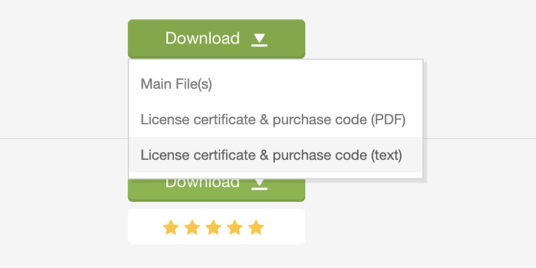
3. Open license file and copy Item Purchase Code and paste into dialog field.
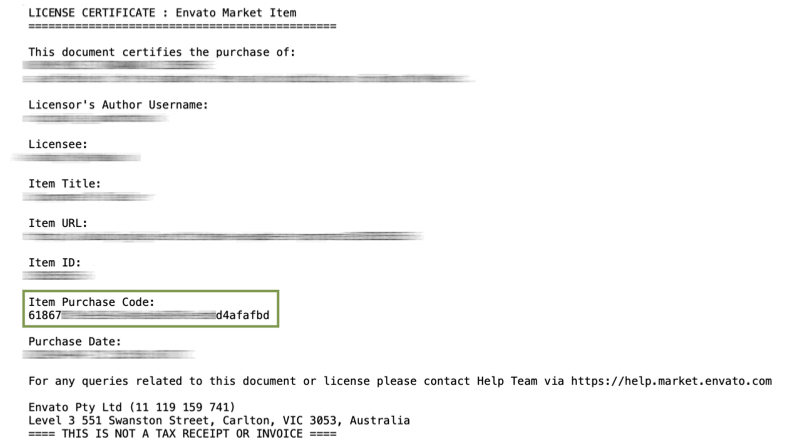
4. Click on activate and enjoy.

How to install the AtomX extension?

More details here
1. Download and install ZXP here
2. Run ZXP
3. Drag and drop file *.ZXP in the package into the ZXP tool and let it install automatically.

How to install new packages?

YouTube Tutorial here
1. Run the extension by the Windows >> Extension >> AtomX.
2. Drag and Drop files *.atom in the package into extension.
by
by
by
by
by
by

Tell us what you think!

We'd like to ask you a few questions to help improve VideoHive.

Sure, take me to the survey