I have the new plugin FORM version 3 or 4,7. It asks to migrate settings.
An update was released wih a project version ready for Trapcode form v 3 and v 4,7 If you already purchased the project, you can re-download from www.videohive.net/downloads


I have the new plugin FORM version 3 or 4,7. It asks to migrate settings.
An update was released wih a project version ready for Trapcode form v 3 and v 4,7 If you already purchased the project, you can re-download from www.videohive.net/downloads
I cant see but only black frames, or an “X” sign over the scren at the last two scenes… Why?
If you only see black frames, that’s probably because you don’t have the required by the project plugin: Trapcode Form
If you see a red “X” sign over the screen, that’s because you only have the trial version of the plugin (it’s not registered).
In both cases you can purchase the plug-in here: http://www.redgiant.com/products/all/trapcode-form/
Can I change the backgrounds behind the people?
All scenes are layered. If you are an experienced After Effects user, you can find the background placeholders, and replace the backgrounds! But keep in mind you have to match the perspectives and the colors to get “natural looking” results!
How many letters per line can my text be?
Until 15 or 16 letters it looks fine. If you need a bigger message add another line! Bold titles looks better than light fonts.
Can I insert my Logo forming at the sky?
Yes, but if your logo has semi-transparent areas, they will appear at full opacity. (Otherwise there would also be semi-transparent people forming it…)
Can’t find how to export in H264 codec
To enable H264 output in AE CC version: Go to menu: edit / preferences / output & enable checkbox: “Show depreciated formats in output module settings” Now you have the H264 output in your output settings!
To render in H264 format in AE CC2014 or above, send the composition directly to Adobe Media Encoder from After Effects (Composition > Add To Adobe Media Encoder Queue)
What if while opening the file I get “missing media files” error message and instead of the footages I find color bars. Is this normal?
No, if you get this error message, this means you have not decompressed the file right, or you have separated the project file (.aep) away from it’s directory.
All After Effects templates projects must be in the same directory with the “footage” folder too.
So unzip the file as is – do not separate the contents!
Check this image to see how a normal directory should look like after unzipping:
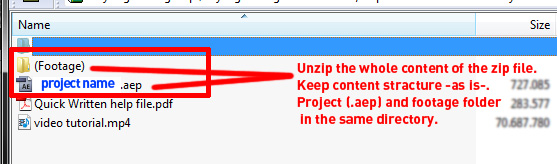
Also here is a video tutorial on how to fix the missing files error for all projects (not only templates): https://www.youtube.com/watch?v=hptLKZmi1qc

IF this did not work, then there’s another 2 possible reasons for the error:
1. The file got corrupted during download (Solution: Redownload from http://videohive.net/downloads)
2. Your quicktime installation is corrupted or missing (Solution: Redownload & install quicktime from https://www.apple.com/quicktime/download/)
We'd like to ask you a few questions to help improve VideoHive.


