28 comments found.

According to the copy on the page this was last updated in 2016. Are you no longer developing / supporting it?
Can it apply AE markers to the audio layer? All the markers in the demo video look like they’re generated by the script inside the script. I want something that can accurately, quickly show me where the main beats are so that I can do my own edits without having to continually scrub back and forth trying to find the right place to cut.
Finally, is it compatible with CC 2021?
Thanks. SJ.
Hello! Sorry for the long answer. This project may not be suitable for your tasks.
hi i want buy buy the beat editor but i do not know how to make it work in 2020 after effect and can i have a test for a one day try ?
Hi, unfortunately there is no such possibility
Ok , but how can i make it work in after effect 2020 ? Because i do not know how to use script. And there are a tutorial video how to use the beat editor thank you ❤️
The script should work in the 2020 version. The instruction will be in the archive after downloading
There are tutorial video how can i make it work ?
Of course, after purchase, you will find a video instruction in the archive.
its ok for after efects 2020
Thank you for your purchase and feedback.
sorry mine was a question. ok for after effects 2020? because I can’t get him to generate the wave he says script error etc.
Just checked AE 2020. And he created the graph for the mp3 layer. Can you record a video of this problem?
mi puoi dare un indirizzo mail dove mandarti il video ?
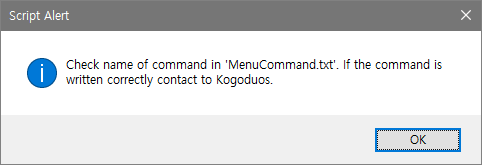
Did you use the steps from the instructions? 2.1. Change MenuCommand(if error)
come si cambia?
Place the file “MenuCommand.txt” from videohive archive in the same folder where you have the file “BeatEditor v1.2.jsxbin” in After Effects folder. In this file write the command exactly as you have in your version of the language. In English version it looks like this: right-click on your audio layer “Keyframe Assistance”->”Convert Audio to Keyframe”. This “Convert Audio to Keyframe” on your language paste into file “MenuCommand.txt”. And allow all applications access to this file. I described what I do in the video “2.1. Change MenuCommand(if error).mp4”
Amazing, Exactly what I was looking for and more. Accidentally Purchased twice, can I get 1 refunded? Can markers have properties to make the time-remap go in reverse?
Hi, thanks! Write in support of envato about the second purchase, only they can decide about refund. About reverse. Unfortunately there is no such function.
Not sure from comments above. Does this work with current version of AE CC2018?
Hi! Yes, it works in the latest version of the After Effects. But not in the Premier Pro.
Is this works on Adobe Premiere 2018?
Helo! No, it’s only for After Effects
Can you incorporate your script to Premiere? or should I say make a Beat Editor in Adobe Premiere I will purchase it.
Unfortunately primiere pro does not allow using such a scripting functional as in the After Effect. Therefore, I can not do this in the premiere in these versions. Perhaps there are other solutions that are based on plug-ins, not scripts.
check the Beat Edit of AESCRIPT for your reference. same like yours..
Yes, thanks. This is another engine, I saw it for a long time. Now I have better skills, and maybe I will make another version after I get rid of the current project.
wow nice to hear that. I cant wait to see the another version. When it will be possible?
Because my current projects are quite large, then probably only in the summer can I take them.
for your update to Beat Editor or new products?
I’ll think about this when the product is ready.
Hello! Send me a message via my profile page, and we will continue to work by email. In message write me the name of command which you type in the fille “MenuCommand.txt”, your operatin system and Atfer Effects version.
double post, please delete this
Hi there! Does this work on AE CC2018?
Hello! I can not test it now, I’ll answer tomorrow 
Yes, everything works well!
Hey, great work!
I’m getting an error with CC2017: https://www.dropbox.com/s/rbp3caacw1uj2rb/Screenshot%202016-12-19%2014.41.21.png?dl=0Any ideas? Thanks
Hi, thanks!
Looks like script can’t take command “Convert Audio to Keyframes”. As you can see on my example on this stage he create layer “Audio Amplitude”: https://www.dropbox.com/s/dltmftnosdwb9iw/AudioAmplitude.jpg?dl=0Is it possible to get this project from you? I will test it on my computer. Also, did you try this script on other After Effects versions? Perhaps there was a conflict with other commands or plugins.
If I will not find solution we will make refund. Sorry for this.
I see!
After I did “Convert Audio to Keyframes” on the audio layer and then it worked after I selected the audio layer…
It did not without doing “Convert Audio to Keyframes” before pressing generate.
Was that in the guide? Am I dumb? 
Refund not necessary even if it wouldnt work bro 
It must work without any additional manipulating.
I just made same process like you and it’s work fine too.
Could you run this code using Extendscript with selected audio layer: var numb = app.findMenuCommandId(“Convert Audio to Keyframes”); alert(numb); app.executeCommand(numb);
Lets check the number of command and the possibility of its using.
GREAT!!!
Thank you!
Is this kit for after effects ????
Yes it’s only for After Effects CS6 and higher.
Use it every day ) Realy Thanks !
Cool! Thank you!
I like it but the tutorials are hard to follow since you have to spend your time reading instead of watching what its showing you. Fruit for thought. Good Job.
Hello! Thanks for your feedback. How can I improve the tutorial without using voice? Maybe change timing of text showing?
THe plugin ask me to “select a Vanishing point exchange” and don’t create a graph…. can you help me? I use CC2015 with win10
I sent you a message to your mail
“Something wrong! Check selected layers or contact to Kogoduos!” help…
I used a song in mp3 , so after I have installed in your ( pc i7 gtx670 video card ) “Something wrong! Check selected layers or contact to Kogoduos!” help…
Hi! Send me email please from my profile page. It happens because of different language of After Effects or different version. Write me your After Effects interface languages and version. And if you have not english interface send me same picture http://ic.pics.livejournal.com/donberserk/60432954/6374/6374_900.jpg or write me command “Convert Audio to Keyframes” on your language just like in your After Effect.