66 comments found.

I found the “Shy Switch” and turned off the BG layer. The map is now surrounded by dark space with 3D buildings. It defeats the purpose of this 3D map if you can’t show the surrounding area.
3d map area is as big as your screenshot area, so mirroring is hiding empty areas around map, you can turn off BG layer and create white solid as background.
What is the “Shy Switch” you mentioned in an earlier post about the mirroring problem this product has?
Is it possible to oclude the name of the streets ? Could I change the view position of the camera, turnig around a building ?
Sorry, Im looking for some way to HIDE the street names, is it possible ?
You can hide street names in photoshop. Yes you can change position of the camera
can i get mp4 file if i bought it?
If you buy it, you will get a After Effects project
After inserting a map in “Change Map” and modifying the “Road Line” layer, it duplicated the line in Local Map. How can I fix this?
Sorry, I didn’t understand, can you send me a screenshot of a problem to my e-mail: vitalik-videohive@mail.ru
my project is extruding the streets as 3D, and rendering shadows as 3D as well. How do I fix?
Send me screenshot of your location
hello, thanks. I can send you the screenshot I am using from google maps, as well a screenshot from the pre-rendered comp. The email feature on this site doesn’t allow attachments, however…?
sent! thank you
Hi,
I have to put together a video for a client. They essentially want to show 5 different neighborhoods that border the area they are targeting so they want it to look like we are going through the neighborhoods like going from one to the next as they say the name. How do I go about doing this? I tried to take a screen capture of all 5 neighborhoods but I cant get them all with that building line. I love the idea of the template, I am just confused how to capture several areas.
Try to use this http://www.codres.de/google-map-saver/gms-net-download Mayby it will help to make a larger screenshot with all 5 neighborhoods
do you have for final cut?
No, sorry
How do I get it to stop mirroring the map? It kind of defeats the purpose of showing a map if it is not a correct representation of the area. http://i1313.photobucket.com/albums/t560/Tdmapollo928/Untitled-1_zpszxpxzlru.jpg
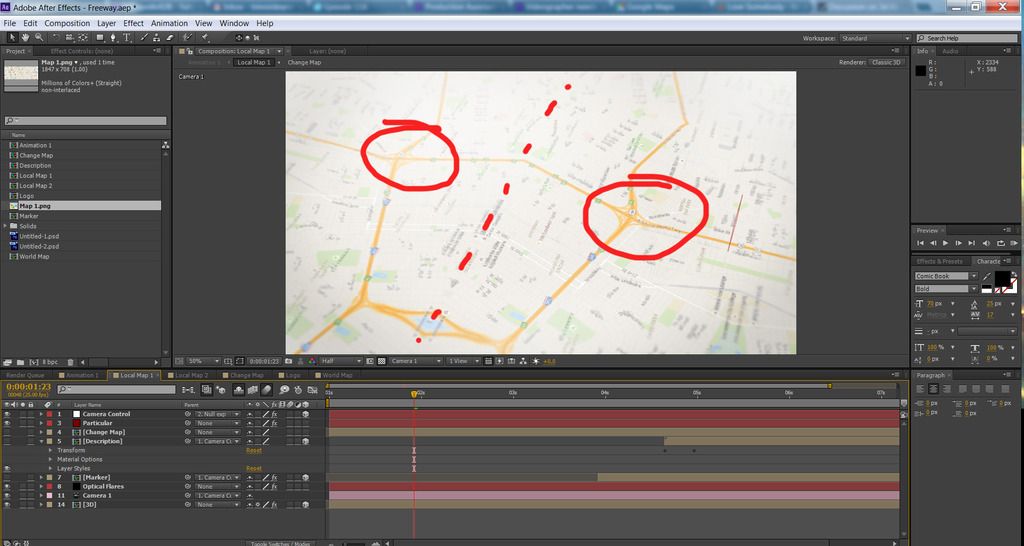
Press “Shy” switch off. Then you will see “BG” layer – turn it off
HI, is the backgorund sound included?
No, it’s not included.
Hello, I bought the project, but the google building option does not exist in the world, in Brazil’s case for example there is no such option. Only discovered this when I was following your tutorial. I would like to have my money back please. As the return is made in this case? Thank U.
Att Dagoberto
Hello, I understand the situation. I dont know how return money to you via videohive site, you can contact videohive staff and ask them. Another option I can send you money via skrill.com
why the map in rendering change and transform to two parts(left and right and cut from the middle)
Does this come with a tutorial? We are considering buying to use within a local travel tv show.
Text tutorial included.
“Sydney” not “Sidney”
Thanks)
What is a differents of Regular or Extandet License? I dont understand from your explanation.
Bought this project! Great job! Thanks to Author! One tip to others…. use this Google maps site for remove labels. I removed 80% of labels, lived just streets names. http://gmaps-samples-v3.googlecode.com/svn/trunk/styledmaps/wizard/index.html
Thanks for link)
Great project!
Fantastic Idea! 
Also when we turn off the cloud particular so as to work within the project, the whole composition turns into red.
We haven’t bought what was advertised im afraid…Im sure there will be updates in not so distant future
Thanks for reply. I’m working on an update right now. Also the composition turns into red because The Particular plugin applyed to red solid, so if Particular isn’t installed, red solid it self become visible. Simply turn off layer called “Particular”
Cool plug in but it needs a lot of work, A lot of the composition e.g optical flare, the shadow etc are hidden and so not editable.
We are not entirely enamoured by it to be honest.
When I finish rendering it only shows a red screen as an exported video file! Nothing is rendered but a blank RED screen!
I’m NOT happy!
I want a step by step rendering, I’ve rendered videos before. 1) Ram Preview, 2) Composition, ad to render queue, 3) Output to Desktop, 4) Click Render, It always works accept with your file! it exports a RED blank background thats it!
Do you have Particular and Optical Flares plugins installed?
I don’t know what that is! I didn’t install anything unless it comes with After Effects!
This project required Particular and Optical Flares plugins as it said in the description. You can turn off layers which required plugins. Presss “Shy” switch. Then turn off “particular” and “Optical Flares” layers. That will help.