133 comments found.

Hello, I am working in adobe pramire and i could not know more about aftereffects bro can you guide me or give me a any help how can i use this in adobe pramire with after effects
Thanks
Hello,
Thank you for your purchase. Unfortunately, this is an After Effects project and the only way it could be edited, is in After Effects. However, it is pretty easy to customize it, even for a beginner in AE. Besides the tutorial, there are many guidelines inside the project, and I could answer to any questions you might have. If you don’t have After Effects, you can download a trial version here: http://www.adobe.com/products/aftereffects.html
If I could be of any further assistance, don’t hesitate to contact me anytime. I will gladly help 
Best Regards, Jo
Hi Jo,
Again thanks for you response
Sir i make this from your weather section Now it is showed in just 3 or 4 seconds and then finish And now i want to increase the time of this
Sir please guide me how to increase the time ? Sir if it is possible for you Please give your Email or facebook id
Best Regards,
Hi,
It’s very easy. By stretching “IN & OUT Controller” layer to the right, you can extend the length to any time you need.
Hope this will help
If you need further assistance, you can contact me by e-mail on my VideoHive profile http://videohive.net/user/IronykDesign (on the bottom right).
Best Regards, Jo
What a quick response sir 
My this issue resolved
Sir i need to change the text from this weather template from at-least 20 times So after changing from one composition how to i copy and past this composition in main screen and change the one by one
And i will randier all the compositions from one screen
I don’t know i will describe the complete problem or not 
1) after changing the text from one weather template I want to use this weather template 20 times with different text on main screen
Is it possible
Please write me an e-mail through my VH profile, so I could further help you on this.
Thanks
ok sir sent
Didn’t receive any e-mail yet.
I think website have the error at this time sir this is my email misbahudduja@yahoo.com I already sent email but i think again error and i am still trying
e-mail sent
Sir i think this website have error for sending emails But
sir you are 100% right
I need to multiply this “03. 7 day forecast” composition 20 times, and to have different texts in each of them
Great customer service, quick respond to email questions.
Many thanks for your feedback! Really greatly appreciated!
Hello, do you think using an animated character as the anchorman would work? Or there might be some problems to work with an animated character in this project? maybe lighting, shadowing problems that i could only encounter while working with an animated character?
Hi,
Thank you for your purchase and I apologize for the late reply. We were out for a couple of days. Please let me know if you managed to add your anchorman, and if I could be of any further assistance.
Best Regards, Jo
I love this template! It’s really well designed, organized, and presented! Thanks so much for being awesome!
Quick question – how long does it usually take to render out these comps? I’m working in the pre-rendered no-desk project file and tried the Quicktime>Animation>Alpha&RGB setup suggested in the tutorial and my computer is telling me it’s going to take 60+hours to render out the split screen 2 shot. Haha – is this normal or could it be a computer issue? Any info you could provide could be splendid!
Thanks! GL
Hi GL,
Thank you very much for your kind words and for your purchase! Much appreciated!
Well, it very much depends on your computer specs. However, 60+hours sounds too much. Have you added footages in all of the control room monitors? If so, try to pre-render first the virtual studio. The render time, could be also be improved in After Effects settings. Could you please write me an e-mail through my VideoHive profile with details about your AE settings? In addition, I would recommend to always render first as TGA image sequence. This way, if the render get stuck for any reason, it can be resumed from where it stopped. Besides, the render is faster and once you have the image sequence, you can easily make your final output to quicktime movie with any compression (as I recommended in the tutorial, Animation is a good compression).
Looking forward to hear from you. Best Regards, Jo
Hello There! I just purchased this News Studio package, but when I try to watch the tutorial on how to use this package, the tutorial video has NO audio making it virtually useless. Am I missing something??? I am very confused and don’t know where to start! Help please!
Also, when I try to open some of the files in the package, I get error messages saying that there are plugins missing? I am using After Effects version CS6
Hi,
Thank you for your purchase. The tutorial has only subtitled explanations, because I’m not a native English speaker and I think it would be annoying to hear my voice. Sorry, I’ll do my best to add voiceover to the next project. Regarding the plugins missing, most probably you have opened the “Editable Optical Flares” version of the project. If you don’t have Optical Flares plugin, there is also a pre-rendered version of the project included.
If I could be of any further assistance, don’t hesitate to contact me anytime. I will gladly help.
Best Regards, Jo
Thanks Jo! Where can I get Optical Flares Plugin? I just edited one of the news graphic intros… but when I rendered it… it said there were 32 files missing. It is still went thru with the rendering after I said “OK” to this error message. Why is this?
Optical Flares can be purchased here: https://www.videocopilot.net/products/opticalflares/ The project can still be opened and rendered, but if you don’t have OF installed, there will be black screens. That’s why I included the “News Package_Pre-rendered Optical Flares” version, for the customers who don’t own a copy of this plugin. The two projects are the same, but in this one, the optical flares are pre-rendered. If you open this project, there will be no errors.
Ok… I will try that! Thank you so much for your help!
You’re very welcome! Anytime If you have any questions, or need further assistance on customization, feel free to contact me by e-mail, and I’ll do my best
Hello, I am kind of new on this topic, let me ask you some questions please and please be patient if i do obvious questions, first of all do i need after effects and cycore plugins installed on my computer to modify names and other things?? Second, after modify names do i need to export it to a movie format?? Third, can i modify names more than once?? And finally, what kind of cycore plugins shoul i buy, because thre is more than one version i think, or if you could give me the exact page to buy this plugin, please. Btw you are a genius to create such a geniality.
Hello,
First I’d like to thank you for your kind words! Appreciated! Now, to answer your questions, indeed you need After Effects to customize this project. You don’t have to purchase Cycore plugins. They comes bundled with the full version of After Effects CS6 (and below), and they are included in the trial version of CC. Therefore, the project can be customize with CC trial version as well ( https://creative.adobe.com/products/aftereffects ) Besides the virtual studio (which is pre-rendered), everything can be edited in After Effects – the logo, the names, etc. And yes, you can modify the names as many times as you need. Indeed, to be able to open a graphic element (lower3rd, Over-the-shoulder, etc.) in a video editor, or to upload it somewhere, first it has to be exported from After Effects as movie.
If you have any other questions, or if I could be of any further assistance, don’t hesitate to contact me anytime. I will gladly help
Best Regards, Jo
Hello again, Let me tell you since i´m working with your project everybody which sees my channel are amazed by your work, they said “only a genius could do that”, so i´m really grateful with you.
My question comes here, now we´ll start working using virtual sets and i don´t know how to use the one which comes with your project, i´m using VMIX by the way, and virtual set by default in that software are really poor, also i saw a folder called “virtual set” in the software and it has only a pair of png files and a xml.
I hope you could help me.
Once again i really appreciate your work.
Best Regards. Augusto
Hello Augusto,
Thank you for your purchase and for your feedback! I’m glad to hear this, and it’s much appreciated! Well, I’m not sure how vMix work, but from what I’ve seen in their demo video, I assume you can use pre-rendered png files out of After Effects and assemble them in vMix. I’m not sure about xml file though. I think the guys from vMix could be more helpful on this I’m sorry, I’d wish I could help. Thanks in advance for understanding. Please let me know if you managed to make it work. Thanks.
Best Regards, Jo
May I kindly ask you to rate the project? Thank you very much in advance.
Thanks in advance
Hi Augusto,
Thanks for letting me know. So I assume you have to separately export the background, the screens, the talent, and you also need several shots.Sounds a bit complicated, but I think it can be done. Looking forward to see the answer from vMix. You can rate the project in your “Downloads” tab. You can see the stars below the “Download” button. Thank you very much in advance.
Best Regards, Jo
Ok thanks for all, it seems i have work to do it isn´t hard but kind of tricky. See ya my friend, and really thanks for quick answers.
Best Regards
Thanks a lot my friend! And thanks for rating the project! Much appreciated! Please let me know once you managed to make it work in vMix. Thanks.
Best Regards, Jo
Hi Jo, Again me everything is perfect, however now there have to be 2 people on screen, the journalist and the one who has to be interviewed. the position to journalist is ok, but i can`t find a camera position for the another i`ve been trying lots of combinations but can`t find one. I would like the another person be on the right of the screen which means he has to have the big screen as background. Please help me to find a good combination which would be ok for me. Or if it is posible you could create a bigger desk which would be suitable for these two people??, the one i have is excellent but is just for one person Of course, i know your time is money that`s why i`ll pay you.
Best Regards
Hi Augusto,
Thanks for letting me know that everything is fine. Appreciated. Choose Camera 2 instead of Camera 1 in “Virtual Studio Panoramic View” composition. It is oriented toward the big screen on the right side of the scene. We could create a bigger desk for two people, but please let me know if you have a deadline. Thanks.
Best Regards, Jo
Ok, I`ll try with camera 2. We`re planning to run the channel next Monday on Sept . 1st.
Best Regards
Looking forward to hear how it works.
Best Regards, Jo
Jo what about the bigger screen??
Sorry, I’m not sure I understand. What about the bigger screen?
Jo, what i mean with bigger screen, is that if you could do the bigger screen.
Regards
Jo, Excuse me instead “screen” i should have put “DESK”. My bad really sorry
Unfortunately, I’m afraid we are not able to make it till September 1st. The earliest we could start to work on it, is in about two weeks. I’m really sorry. Thanks in advance for understanding.
That`s ok, but please as soon as you finished the desk please send it to me. I`ll Reallly appreciate it.
Regards
Sure, we’ll keep in touch.
Best Regards, Jo
Jo, Probably the best idea is not to do a bigger desk instead could be a desk with shape of “L”, it`s my opinion but you are the genius. Regards
Jo, I would like to know how is the project going?? By this time everything is going ok with channel, however i can`t show journalist and guest at the same time because of the desk. Regards
Hi Augusto,
Could you please write me an e-mail through my VH profile?
Thanks, Jo
Great project! Allowed me to do things well beyond my pay grade! Not only does it look great, but the organization and thoughtfulness put into the project file and layout made it easy to adapt to my particular needs. You’re officially and AE god. And very easy to get ahold of too when I had some questions, even before purchasing.
Thanks so much again for your great feedback, Bret! Really greatly appreciate your kind words!
All the best, Jo
I have problem with renter i like if you could renter I need help render 2 scene on this project how much cost ? Virtual Studio – 180° Panoramic View (move Camera in After Effects) and Close-up view please reply asap thanks
Hi,
Thanks again for your purchase. I just sent you an e-mail.
Best Regards, Jo
I have an illustrator logo I’d like to swap for the “5.” Is that possible and will it take on the extruded look, etc?
Also, is it only 25p? I’m working in 1080 60i, so it’s not a huge issue. Easy enough to just render at 24 and then let FCP X add pulldown?
Hi Bret,
Yes, you can easily swap the “5” with your vector logo, and all properties remain the same (included extruded look).
In the project there is only a 25fps version, but I already have one converted to 29.97 and I could send it to you. If I could be of any further assistance, don’t hesitate to contact me anytime.
Best Regards, Jo
Thanks! I know it says customizable, so I should assume you can change out the words, “weather,” “sports” etc. to whatever you like? They’re actual text elements in AE?
Sure, all words can be changed in AE to whatever you like.
So to get the news anchor to “sit at the desk” correctly, you’d need to have him on a greenscreen-covered desk, right?
Yes, that’s right. Thank you for your interest in our work.
Best Regards, Jo
Awesome. I think I’m going to purchase this as soon as I can scrap up a few extra funds for this project!! 
So I finally purchased it a little back. I’m a tad frustrated, because I’m trying to use the “Panoramic Studio” view and it plays part of the anchorman clip in reverse, and then plays it forward. I want 0:00 of the panoramic view to start with 0:00 of the anchorman clip/layer. How can I fix this?
Hi,
Thanks for your purchase. Could you please write me an e-mail through my VH profile? We’ll gonna fix this.
Best Regards, Jo
You got it! Thanks.
I just answered to your e-mail. Please let me know how it works.
Thanks, Jo
Your email fixed EXACTLY what I needed! Such a quick reply, thanks!! A+ customer service so far!!
Thank you very much for your feedback! Much appreciated!
issue with audio, when I try to render or ram preview the Virtual Studio Panoramic View I’ve encounter audio issue ( a lot of noise)
in the Virtual Studio Closeup View I don’t have any issue.
can you please help ?
Hi,
Thank you for your purchase, and I apologize for the late reply. Could you please send me a sample of the render by e-mail, so I could figure out what could be the issue? Also, please let me know what format you choose for your output. Thanks.
Best Regards, Jo
That’s huge! Great project man
Hey Luis, thanks a lot man! Much appreciated!
Hello, I purchased your nice project. I would like to know the title of the music used on the preview, since I couldn´t find there. Thank you so much!
Hi,
Thank you very much for your purchase and for your kind words! The music is “World News” by Leto, and can be purchased here http://audiojungle.net/item/world-news/4948362
If I could be of any further assistance, don’t hesitate to contact me.
Best Regards, Jo
Hi, I really interested to purchase this design but can I use it on my youtube channel to do a weekly news report with regular license? or do i need extended license?
Hi,
Thank you for your interest in our work. I think the regular license is fine. However, to be absolutely sure, could you please contact Envato support here http://support.envato.com/index.php?/Tickets/Submit They could give you a straight answer to your particular case.
Best Regards, Jo
Hi, Great Job ! I have a problem when I open the project. After effect me shows me the following message: “Invalid argument: could not find effect named Point Control. Expression disabled. ” Everything works fine except the animations on “Lines ticker” ... thank you for your answer Nicolas
Hi Nicolas,
Thank you very much for your kind words and for your purchase. Sorry, I’m not sure I understood what is the composition that gives you this error. Could you please write me an e-mail through my VH profile, so I could further assist you on this? Thanks.
Best Regards, Jo
Ok, if you give me an email adress i can send you some sreen shot..
Hi, Great job and i just purchased a copy of this set. Can i have the news desk seperately as i want to use this virtual studio in a real time tv green screen project and the anchor needs to be behind the desk not in front of it! how we can have the news desk separate from the rest of the virtual set? Appreciate for your quick reply and suggested solution. Thank you Sam
Hi Sam,
Thank you for your purchase and for your kind words! Appreciated! Sure, I could render the desk separately. Could you please write me an e-mail through my VH profile? Thanks.
Best Regards, Jo
I will Jo, many thanks. Please send the rendered file to me by email.
Has project included the videoes of bottom of the set?
The videoes that estan behind of the reporter
Hi,
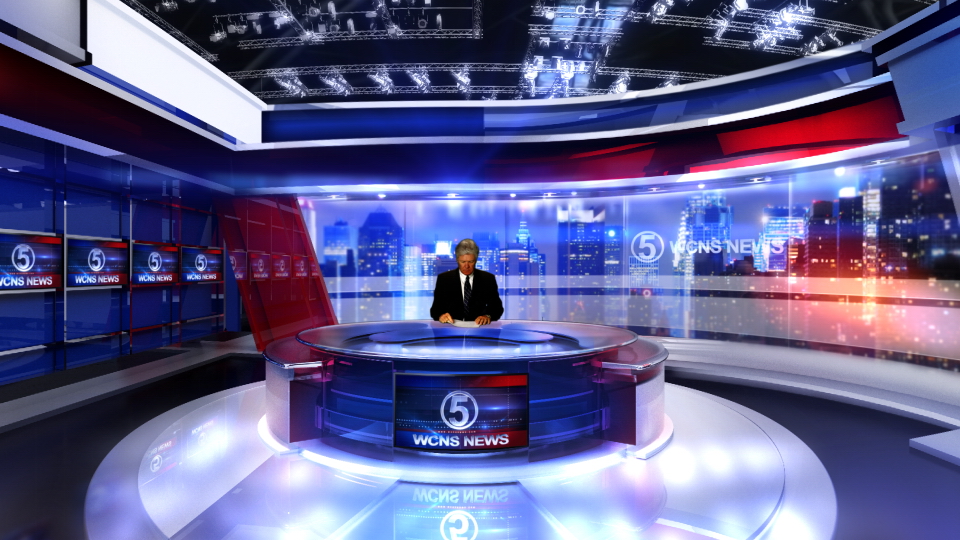
Thank you for your interest in our work. I’m sorry, I’m not sure I understood right what you mean. If you mean the control room behind the reporter, yes it is included. If you mean the footages you see inside control room monitors, they are not included. Please let me know if I understood right.
Best Regards, Jo
Hi,
Thank you for your interest in our work. I’m sorry, I’m not sure I understood right what you mean. If you mean the control room behind the reporter, yes it is included. If you mean the footages you see inside control room monitors, they are not included. Please let me know if I understood right.
Best Regards, Jo
Understood, thank you
Just making sure before I purchase this. Do I need chromakey in order to use this as the anchorman? Since the anchorman is not included correct? This way here I can achieve the same effect as your sample. Make sense?
Hi,
Thank you for your interest in our project. Yes, to achieve the same effect, your anchorman have to be shot on green screen, then keyed out. The anchorman from the preview, is not included in the project. If you have any other questions, don’t hesitate to contact me anytime. I will gladly answer.
Best Regards, Jo
Thanks Jo, I going to give it a try. There’s a first for everything but what the heck.
Please feel free to contact me if I can be of further assistance on this
Can this also be used in Final Cut Pro x by chance
No, sorry. The project can be edited only in After Effects.
In order to use this it says that Cycore plugins must be installed. Don’t these cost $300-500.00?
Cycore plugins comes bundled with After Effects. They don’t have to be purchased separately.
last question (hopefully) will this work with Creative Cloud’s After Effects? which may be a higher version?
Sure, it will work with After Effects CC.
Greetings,
Can I use your product on multiple youtube videos? I am not sure what constitutes a episode in the license agreement. All I really want to use is the OTS, lower third and the OTS that has text. All of the videos will be directly related in topic but not really episodes.
Do you think it will be OK to use with a regular license in my case?
thanks in advance,
Andy
Hi Andy,
Thank you for your interest in our work. I’d say one regular license is fine. However, to be absolutely sure, could you please kindly contact Envato http://support.envato.com/ They could give you a straight answer to your particular case. I’m sorry, with all the changes over the years, I’m not sure anymore Thanks in advance for understanding.
Best Regards, Jo
Thanks, I will let you know what they say.
Hi!!
Nice!! Is it possible to change the vid background behind the host as the jagged stairs I would like to see changed.
Thanks!!!!
Hi,
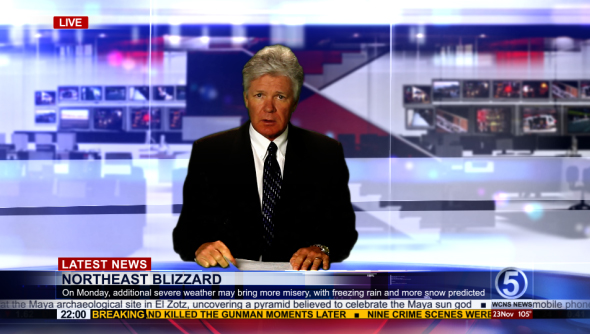
Thank you for your kind words and for your interest in our work. The stairs are part of the control room image layer (the control room is a separate layer from the virtual studio). You can add another image behind, instead of the control room – a city image for example. You can see how it would look like Here
If you have any other questions, don’t hesitate to contact me anytime. I will gladly answer
Best Regards, Jo
Thank you, you are very talented.
Thank you very much for your kind words! Much appreciated!