37 comments found.

if I buy this graphic from you can you put in text for me? thanks so much!
Hello, yes I can. But customization costs additional fee. Please contact through email form in my profile.
This comp is crazy awesome. I have what I hope are 3 fast/easy questions if you don’t mind…
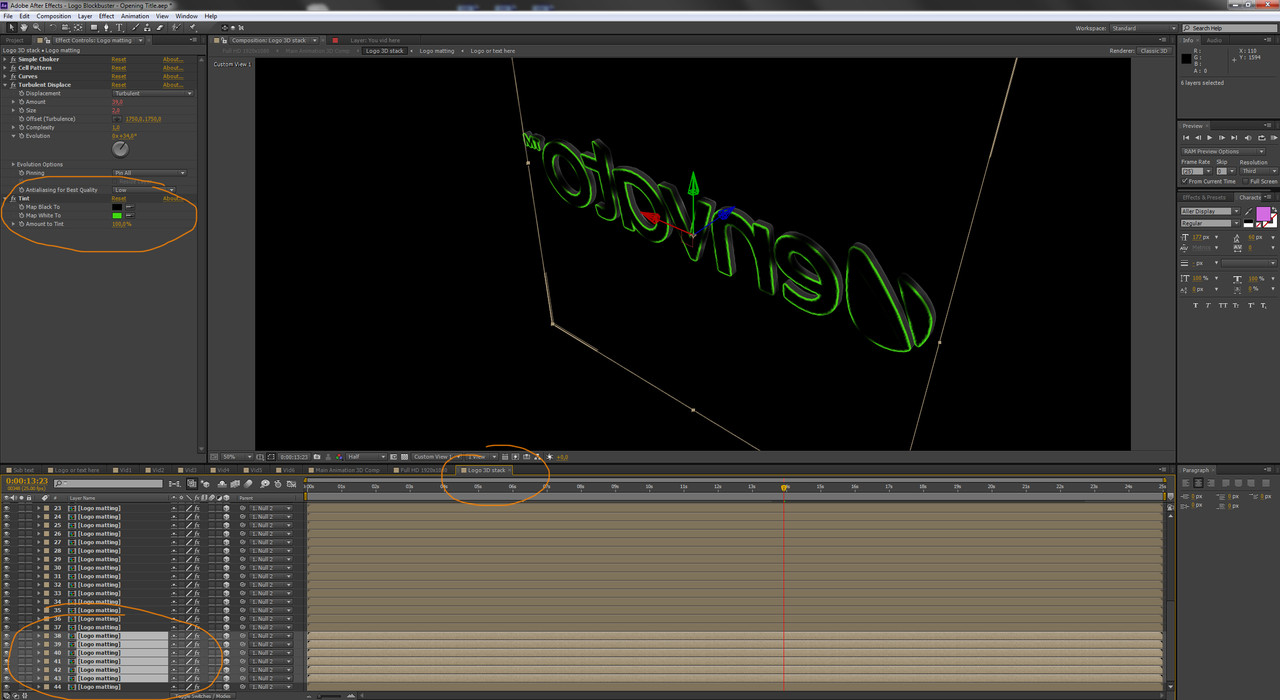
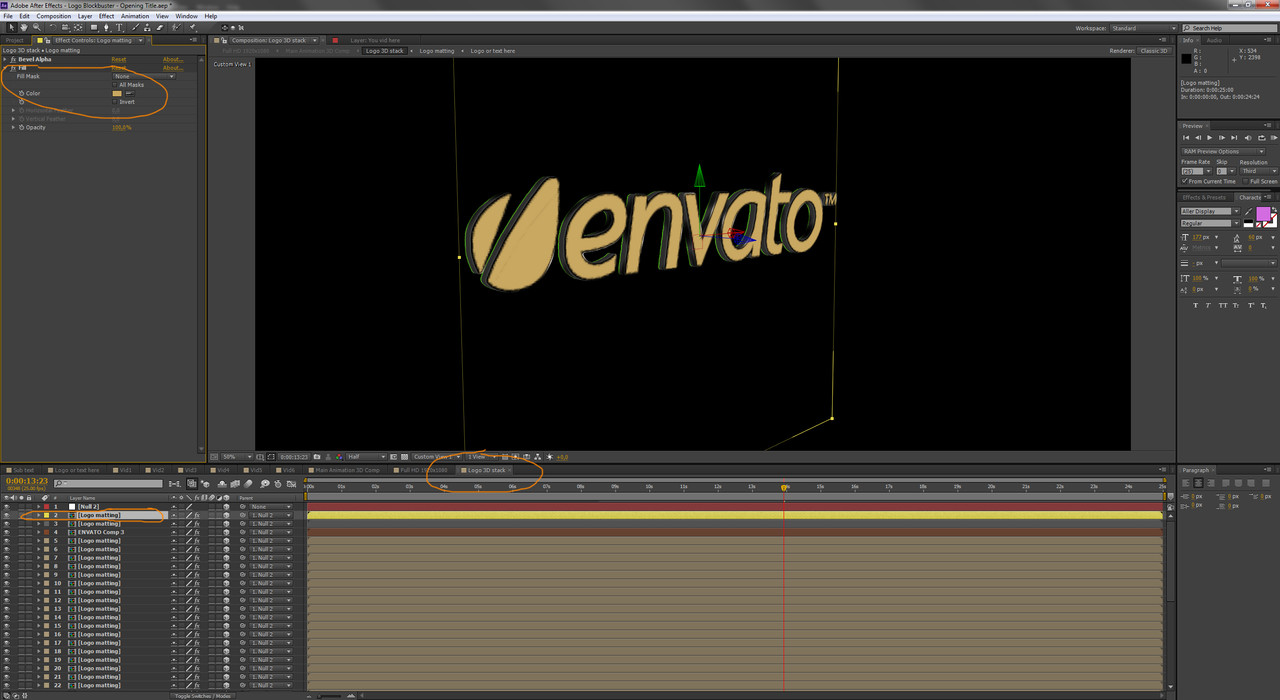
1. I would like to know where to change the color of the red light emitting from the logo
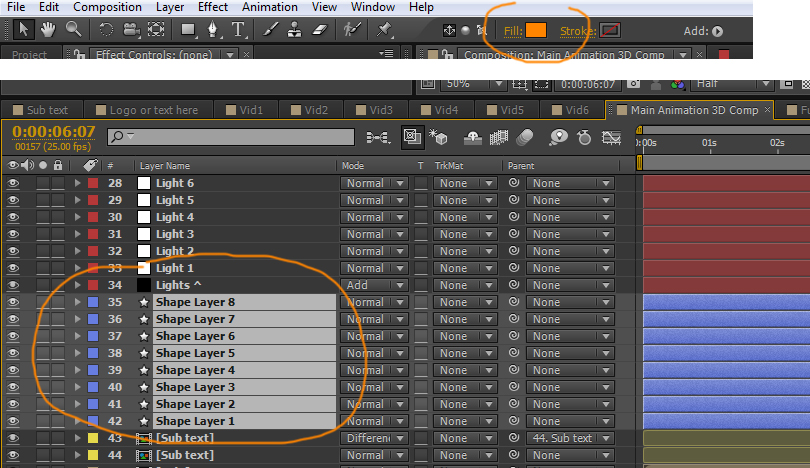
2. I would like to know where to change the yellow light color from the 8 horizontal bars.
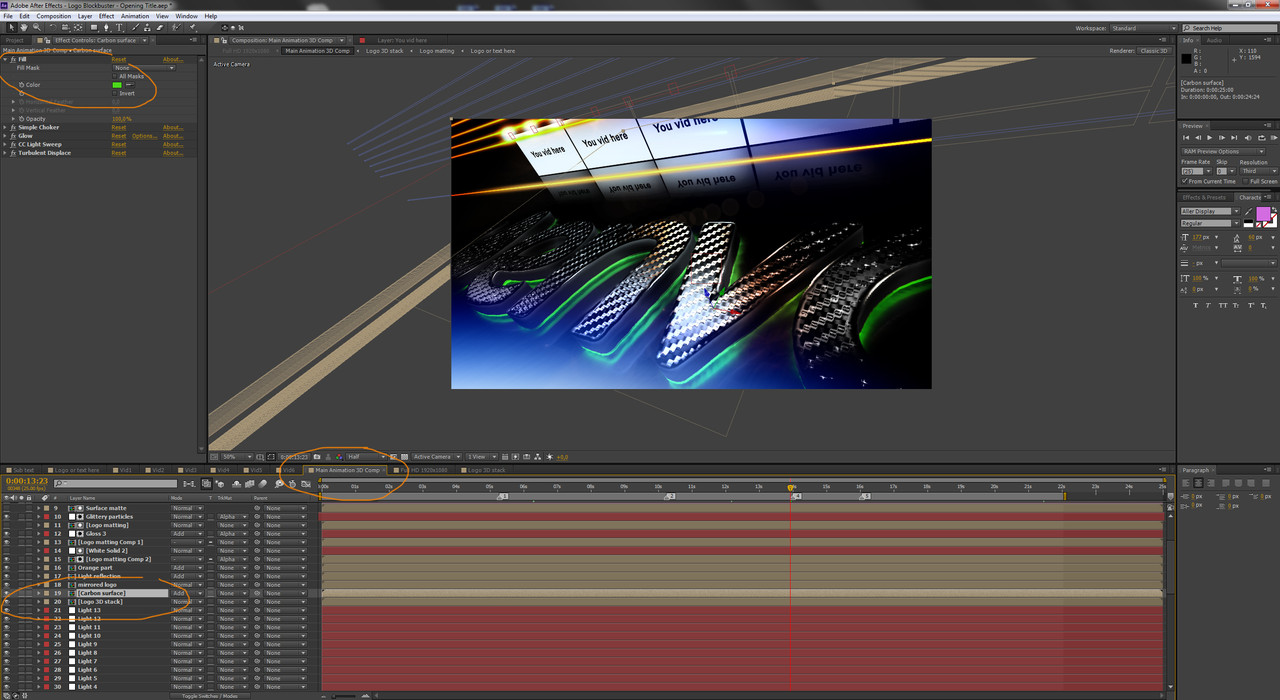
3. Which exact files would I adjust to change the “black” carbon fiber to yellow carbon fiber (I understand yellow carbon fiber might not exist but the ability to add color to such a perfect surface would be great.)
Screen shot: https://cl.ly/8da9547df980Btw, I also bought your “AD – City Titles Mockup Business Intro” (Unreal deal) and will buy “Hand Explainer Product Commercial Kit” when I have the time to switch content on 7 min worth of bada**ness.
Seriously, thanks so much, you and a few others have taken this platform to a new level…
- Phil G.
Wow, thanks!!
Ye, I might sound arrogant but I do think that Hand Explainer is one of the best templates on the market  Same with the AD. :))
Ok.. but as for the Logo Blockbuster. Unfortunately, it’s not that perfect, I haven’t had time to update it to have fast color control(But I released so many new projects!!) Ok.. so you still need to select colors manually. I will definitely update it to have fast color controls, in the coming weeks.
So, for now, you need to find layers in the main comp.
in your numbered order:
1. https://i.postimg.cc/vTv3LMJr/2.jpg + https://i.postimg.cc/bNz6YDn3/3.jpg
2. https://i.postimg.cc/rwg2F2zt/1.jpg
3. https://i.postimg.cc/vZKXv0NN/4.jpg
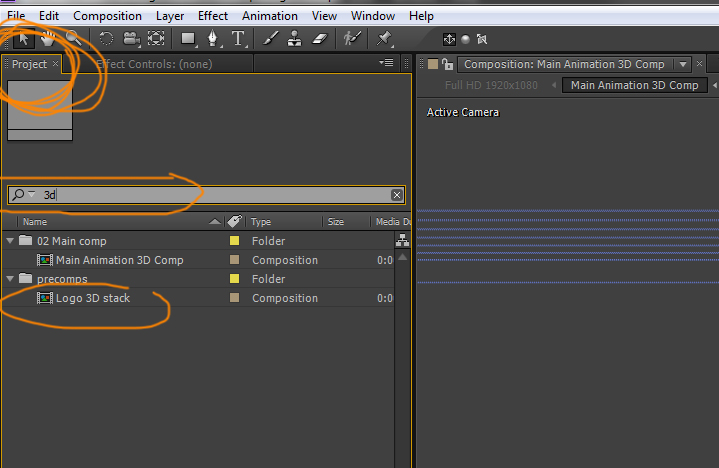
All those compositions you can find via simple search in you project window: https://i.postimg.cc/QtQbhhx2/1.jpg
WARNING – ADVERTISEMENT:
And of course, I can’t skip the opportunity to advertise my new Black Friday themed project which will be released in a day or two!!! Keep eyes on my portfolio!
END OF ADVERTISEMENT
lol ❤
Thanks for the fast response.
For a second there I thought you where going to have a Black Friday Sale. Darn it… LOL
It appears my AE is arranged a bit different than yours maybe due to version or platform. I will attempt to make the modifications manually and if there is anything that I can not figure out, I am not in a huge hurry anyway. I would be happy to wait for the possible update. I am good either way.
I am not 100% why but I am also experiencing crashing either right at the beginning of the render process or several hours in the render. Would you recommend rendering out a jpeg sequence for safety?
Well then I suggest waiting a bit! I will definetly make it faster and more controllable!
HELLO CYZER HOW CAN I CHANGE THE EVATO TEXT , IM NOT GETTING AN OPTIONS. THANKS
Hello, Well firstly, you need to purchase it. Then open it with Adobe After Effects.
Hello, (1) do the shiny letters come with the template. (2)Also, if I want to use my own logo, can I do that?
Hello, yes shinny letters is simply part of animation. And yes you can use your own logo or text
Nice…can any of the colors be changed?
Hello, yes it can as there are no pretendered objects but it depends on your skills. There is no fast controlls but it can be edited in composition
is there any way to edit screens from behind ?
Yes. Those screens are there for editing. You need to add your own video .
This is some of the finest work I’ve seen, given the complexity of the graphics, textures, angles and lighting effects involved. It is a very slow rendering project, even using the optimized file, but the final result is well worth it. Just be aware, you will be waiting several hours for a full render, even at 720p and using that aforementioned optimized file. Other than that, a fine demonstration of the power of AE in the hands of a master.
Can this be done w/o the carbon shiny surface and with a matte finish instead?
it depends on your AE knowledge  but yes it is relatively easy, if you purchase I can help you out
I couldn’t get this thing to render on either of my machines, purchasers beware, requesting refund, cool logo but way to much stuff involved for fast render
How you could not get ir rendered ? whats the problem? You just suddenly request a refund without even explaining the problem. Did it gave you error ? Or you maybe used trial version of AE? Can you post some screenshots ? Explain something for me to try to solve it ?
Yes it is not fast rendering project, but just because of that the project doesnt render in minutes you didnt need to give it up.
You have to open the project in english version for the expressions to work.
It says, expression disabled. And it is because of the different language After Effects.
now it works – thanks a lot
yey!
Hi, I can’t modify the project, because I always get the message, that the effect cell pattern was not fount (but I habe the full German version of AE). Before starting, the project was converted from version 10.0×388 – don’t know whether this is important. Please help me.
can you please send me a screenshot?
i think this problem can be because of german version. Usualy projects which were made in eng version using expresions doesnt open in other language AE.
Amazing work!
Attention:
shadow/highlight effect bug is fixed.
This item works perfectly on CS6 now.
phenomenal look! well done A+ cyzer
Amazing work! Well done!
Very nice work
Nice work dude, keep it up!
Totally hip atmosphere, well done!
Stunning. i love the red glow and the atmosphere created. you are slways improving your high level. you are an elite author buddy
Beautiful work friend! Congrats!