35 comments found.
Awesome! I wish you good luck and more sales! 

I’m doing a project in after effects for a society…today they bought this template.
I think it’s very bad…it’s ok and usable but is VERY VERY LIMITED
there’s a background that I can’t remove (line and months…why i can’t edit or at least delete?).
the bar are max 12…
impossible manage the position or dimension of the whole graph
the value are max 100…yeah, if i put more the bar fly over the square

I found how to remove the various background and element, and how to edit but the general limit remains
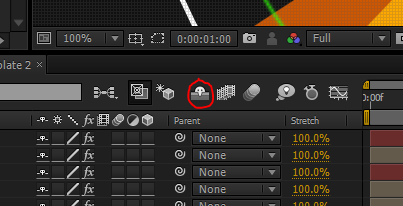
Hi, if you press the shy button in the timeline you will be able to edit every element of the template. The template was made for people that have a basic knowledge in after effects.
Yes, but in my case I had to make a 15 bar graph, but I have only 12…with value from 0 to 1000.
How I can set the range of the bar?
I have more than basic knowledge of after effects, but I think there’s some limitation that we should note before…at the moment they take this licensed template but i don’t know how many times we can use it
I should make all the graph on my own and animate it…
Really appreciate the great work. I am trying to change the numbers on the left side of the bar graph so I can go over 100 and eliminate the negative numbers. Any way to adjust that in the template?
I’ll check the file and I’ll let you know. Thank for purchase it!
Thanks. It looks like everything is based on percentages. 100 is the top. I just assumed that would be adjustable.
Looking forward to your reply. This template is useless to me if this can’t be changed. It should probably be labeled more clearly.
Pay attention, in the comp of the bar graph that you want to edit, click the shy button https://4.bp.blogspot.com/-bioChFlHabI/T5lYcJ4gNAI/AAAAAAAAA3Q/0Om3fLP3Cnw/s1600/shy.PNG once you pressed all layers will be available to edit it.
To edit the sliders in the layer “Percent & Width Ctrl”, just go to the “Effect Control panel, double click over the nslide you want to edit and press reset to start from 0 to 100.
It still won’t let me move the zero to the bottom. The graph will always start in the middle of the field. Not sure this template would be useful for people who actually work with numbers for a living. Pretty disappointing.
Dear krizage, just select the layer called “Bar 01 (the one that has a star)” and drag it to the bottom to the comp, that all. If you have the knowledge in how to use After Effects you can modify every element of the template.
Thank you. Would recommend including that in the how to use material.
Thank you for your feedback 
Bought your inforgraphics and works great, however I’m struggling to change the colour of the bar chart grid and purple bar
Hi, thank for your purchase! To change the color of the grid just unhide all layers pressing the “shy” button then find the layer called “Base Line”, select it and change the color. The purple color bar belong to the layer called “Month Bar”, select it and change the color too.
On the Ring chart option, how do I remove the white lines under the percentage?
In the timeline there’s a layer called “Line 01” just hide it and that’s all.
Hey, might be a stupid question but is there anyway to change the font of the project, as in the figures generated by the expressions and sliders? I can only manage to change the regular text, thanks
hi, you can change all the fonts.
I just wanted to chime in and praise Doren for such great customer service ,prompt communication and great product.
Thank you for helping me figure out the issue I was having…
Julian
Sorry Doren but I’ve got the same problem, the link isn’t working, I’ve a 403 error
Ok sorry I didn’t view the last link and it works. well i will try this
Hi Doren, i have purchased your cool template but I cannot download the fonts. Can you help me?
Hey Doren – I just purchased the template, but ran into the same problem trying to download the fonts. I tried the links you posted a few days ago, but I also get the error message. Can you help me obtain the fonts?
Looking forward to using the template – looks great!
send me your email via my profile to give you the links.
now the link are working http://goo.gl/Lyoa5N
I too get the same error for the font in spanish. translated the error is : “access is denied for security”
here is the link http://goo.gl/2sTh21
Just purchased, but the fonts link isnt working for me. Anywhere else I can get the fonts from?
the link is working
Very nice
Good job!!
Just nice, very useful work! Wish you more many sales
I have a problem when trying to edit the point chart. How can i keep 3 months instead all 12, without messing it all up? When I start erasing the points (months) i dont want, a pop up says: “After Effects Warning: Bad argument: couldnt find effect named ‘FEB’ Expresion disabled. Error ocurred at line 1. Comp: ‘Points Chart 01’ Layer: 22 (‘FEBRUARY’) Property: ‘Position’ “
And then a new point appears, that I cant edit, delete, move, or even undo….
Is it even possible to work this point chart with just 3 months? or should I stop searching how to do it and buy another template that works?
Thnx.
Hi, send me an email to try to help you. If you erase “points” you cuts the “expression” link added on the layers to make the effects and you’ll have to re-do it the expression manually.
Very great project!
Thanks 
Awesome details!!
Very cool project: colors, effects and all!