146 comments found.

Hello, I have this product.
I have a question please  How can I extract the video as you did in your presentation ?
https://previews.customer.envatousercontent.com/h264-video-previews/220e7ed3-938d-4a08-8cf2-7050d57f7b3e/13318109.mp4 .
from 8 to 47 second
where do you buy the plugin ‘Element 3D v2’
VIDEOCOPILOT.NET
thank you for your reply
you are welcome
Hello, What is the time limit for video duration.I want to create video for 1 hour or long. Can we extend the the duration, if yes how?
there is no time limit
Good morning. Days ago, I bought your “3D Virtual Studio” template. Install the pluying “Element 3D V2”. Everything opens well but the study does not appear, everything is black. I’ve been looking for solutions, but they don’t work. I need your help. I await your response as soon as possible. Do all the solutions that are in the other comments and it doesn’t work.
tecnologypak@gmail.com my email
this template is not working plz help me send me original file
problem is solved
This project doesn’t work. There are missing files and 3d scene doesn’t setup correctly. Please Help Me
how to install this plugin ELEMENT 3D
You can find it here videocopilot.net
hello do i have to pay any pligin ‘element 3d’ on this videocopilot.net site and install it for it to work?
About that plugin, all information is on this site videocopilot.net
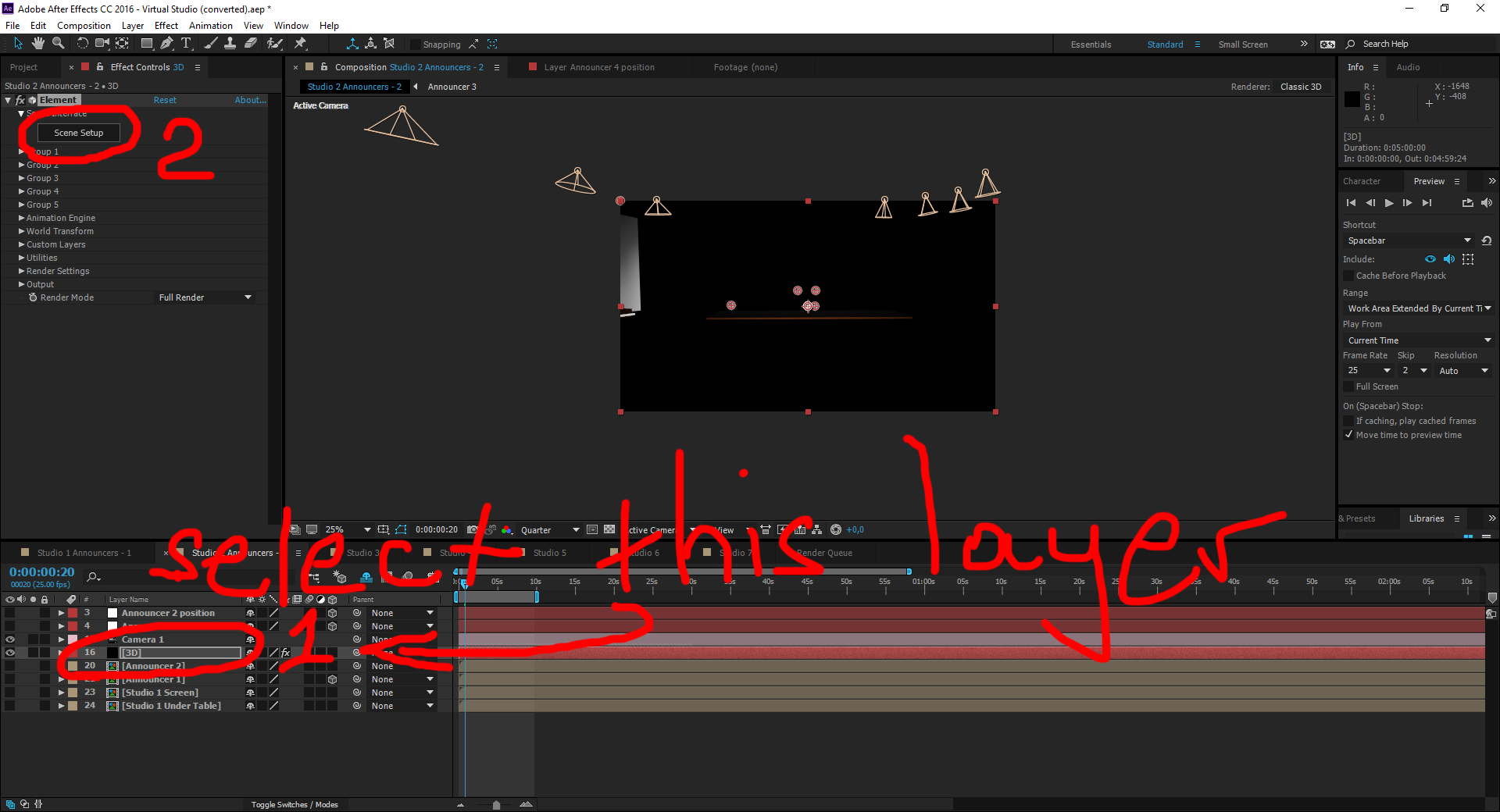
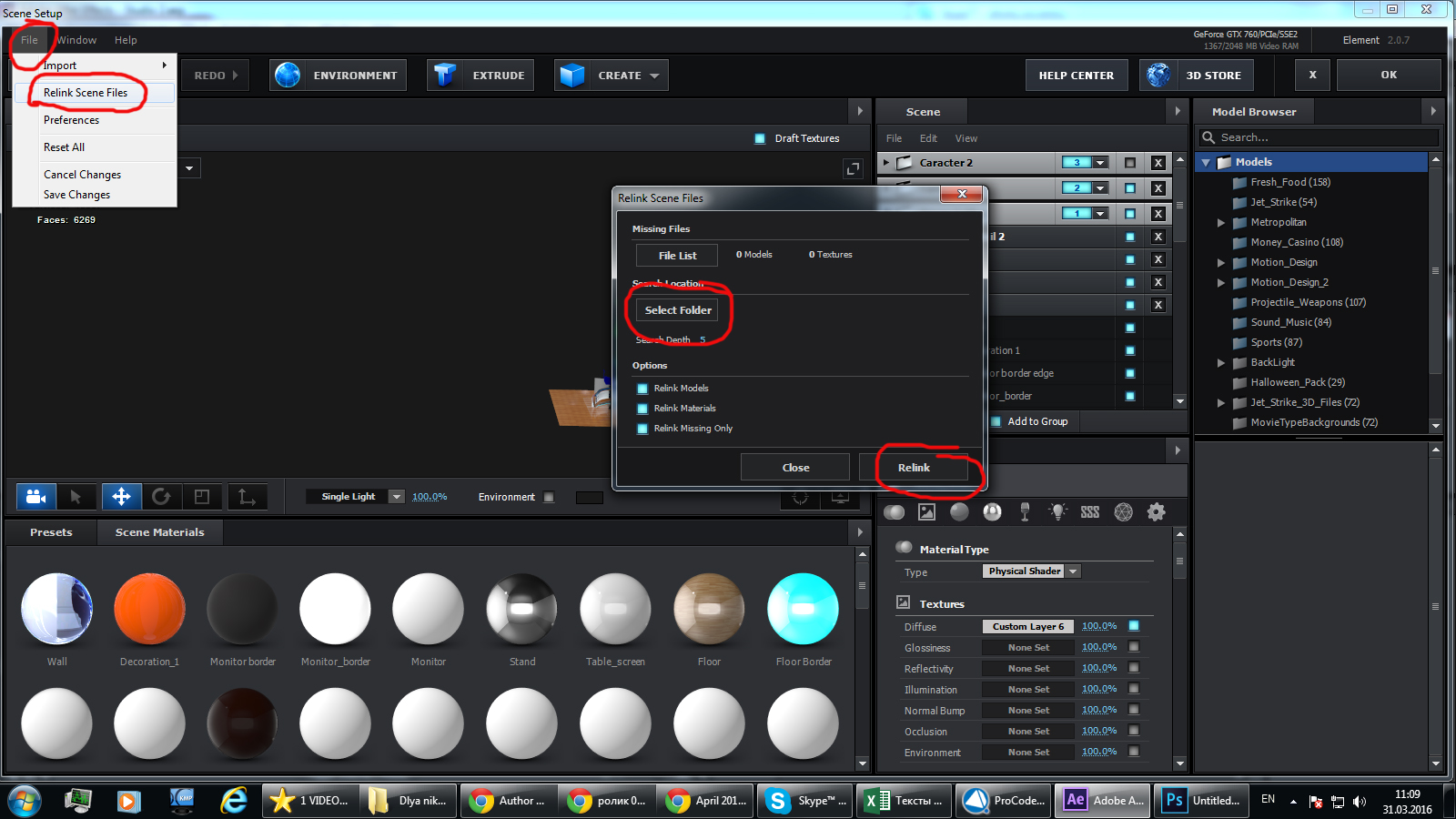
I purchased this studio but all of my files are black. I have Element installed, I linked all of the 3D files as instructed in the tutorial and through screenshots provided here, yet all of the screen materials are still black. I really need to turn a project around quickly so can you please help?
can you send me screenshots of your problem? aku6@inbox.ru
I bought it for $ 24. If I use it in all the videos on YouTube, you will not give me a copy, it will not be a problem.
It is better to buy extended license
When I open it on my mac everything is black, I have 3D elements and everything. please help me out my email is mheiranas@gmail.com
hi i need help with filming the announcer everything i cant get the hands to be on the table ?? any specification when we film the announcer in studio ?? angle ?? height ?
can you send me screenshots?
how i send ?
Move actor up. There must null object. Move it up. You can not put your hands to the table. because it is 2D video. You can keep your hands above table
There is no option to change the Side Wall Logo and Slogan in Studio 2 Announcer 2 Scene. How can we do it?
change text in composition. Watch tutorial
When i put my My chroma video of announcer in announcer1, it is visible in in draft mode, but when i turned on Full Render, the scene gets full render but the announcer gets black. What should i do? Please help
maybe you have problems with your videocard?
I am having trouble loading my project properly. I did have just a black screen but after following the directions you have to someone else, I followed your instructions to relink my files and some of the images popped up in scene setup…but not most of them. There are some items labeled in red so is that the problem? If so, how do I fix it? I e-mailed two screen shots to you.
Thank you, Chevy
You did not relink all files. Try like this http://images.vfl.ru/ii/1539205128/4a04fe20/23739119.jpg http://images.vfl.ru/ii/1539205128/3b4b1e07/23739120.jpg
Hi, Thank you but I tried that to but it is still not coming up and many elements are red as you can see in my screen shot.
When I click File>Relink Scene Files the Relink Files window does not pop up…
Maybe you have some problem with your plugin? Window shoyld pop up. Red elements means files are not re linked
My 3D Element plug in is fine. The window pops up the first time and relinks some files, but not all of them. I cannot get the window to pop up again.
I think I got it. In the scene set up it gives you a choice to locate files so I just clicked it and went to my folders in Virtual Studios and added each folder.
Thanks for your help!!
One more question…You had a tutorial I saw before but I cannot find it. Can you send me the link? Thank you.
Tutorial is in the archive which you’ve downloaded
Please Help. I converted to CC and I have no textures. No bricks, no wood, etc. What can I do?
Many thanks for the nice studio set-up, the composition “Studio 2 Announcers – 2” renders as expected. Great!
However in your demo video around 34 sec you have a city view showing through a window surrounded by dark brown curtains. In my case an out-of-the-box render of comp “Studio 6” results in a view with no materials/textures applied to the 3D model apparently showing the window opening. Do you have any tips for fixing that? And is the model/texture for the brown curtain also included in your package?
These are minor issues though and may be due to the fact that I am a relatively inexperienced AE user.
Answering my own question: I had to relink the missing files once again and everything worked perfectly. Somehow I overlooked the relinking process after having done it for one composition. I thought I was done once and for all. I could have missed something, but the lesson learned: if the scene is missing textures/stuff, relink the files, it may solve the problem.
Great
THIS PROJECT IS NOT WORKING
Send me screenshots of your problem aku6@inbox.ru