114 comments found.

Can I use this bundle on a pictures, instead of video footage? Thank you!
I mean pictures, added of course in Premiere Pro
Hey, of course! All the assets can be applied to photos/images just right same way like video. Hope it helps. Thank you.
Thank you very much for your fast answer! Wish you happy holidays!
Hey, thank you very much! Happy holidays and Happy New Year to you!
Hi I have purchased the product but When I try to use it on my footage all the things are substituting my stuff I cant be seen at all. It doesn overlaying As I expected. How can I change that? I understood that is just drag and drop. Can you help me?
Hey, thank you for purchase! Please, send me to daniel83@list.ru more info about your problem: what exactly mean your stuff cant be seen, may be some screenshot of workspace from Premiere Pro with this issue? Thank you.
Hi,
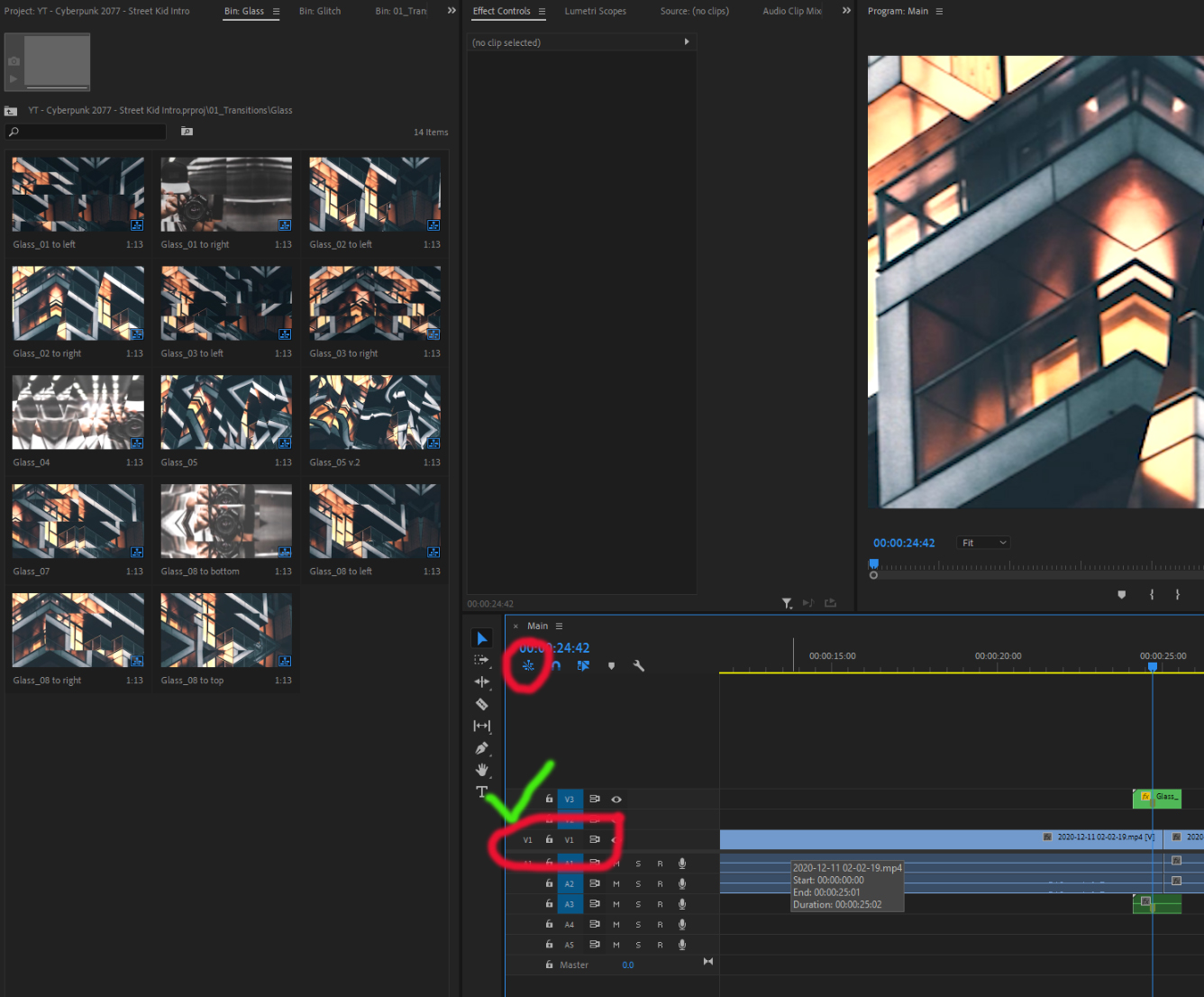
I purchased your transition pack. Love it. Only problem I have is after I unclick the V1 and make sure the nestled button is in White, whenever I apply a transition, after I render the file, it shows the place holder images in your samples, rather than using the video footage from my project. Please help. Thanks!
Hey, thank you very much for purchase! When you see this – just check out V1 track again, turn it off and you’re done. Hope it helps. Thank you.
I’m getting an error code everytime with the newest update. File is corrupted or outdate. Email: profusehabits@gmail.com using a mac. Would love some help here, love the product.
Hey, I just check it out — the files is not corrupted it is ok. But if it is on your machine — you can always re-download the archive again from your Videohive account. I see, you try to import the Pack`s file. Just try open it as a parallel project, not importing… Hope it helps.
The Glitch Bin II – is using the preview images when doing the transitions and not the footage. I do have the nested button set to white this time.
Hey, please, send me email to daniel83@list.ru about your problem with a screenshots – I`ll check it out closer. Thank you.
I downloaded this yesterday and when I try to use the transitions, I get only the preview in the timeline, it does not use my footage. https://cdn.discordapp.com/attachments/676930111324553296/787481870438760459/unknown.png
Also my Adobe Premiere is up to date at v14.7
Hope it helps. Thank you.
Lol, thanks for that. I forgot to do that ONE thing
So many transitions, titles and effects. If I use just one transition in a video then that’s it. I have to buy another license?
Hey, of course not) You can use the Pack for creating many videos, and regular license is ok for this. After all, this is an Package, it is just needed to create more than one video))) Thank you for your interest.
Thank you kindly for answering. Good to know.
when I use Luts my video is shaking can you tell me the reason please
Hey, thank you for purchase! Can you send me more info about your problem and may be some screenshots to daniel83@list.ru, please? Thank you.
will you have black friday sales?
Yes! It`s happening now) Thanks!
The latest update of this pack is AMAZING!!!! Period. If you edit videos in Premiere Pro, you NEED this pack. Seriously. Nice work DaniMult!!
loveandpeace.
Thank you very much, man. Appreciate your support.
hej, i dont know what happened…i cant work with this preset anymore, premiere is crashing all the time, when i tried to load this preset. I dont know how to update the preset, because i cant find an update link. how ia get the actual version? thanks for help..
Hey, first of all, you need to restart your computer, download the Pack again (the link is located in Downloads section in your account) and try it again. If you still have a problems – please, write me to daniel83@list.ru Thank you.
i will try it, thanks for fast response 
And if you have nvidia graphic card – there is a meaning to update video driver
Hi! I am really interested to purchase this product. But i have Premiere Pro CC 2018 and the version is 12.0. Will it work ?
Hey, thank you for your interest. You will need Premiere Pro CC 2018 v12.1 or above, so, you need to upgrade your PP, unfortunately. And if you`ll decide to download this Pack – don`t forget about coming soon big update (free for customers)! Thank you.
how can I get the prfpset to install the pluging into premiere pro
Hey, thank you for purchase! This product doesn`t required any istallations or activations. Just download it, unpack by any ZIP app and just open it as a parallel project in your Premiere Pro. Please, check it in first part of this short video tip: https://www.youtube.com/watch?v=bngEdwJuU8E&feature=youtu.be If you have a questions – please, feel free to write me an e-mail. Thank you.
Hola, compré el producto en Junio y hasta ahora no sé como usarlo, demasiados pasos. No es simple como está en el video y se demora demasiado en dar render. Solicito la devolución de mi dinero por el producto.
Buenas tardes, gracias por la compra. Quiero decirles que usar el producto es muy simple. Solo ábrelo en tu Premiere Pro como un proyecto paralelo. Apague la capa V1 y puede aplicar cualquier efecto. Si tiene preguntas sobre el uso, hágamelo a mí y le ayudo. Si desea hacer un reembolso, debe ponerse en contacto con el soporte de Envato, solo ellos resuelven problemas similares. Gracias
hi, 2 questions, fisrt i just see your photos in the transition ( I switch off V1 and nest) and then when I want to insert a transitions its say out of range secuence. hope you can help me, thanks
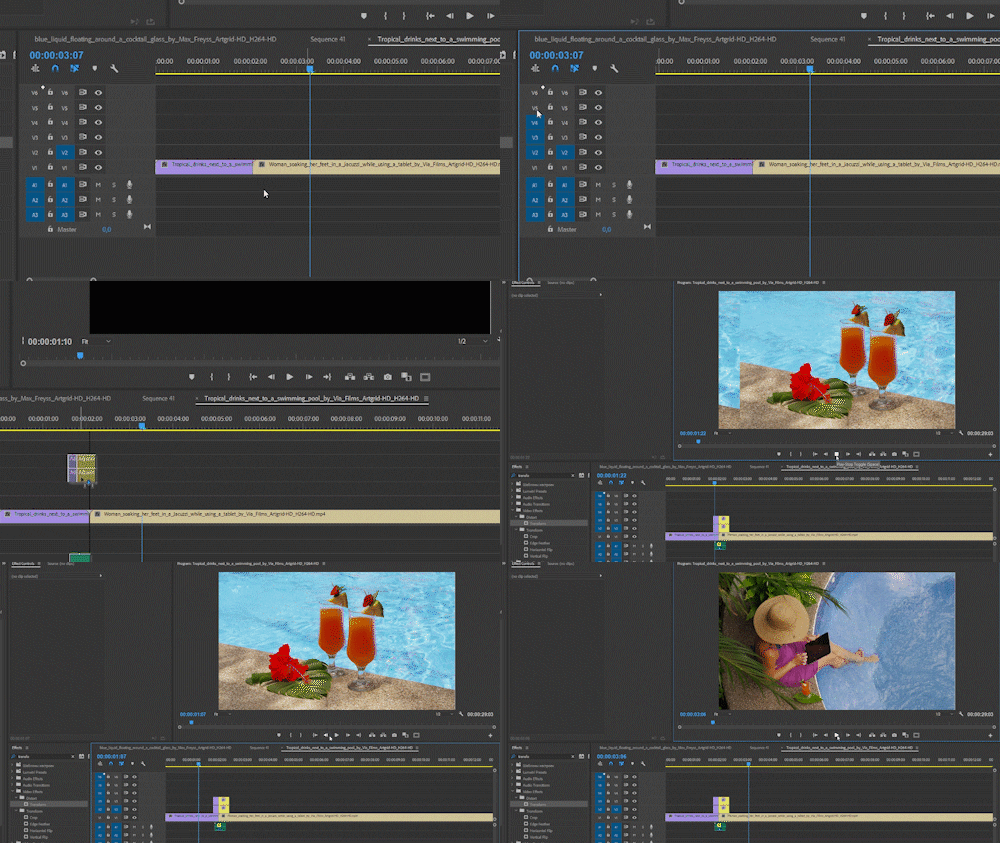
without content in sequence / out of range
Hi! Thank you very much for purchase! Yes, you did all right, but looks like you forgot to turn on all other layers (except V1) before work once. Please, check this gif, I showing it there: https://media.giphy.com/media/LrXHnM5hQyKCHSA0v5/giphy.gif Hope it helps! If you have a questions – please, feel free to write me on daniel83@list.ru. Thank you!
Every time I try to open the preset pack, it tells me that its been created by a previous version and then 1/2 way through the loading after i click “ok” it crashes the program. I tried all three and all three crashes. I am up to date running VER 14.3.1
Hey, I answered you on e-mail.
Hi, I’m working in the current version of Premiere 2020. for some reason, I can’t import the project resolution I need. If i open it dorectly it says it was created in an outdated version. I overwrote the old version with the newly converted file then try to import again and it still doesn’t work. Can you help ?
Hey, thank you for purchase! Dont worry, this is not a problem – open (not import) needed file in your Premiere Pro and when the program reports that the file was created in the previous version – just press OK and after autoresaving the file will open and you can work with Pack. If you still have a questions – please, write me to daniel83@list.ru. Thank you.
hey i love you product but for some reason every time I try to open my plug-ins it says media not found.
Hey, thank you very much for purchase! Missing files can be come for two simple reasons: you renamed or replaced some assets from Package folder or you try to open Pack files from zip archive. Please, re-download the Pack archive, extract it by any zip app and just open Pack file with needed resolution. Please, send me an e-mail if you still have a questions. Thank you.
I’ve turned V1 off, as well as the nest, and it’s still showing the preview images. How do I fix this? I watched the help video as well
Hey, thank you for purchase! Please, send me an screenshot of this to daniel83@list.ru. Thank you.
Sent it
Answered, please, check it
I was actually able to fix it myself. When opening the file, it wants to update since it was saved on a previous version. It will want to automatically re-save the file as the same name as the original file, however it will put a _1 at the end of the file name.
You have to erase the _1, so when you update to the current version of premiere pro, it will have to overwrite the original file name which will give you a prompt stating that there is already a file with that same name. You just have to press okay, and let it overwrite the file.
Yes, that`s correct – if you have Premiere Pro newer than CC 2018 version – your Premiere Pro will automatically re-save the Package files to newer version and you can use it in normal mode. Thank you for your explanation.
When I put the package to premiere,they show me “Missing medida” I try many times can you help me plz ASAP
Hey, thank yoy for purchase! You dont need to put it into Premiere Pro. Just unpack it from zip, go to “Project files” folder inside and just open a file with needed resolution as a parallel project in your Premiere Pro. Please, check short video tutorials in “Help folder” for more info. And you can write me e-mail for any questions. Thank you.
umm.. I got a new problem is when I use the transition the color looks wired..
Please, send me a some screenshots how does it looks like, please at daniel83@list.ru
Hi. I want to change the logo reveal with my logo, I’m going through the tutorial, but don’t see the files indicated. There are no logo files included.
Hey, thank you very much for purchase! Don`t worry, logo reveals are included. Just drag and drop a logo preset on timeline and replace logo by yours (by drag and drop on logo layer and pressing ALT button). Please, send me an e-mail for any help! Thank you.