

146 comments found.

Black Screen of Studio.
I purchased 3D virtual studio. I have installed Video Copilot v.2.2. I am using a MacBook Pro.
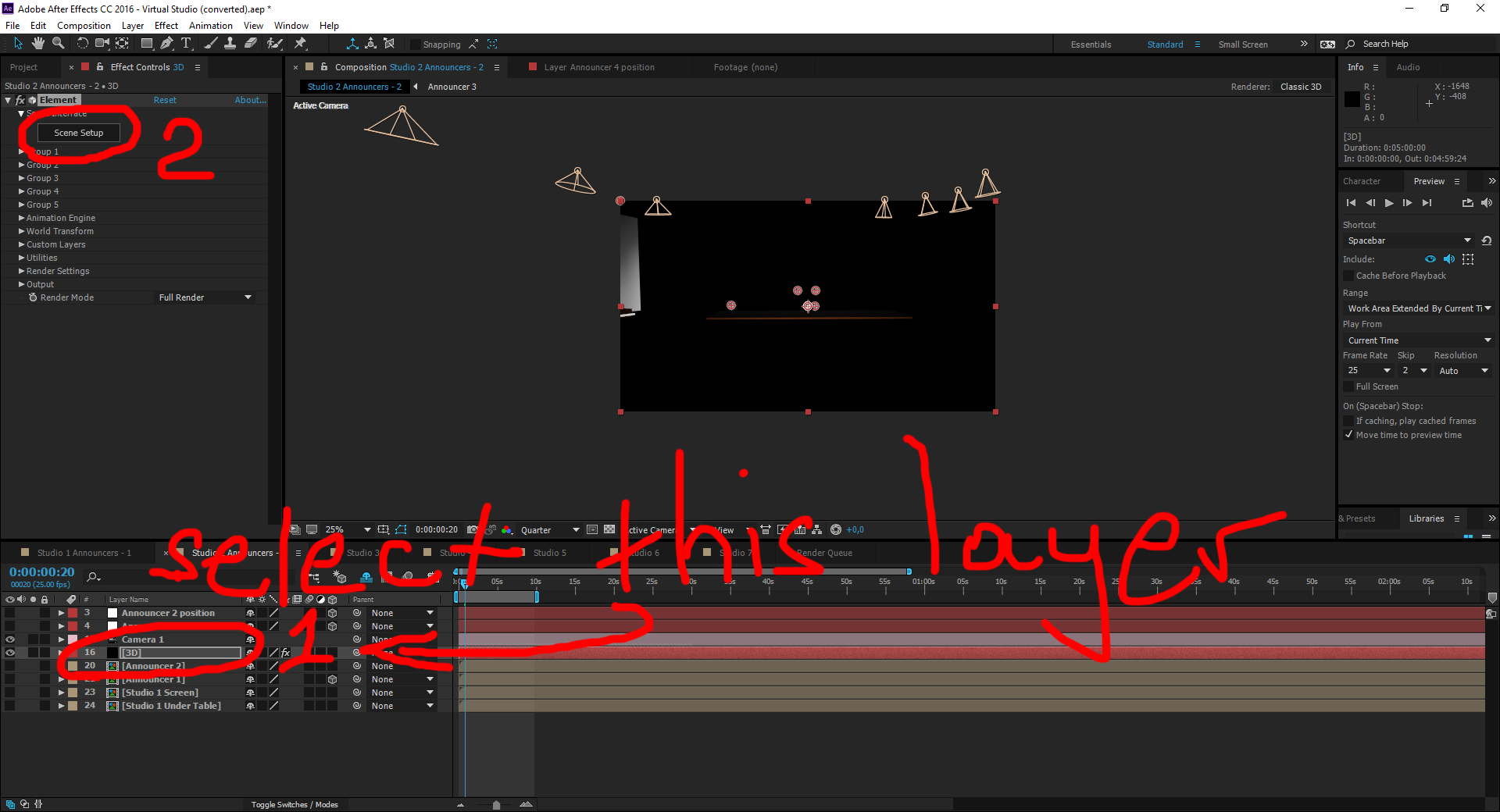
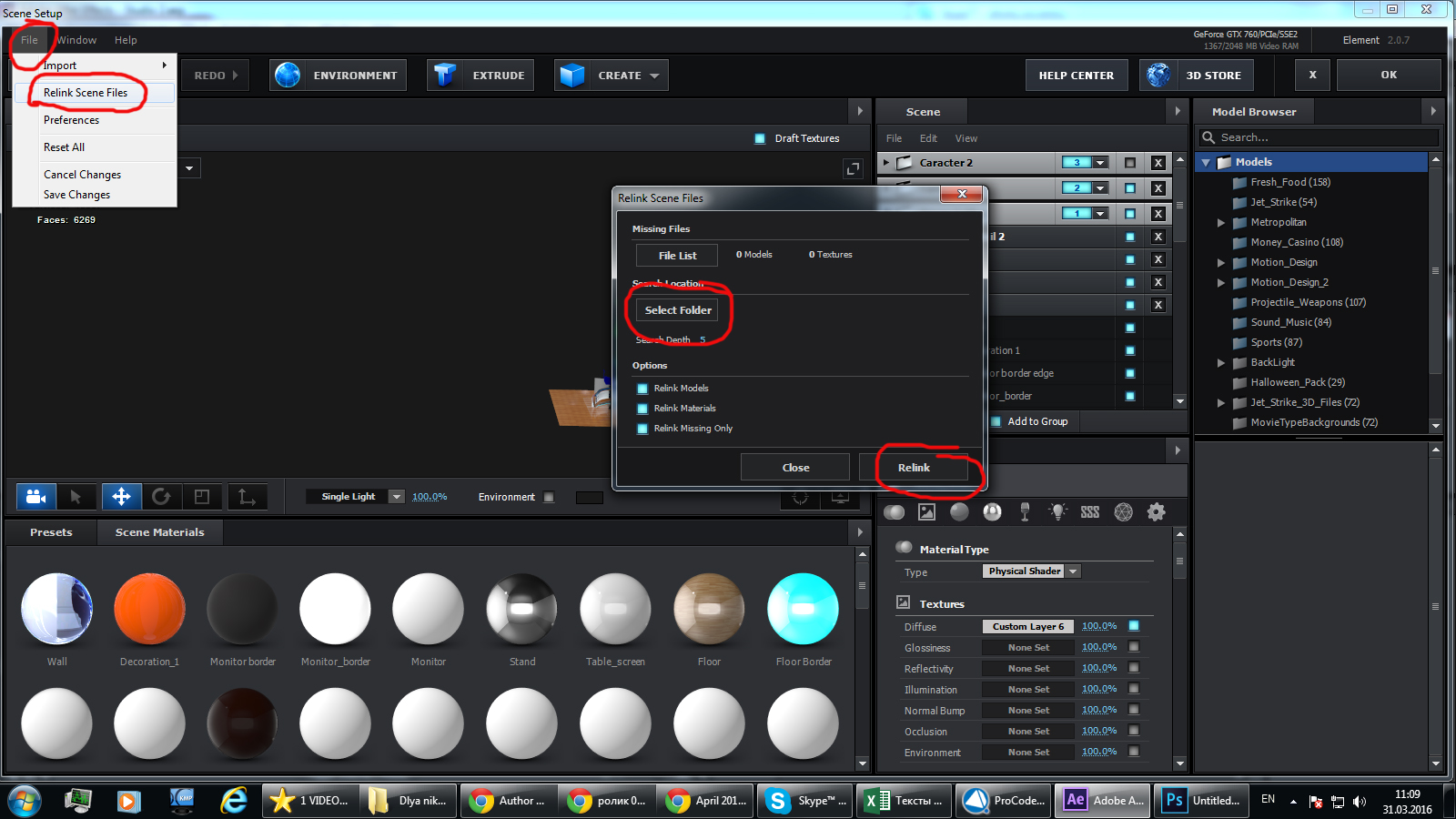
When I first open the project file, either (Virtual Studio) or (CS5.5), I got a “Keylight error” as it’s opening. When the project opens, the studio is black. It seems like all textures and backgrounds are missing. I have selected Video Copilot/element’ from ‘Effects and Presets’. 3D Layer Selected in Timeline, I clicked on ‘Scene Setup’. (As you’ve shown in other comments) I Select the path and do File/Relink Files. I select the path to Footages. Seems like it is working but I still get a black screen. I can see the studio in Video Copilot, but not in Aftereffects timeline.
I sent you an email from Scott@BrightWealthAcademy.com with Images. My account is under Scott@ScottMcLaine.com.
Love the studio design. Looking forward to getting it working. Thanks you kindly for your design and your help.
Scott
Hi, thank you and I love the studio!!
Here is a link to a video of the ‘Black Screen’ problem occurring: https://youtu.be/BJnDeu6BheY
Why you are adding new Element 3d plugin? (in your video 1:18 timeline) . Plugin is already applied to 3D layer. Watch tutorial attentively. In this layer must be only one plugin Element 3D, which already there. Edit that one
On your tutorial video at 29 seconds, after your relink files, the studio appears in the project window with all the images. My ‘Studio 1 Announcers -2’ is black when I follow these steps. How do I make the studio Appear?
BLACK SCREEN – Still Un Resolved … Please See Video …
https://youtu.be/KdtFM12BJBUAbsolutely amazing and simple to customize for beginners like myself. Keep in mind you will need Element 3d plugin to edit but once its installed and you relink the files within the plugin it works as easy as 123. Great job and most impressed with your design work
Thank you very much
Hi Altuha, I have the same error message (ask to be converted & and no. 1 about keylight) like theremnantmediaproduction from above EXCEPT no.2 the error for the missing effect. I have the plugin installed properly. Once clicked through and opened, the scenery is black-ish. can you kindly help. Best
Can you send me screenshot of your problem to here aku6@inbox.ru
Absolutely love this template. Trying to recreate the panning by the bookshelf Could you share the position / rotation points to re-create the scene as in the demo.
Thank you! Try just use camera. Move your camera
After effects: this project must be converted from version 11.0.2 (windows 64). the original file will be unchanged How do i fix this i am using AE CC please help
This is not problem. Just open it. Let it to be converted
hi i sorry for asking and i know your busy but is there a way or a link where you send that i can show me how make this file work on my AE CC.
1. after effects warning: effect control conversion required in effect “Keylight (1.2)”. Somme effect controls will be reset. To avoid silently resetting these same effect controls on all subsequently loaded projects, save this project and then quit & relaunch after effects. (25::0)
2. After Effects warning: This project contains a reference to a missing effect. Please install the following effect to restore this reference. “Element”
It says that you don’t have plugin ELEMENT 3D. In description it written that this projects works with plugin ELEMENT 3D. Please install it
hi im ame all off this people erro back screen and im install element 3d ans do like your pictur still black screen pleae need my refound
Can you send me screenshot of your problem to this email aku6@inbox.ru ?
I bought the unlimited suscription , but wont let me dowload this studio, it says i have to pay it
Maybe you bought with another account?
Hello, I’m having problems when opening projects. Its saying I have to convert from version 10, 33 files are missing from last saved and all images are black. Please Help
Email: dhudlin@ecisd.org
i was able to locate all files but I still have a black screen.
This is not this project. I think you are talking about this project https://videohive.net/item/virtual-studio-116/23377820
I have a problem! Every time I try to relink my After Effects freezes on saving screen.
Does your after effect and plugin Element 3d work well?
I want to ask you when project is short but footage which is long and I want to place the footage fit with project how to do.
you mean timeline is short?
not able to open missing element
we are not able to re link the files my email is bijo.cb@gmail.com
waiting for your replay
plz update
replayed
The studio is only visible when I generate the scene. In the editing area, everything is black.
Can anyone tell me if this product runs on Mac?
Never mind I see that it does
Has anyone else here found this product to be defective?
The download seems to have missing files and crashes AE CC repeatedly
I’ve sent you a couple of emails, I’d sure like to understand what happening with this software as it’s just giving me black images!!!
I am facing some problems. I got Element 3d 2.2 installed and AE 2019 cc. After I open the project, the lights does not work and everything appear dark. When I open the Element 3d window, appears a message: “effects that use camera or lights should be applied to 2d layers”.
Also, the message of “missing files” does not appears as show in the tutorial video.
I already did as instructed by you to “Jordongray” (pictures in http://images.vfl.ru/ii/1539205128/4a04fe20/23739119.jpg http://images.vfl.ru/ii/1539205128/3b4b1e07/23739120.jpg). I did relink inside the Element 3D window and saved the changes. But when I get back to the project it is all black.
Sent you an email. This is so frustrating.
answered to your email
hello good morning, sorry the trouble, I am interested in this project but before the purchase I have to ask for this information. I need only the scene with 2 commentators behind the desk, then I asked if I can replace both of these 2 commentators in chroma key and even if it is possible to make the scene last for an unlimited time (only the scene with both 2 commentators) and to be able to also replace the video behind on the screen. Not interested in moving the camera but only a fixed view with the 2 commentators both present Thank you, greetings cordiali and comoplimenti for the good work
Yes of course you can do If you know after effects well
When I open adobe after effects your product has a black background. I emailed and looking forward to hearing back from you



.)