65 comments found.

Hello, can you provide with the list of fonts used in this, every time the dialog box is poping up saying I don’t have the exact font.
In description you have it
Where do I find my purchase code?
Update: I Found It.
Hello Nitrozme, it really a bad experience to install your product.I had CS6 version but today I install CC2018 but when I try to AnimationStudioV2.0 it transfer me to Adobe extension and not allow me to install the preset.
I am not able to install the other montage library and action library
I managed, thanks.
Great!  Super useful item!
  GL!
GL! 
I have Mac – Adobe cc2019, when I double click on the install file I get the error message “There is no application set to open the document “AnimationStudioV2.0.zxp”. Can you walk me (and a few other I see here) through the setup process. It is obviously different than the process that you include with the tutorial file. Thank you!
I have searched the Adobe forums and found nothing for using that file in the new version After Effects.
I just had a chat with Adobe tech support and they said that Extension Manager is no longer supported for CC products. According to them, .zxp files can no longer be installed. Can you please update this so it can be used as shown. If not, then all your great work it is useless to me and Im sure many others using Adobe versions newer then 2015.
Hello! Use manual method to install it from nitrozme.com/help and it works fine
Hello, When I tried installing the Animation studio I received an error that said this error: https://snag.gy/z39K6F.jpg
For cs6 use import method or update your ae to cc2014.2 Check tutorials on nitrozme.com/help
If I use Adobe cc 2018 cloud version, will that solve the problem.
Yes
Purchased, trying to install on Mac OS 10.13.6 with AE CC 2018. Adobe Extension Manager keeps giving me the following error: Failed to install the extension ‘AnimationStudio’. Please make sure the manifest.xml of this extension is valid and the Extension Manager recognizes at least one product which the extension supports.
Please help!
also trying with aescripts + aeplugins zxp installer with no luck
Scratch that, figured it out… Manually Install Animation Studio Step 1. Rename file extension “Animation Studio.zxp” from ‘ZXP’ to ‘ZIP’
Step 2. Unpack resulting ZIP archive
Step 3. Copy resulting “Animation Studio” folder to the: Windows Directory: Program Files (x86)\Common Files\Adobe\CEP\extensions Mac Directory: Library/Application Support/Adobe/CEP/extensions
Also would it be possible to have updates that provide templates with more space to write text on? Thanks.
Yep we will make it
Hi, how does the update work? How do you get the update onto After Effects? Thanks.
To use update you need to re-download zip from video hive and install new .panel file.
Hi, can I get more detailed instructions please. I’ve downloaded the files again, and unzipped them. What do I do now? Which file do I do it with? I’ve tried going into After Effects, clicking on dashboard, then install pack, then the instagram library.panel file. But if I try to use a new preset it comes up with an error message. Thanks.
Hello! Pls contact us via profile page
Hello! Please update your ae to cc2014.2 or use this technique – https://www.youtube.com/watch?v=s8hPGxD7oGQ
Hello, I received an email with other instructions to install the Animation studio. Everyting went well and now I get this error after I successfully installed animation studio in after effects, when I try to use purchase code. I switched off the firewall and antivirus and still didn’t work.
https://snag.gy/8FpN4G.jpgPlease contact us via profile page and we will send you instructions
I just recorded my screen to show you that non of the installation nor the import is working for me. Please watch the video here https://drive.google.com/file/d/1myy9n3xvLa3Q5h98J4Be3isUA-EJY8G9/view?usp=sharing .I don’t want to wast time back and forth If this is not going to work for me
Please contact us via profile page to solve it
I contacted you via profile page. Do you know how long will it take to fix this issue?
hello! we already updated this package and make cs6 versions useful for you. now you can see _CS6.aep files, just re-download them
I received the update notification this morning, downloaded and installed but the issue still the same. Were there any new updates besides the one I downloaded few hours ago?
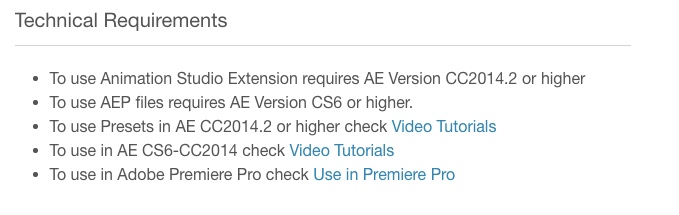
it was created for importing scheme. if you have cs6 you cant use panel because abode not allow this function. if you want to use panel please update your ae to cc2014.2 or use AEP files for CS6 version
I don’t want to upgrade ae. I already tried the import option as you the sample video showed but was not working properly. Please check the video I recorded for you for more details.
i dont see any videos on our email.
I don’t know if you are reading my comments but here is the same video I sent a day ago https://drive.google.com/file/d/1myy9n3xvLa3Q5h98J4Be3isUA-EJY8G9/view
Hello! You should import aep lie Beauty_CS6, we added them in latest update, check it
This is a repeat of the same comments. I don’t know if you reading my messages or you just copying and pasting here. In my previous comments I said I didn’t want to upgrade my ae, also tried following the steps to import but it is not working. I updated the software yesterday. Was there any new update today? I am behind schedule. I would appreciate if you can just reimburse.
Thanks
Man! Especially for you we added this AEP files, you should use them https://pp.userapi.com/c845417/v845417527/100ed2/GtrVvtSDYhc.jpg
I don’t want to use back door by using the files directly. I need to use the software I purchased as advertised. I cannot wait any longer. I recorded anohter video to show you the software still doesn’t work https://drive.google.com/file/d/1myy9n3xvLa3Q5h98J4Be3isUA-EJY8G9/view?usp=sharing . Please reimburse
Ahh Man! You should understand that it’s impossible to use panel in cs6 because adobe not allow it! We provide for cs6 users another way with importing aep, it’s not backdoor, this is only one way to use it in cs6.
I am not sure what you trying to convince me for something I don’t want. I purchase this so I can use as advertised. I don’t want to use ae. I want to use the software I purchased. Before purchasing I asked the question if this software was going with my mac and cs version I have. I was told yes it will work. I also looked at the version of cs it supports and confirmed my was on the list (cs6). It never said cs6 will support but if you don’t have this or that will not work. Here is a screenshot of the versions you advertise should support https://snag.gy/NfZ9SJ.jpg . At this point, I just need to get reimbursed. Thanks
There is no reasons to reimburse. Because: 1. This project works in CS6 and you can use it 2. Panel is just an additional thing for CC2014.2+ users 3. In description you have all links to videos how to use it in CS6 and before purchasing you can check it.
simple question. Can I use the software I purchase as you advertised?
This should have been clear from your description and not after you purchase. I will contact the support. Thank you
Is this for windows operating systems or can this be installed on mac? Also what version of after effect does it work with?
its can be installed on any system. AE since cs6
I just purchased it and wanted to install on my mac. I am getting all kind of error messages. Here is one of the error message https://snag.gy/eUuFiQ.jpg
Here is another error message https://snag.gy/zZ0qiY.jpg I am getting if I want to open the project files directly with AE. This should have supported from cs6 but asking me to upgrade my software? I don’t want to upgrade my software
I submitted few questions but have not received any answers yet. I need to be able to use the software and that is why I purchased. Please reply back with the fixes of my issues so I can using the software. thanks
Hello! Just check this video tutorial https://www.youtube.com/watch?v=s8hPGxD7oGQ
Hi, I just watched the video but didn’t answer the question I originally asked. I need to install the software I purchased but it is not allowing me. I gave you the error messages I am getting when I attemp to install which I gave you screenshots. This video only shows how to import but can’t even get to that point because it is not allowing me to install..
Hello! This tutorial have all instructions for you if you have CS6 version. The panel allows only for cc2014.2 but you can use imported version on cs6 or just update your after effects if you want to use panel
I don’t want to update my cs6 version but want to use the software I purchased otherwise will defeat the whole purpose of buying this software.
Then use import version
I am not sure if you are understanding my point. I don’t want to import. I want to use the software directly
very nice work..
is this one-time purchase or i have to purchase again and again for my further youtube projects?????
Its onetime
thnxxxxx
Cool work!
Very beautiful work! Good Luck for Sales!!!
Nice work!
блин короче можно удалять свой проект
prosti bratan
WOW  You Monster
Nice work.

Power Elite Author
Contact the Envato Market Help Team