48 comments found.

purchased 3D plugin , followed instructions – just abare screen with space background very dissapointing , have 24hrs to respond or will be posting negative review.
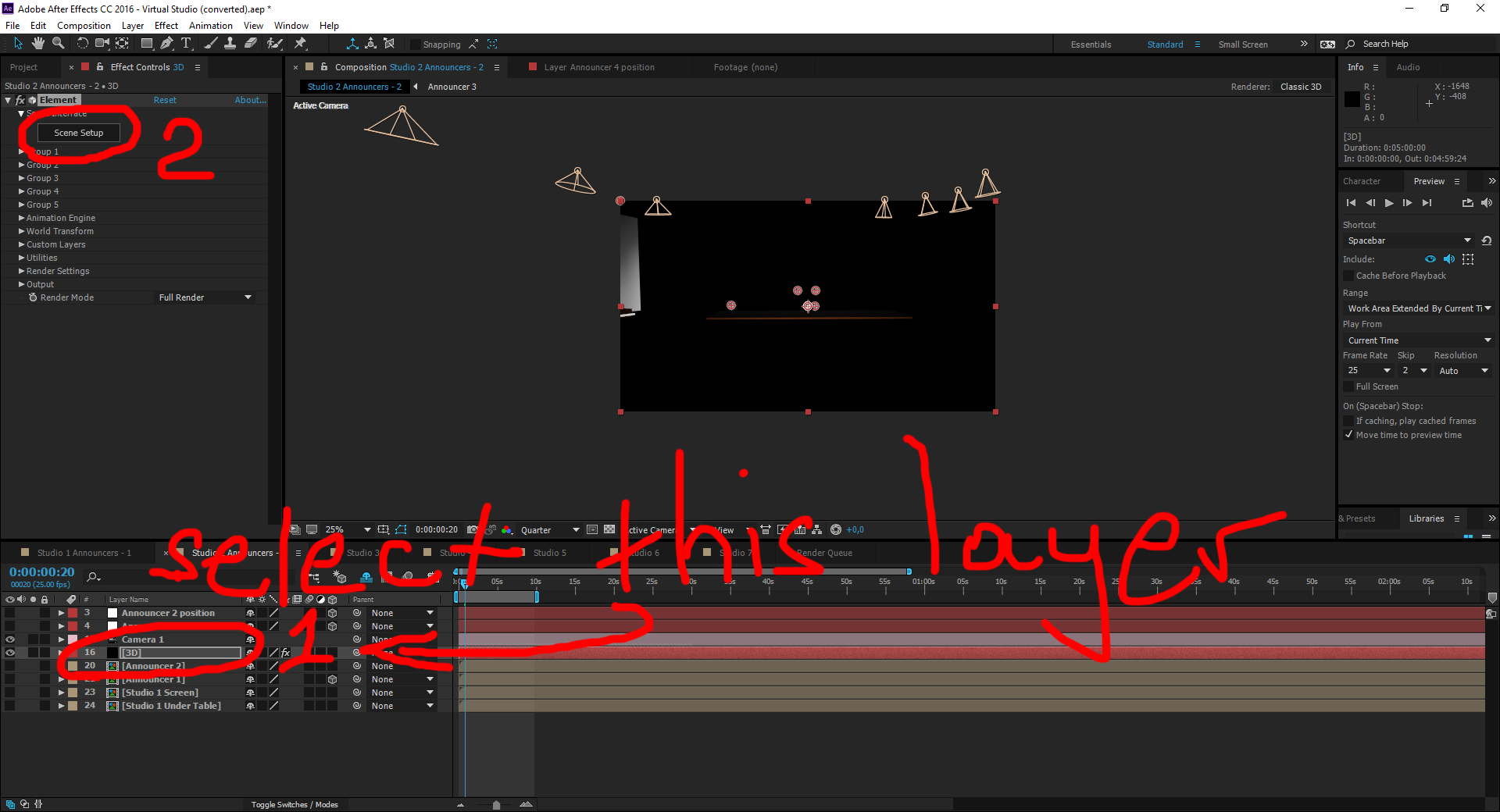
I tried using the 4 step instructions in the photos from above but I do not have a scene setup button to press for step number 2.
ok I found Elements under the effect tab. I press the scene set up button and the window comes up. I set the path to the footage folder but nothing come up on the main screen. All I have showing is the space background. Can you please send me a complete template so I don’t have to keep trying to make this work.
OK. After I set the path to the footage folder in the set up window the main scene will appear in the scene setup window but it will not show up on the main screen.
I finally got the main scene to show up on the main screen when I put the Output Render mode in Unified. (located in Element Effects control panel). People buy these templates because they don’t have a comprehensive understanding of After Effects. You need to be more thorough in the completion and delivery of your final product so your customers don’t get frustrated and waste their time.
I’ve figured most of it out. How do you change the background? There is no place holder for it.
Hi. Which background you mean?
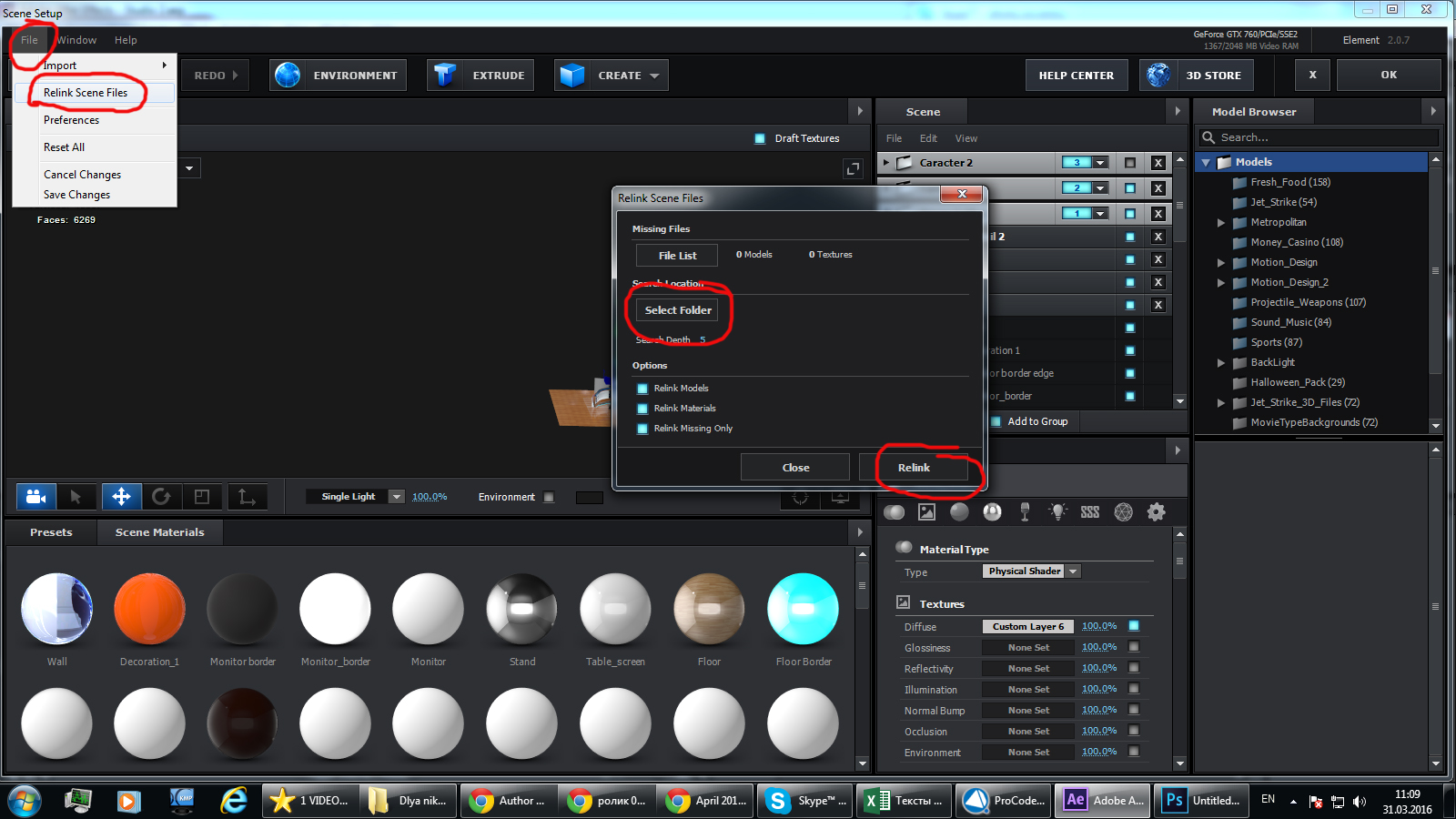
I just purchased this template. I have Element 3D V2. I have an iMac. The relink window does not appear when I open the template. Please send instructions on how to relink.
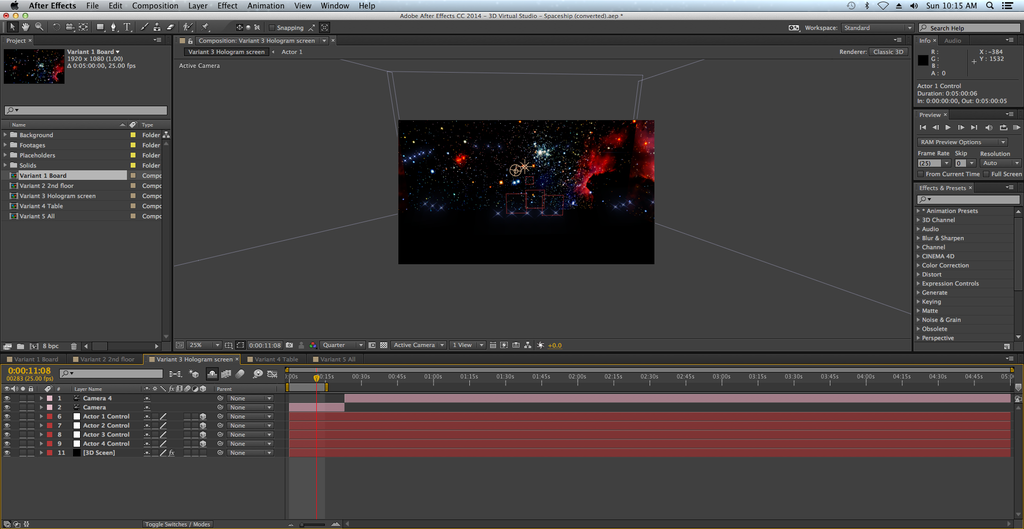
Altuha i am having the same issues and Keven here is the screen shot http://i1221.photobucket.com/albums/dd468/LegendsofRoadal/Screen%20Shot%202016-04-24%20at%2010.15.42%20AM.png
My email is GoldBlum12@gmail.comAltuha I meant to write that I am having the same issues like Keven. Here is the Screen Shot …http://i1221.photobucket.com/albums/dd468/LegendsofRoadal/Screen%20Shot%202016-04-24%20at%2010.15.42%20AM.png and I sent you an email. Thank you, Altuha
Hi. Do like in the picture, that I have sent you before
Ok, Thank You Altuha so much – I just figured out a little more from the screen shot and I am allready seeing more of the 3D spaceship coming together. I will go back to my Adobe After Effects Class to learn more to put this all together…
Hello Altuha, I bought the 3D – Virtual Spaceship about 2 years ago. I did not have your contact until just now. So I bought the Spaceship and now it says I need the plugin element 3D v2 so I go to get the plugin and i looks like I have to pay another $41. How do I get the plugin. and Does this not on a Mac? My email is GoldBlum12@gmail.com
Ok I got the plugin but how do I put it all together. I have Adobe After Affects , the plugin and I am so confused on how to put all these pieces together. Again my Email is GoldBlum12@gmail.com
Did you install the plugin?
Yes. I have the Adobe After Affects installed and the Plugin – Elementinstaller.app
Here is a screen shoot of the installer: https://imagizer.imageshack.com/img922/3220/mjWPyJ.png
Now I just need to get the Registration done and trying to follow you instructions you gave jaredcampbell2003 which is 12 Comments Up .
This is the Registration I guess its for Adobe After Affects. This is what it looks like: https://imagizer.imageshack.com/img924/2955/HT3qaQ.png
I can’t see this images.
Generally I don’t teach how to install plugin. If you have question about the project, I can answer
Hi Altuha, I emailed you and I have a screenshot showing that when I clicked on missing files – nothing happens. No Relink anywhere. I the center console is the sky and in the front, I see the group of lights that would be on the wall in the very front. 3lights – 5 lights – 3 lights then 2 lights on the right side near the steps. What do I need to do to get everything to come up on the center console?
Please. Firstly learn how to work with After Effects
Yes Altuha. Thank You Sir. You are so right. I didn’t realize that After Effects is so much to learn so I found an Outstanding Course for only $17 and it is very intense. 40+Sections – Over 440 Videos that are around 2 – 5 minutes long. The instructor says he is the Best that teaches After Effects. Thank You again Altuha. You noticed right away that I was not familar at all with After Effects and Thank You for suggesting that I learn it. It will make a world of difference and I will be able to do so much. Not only with Spaceship Laboratory, but with other projects. I would highly recommend this course by Louay Zambarakji https://www.udemy.com/course/adobe-after-effects-2017-essential-motion-graphics-training/ it only $17.
Thank you too. Good luck
Hi Altuha – I am using a Mac. It looks like After Effects wants to convert my plugin or something to windows version Is that normal or does that sound like something I did is wrong. I know you don’t give instruction on how to do it but this info might help.
It is normal
please help. i’m having the same problem as everyone else here. martie.lopez@gmail.com
Hi. You have to install plugin Element 3D. You don.t have this plugin. In description it is written that, this project works with plugin Element 3D
Argh! Is there a free version of the plug in or any way around it? I didn’t realize I need it a plug in.
Plugin is here videocopilot.net
I bought the plug in, installed it and relinked all files. Any other suggestions?
that’s all
hello. I too have a blank black screen when i open AE. it says i’m missing the “element” effect. Where do i find this?
Hi. You have to install plugin Element 3D. You don.t have this plugin. In description it is written that, this project works with plugin Element 3D
I have the same issue as just about everyone else with linking the additional files. watched the video but Ae is now an updated version from when the video was prepared. Have sent email but got no response. Perhaps post response on here to help other future buyers. Help Please
how can i contact you ? i tried to contact you using skype but u didnt respond
Hi! I am having the same problem. I am in AE 2018 on Mac and it’s not working. I just get the background images in AE and elements doesn’t ask for files when I open it. Please help.
Ronjamesfilm@gmail.comHello,
Please help me quickly!
This is not working.
I can only see a photo of the space but nothing else.
I am using After Effects ‘5.5’
Thanks in advance,
Daniel.
Hi. What is you email address?
I have not received anything…
Did you receive?
Hello, I have the same problem. Am using AE2018 and Elements 3D 2.2. I just see a space background with marker shapes on and no option to relink files. Have tried Dependencies->Find missing footage but this does not work. Please could you urgently send the answer here or email to will@perform.org.uk
I have worked this out to save everybody else with the same problem. What you do is: For each Variant 1-5 1) Click on the 3D Screen layer bottom left of AE 2) Click on ‘Scene Setup’ button under ‘Scene Interface’ in the top left project settings 3) In the Elements 3d popup, go to File->Relink scene files 4) Click ‘Add path’ and add the paths of the models AND the textures 5) Click OK 6) Click OK on the Elements 3D popup Repeat for all variants. I hope this is helpful to people.
Great
please send how to fix to steve@zenamps.com. Same problem as everyone else, how to re-link files. Comes up with only space background.
answered
Hi Altuha’ how can I get the main screen to stop turning, is it a way to make the back ground just sit still, I’m not talking about the place holders and hologram they are fine the background constantly moves.
Can you send screenshots of your problem to my email? aku6@inbox.ru
Hi. I used your project file in this, starting at 1:55. Thanks!!! I will update the description this week to include VH links. 
Check out the video. I am using project files in a completely different way…..
Cool. I like it. Great job
Hello, I bought your project just like everybody else on this site. It does not work. I would have thought with all these people telling you that it does not provide a Relinking of files as you claim in your tutorial you would have fixed it by now and posted an update. I want to know how to fix this published HERE on this forum and not through some private email so that others who buy your project dont have to go through this. Otherwise I am going to request my money back from Videohive and formally complain about you selling a broken project.
Hi. Projects works very well, just some people have different version of Element 3D. We learnt about it later. We will update tutorial as soon as possible. We would like to post a picture that show how to re link files but it is impossible to post a picture here. So right now we are sending files to email. But we promise we will update tutorial as soon as possible
Send files to gmjintl@hotmail.com
sent
Dear Altuha, I purchased your model about a year ago and I could not get it to work, did not get the “relink files” option when I first open it, just the space background, a few first floor lights show up but everything else is black. I gave up in frustration. I am back to try this again but running into the same brick wall trying to get it to work. Can you please help me find a way to re-link the missing files? It is a cool model but so far has been a waste of time, money and energy. Thanks.
I have a PC workstation, MSI x99A Raider mother board, 128gRAM, two 1080ti video cards, 3.7ghz clock speed. I have the 2018 version of After Affects that just updated about a week ago. Hope that helps.
My email is customerservice@charlesriverpress.com
All of the models and textures are in the folders, just can’t link them to the project. Hmm…
The actor controls show up, too, along with the space background and various light bulbs you placed on the railings, stairway and so forth, Just no models or other textures. Thanks.
Hi. answered to your email
Phenomenal project. Easily the best of its type anywhere on VH. Thanks!
Thank you very much