41 comments found.

It is great, but if you add more text animations it will be the best!
Thank you eraybozkurt, I’m glad you like it. I’ll add more animations in next version.
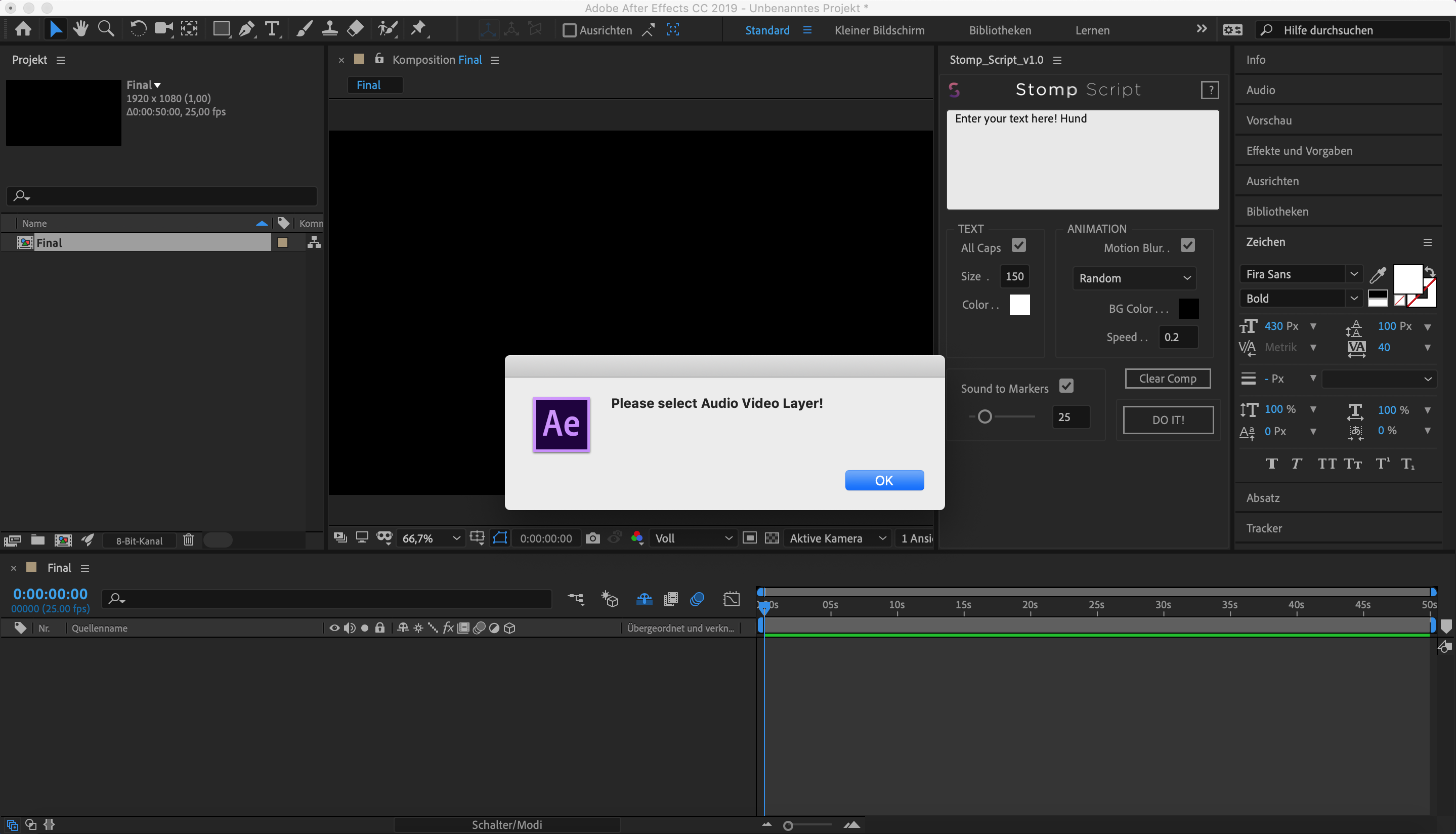
Hi, the plugin doesn’t work for me. Script error “Please select Audio Video Layer! Screenshot: http://video.funke-grafik.de/error-stomp-script.png
Hi FunkeGrafik, uncheck the “Sound to Markers” checkbox if you don’t use the audio for your text.
hi ! I have already bought your product and thx for this very nice jod. just a question… it will be update in 2019 with more option ? 
Thank you Ador, I’m glad you like it! I’m currently working on other projects, but sure I’m planning to add more animations to it. Thanks!
Any plans to update the script for CC 2019? I think it would be good to include in the description above that the user needs to change settings, until the script has been updated.
Thank you JetpackGraphics, I’ve done that…
mmm… problem with AE 2019. Here the message: “this project contains expression errors..” I followed the tutorial and tried out different functions,, but nothing.
Any ideas? Can I send you one screenshot?
Hi Artlandis, Go to File/Project Settings… and click on the last tab “Expressions” Then change the Expressions Engine to “Legacy Extendscript”
Thankyou!!!!! Everything works fine! :)))
can I use this on a transparent background?
Sure, just press the shy button and turn off background layer, it’s the last layer named “Background” and it’s green.
Nice idea! Good luck for you sales! 
Thank you drev0. Glad you like it!
Hello, when I make a text it has a error: Syntaxerror…expression disable, and It is not working. Can you help me, please? Thanks
Hi raulalmendros, can you please send me a print screen of your text on video.code@yahoo.com Thanks
Thank for all!!!! Now everything is alright.
Hi! I’m really interested in buying your product, but I’m wondering if it works with a voice only .mp3? I’m working towards a personal project about “close captioning” some audio files (like interviews/poems) and your script looks promising!
Hi Tzotzgt, the Sound to markers option will work the best with music with beats. But you can create the text with script and easily arrange it by moving markers. You can finish it very fast. Thanks
hi! can i use phrases and not just single words for the animation? (mixed up i mean). Like using 2 or 3 words to show up as a phrase (because the example only shows one word at a time). Thank you!
Sure marcelosmack, when you enter ”|” between your words it will connect it. For example: “Stomp |Script” = Stomp Script. In video preview you have an example at 0:52. “Sound |To |Markers” will give you “Sound To Markers”. If you have any more questions feel free to ask. Thanks
What is the name of the music in the video?
Hi bin7404, you can find links of all 4 tracks at the end of description.
buy Stomp Script, but none of the animations work, example ZOOM, RANDOM, none. Use AF CC 2018. You could help me.
PS: it would also be useful in the future if the option of RANDOM, also would be TYPOGRAPHY; Font size and BACKROUND
Hi Javier, can you please send me screen soot to video.code@yahoo.com Thanks
I’ve moved my comp markers to the exact spots I want, but need to change a few words and subtract one. Is there a way to update the current comps instead of resetting everything? Or if I want to change everything to all Caps?
Hi Lab, thank you for your suggestions, I will add those options in a next version.
-
Hi, just press the shy button in your composition and then delete the background layer. This is a screen shoot: https://imgur.com/SiI8ZCg
Looks great and will buy very soon. I also want the name of the audio clip that you are using in the demo. Can you provide?
Hi Charmedlife, I’m glad you like it. I’ve updated description. You can find names of audio clips there. Thanks
One of the best purchases I’ve done so far! This script makes my process 100x faster. If you hesitate to buy it JUST DO IT, it’s worth the price. Nice work video-code 
Thank you so much Film-Frame for the great review. I’m glad you like it.
Hello! I can not install in AE 2018, the file extension is JSXBIN and does not run. I strictly followed the tutorial and nothing.
Hi jeansestrem, check if you copy the script in “ScriptUI Panel” folder not in “Scripts” folder. If you still have problem feel free to email me on video.code@yahoo.com.
Yes I installed as directed by the tutorial attached to the package. My computer is Apple Mac Pro. Within the “ScriptUI Panel” folder the files have jsx extension and the package file is jsxbin. Maybe it’s this, even though I’m getting it for mac it came to windows.
Hi jeansestrem, the script is working on windows and mac. Can you please send me your email or you can email me so I can send you the jsxbin file saved as jsx? Maybe that will fix the problem. Thanks
hi there! how do i put 2 (or more?) words in 1 line? or is it 1 word always only?
Hi kalteis, It’s very easy, just type ”|” between words you want to be together. That’s key above the Enter button. For example: word |word You can find this example in video tutorial in your project files. If you have any more questions feel free to ask. Thanks
thanks for the fast reply. your script is SO god damn handy in this current project, seriously, thank you! rating now.
Thank you kalteis, this is the best recommendation for the script. I’m glad you like it.
Hola como estas, sound to makers en AE CC18 NO FUNCIONA!!
Hi Daniel, check video tutorial so you can see how to fine tune the Sound to Markers slider. If you have any more questions feel free to ask me on video.code@yahoo.com Thanks
After Effects CC 2018 doesn’t work…
Hi Tokiwa, Can you please send me the screen shot on video.code@yahoo.com so I can help you.
my fault!
OK Tokiwa, feel free to rate it if you like it.