114 comments found.

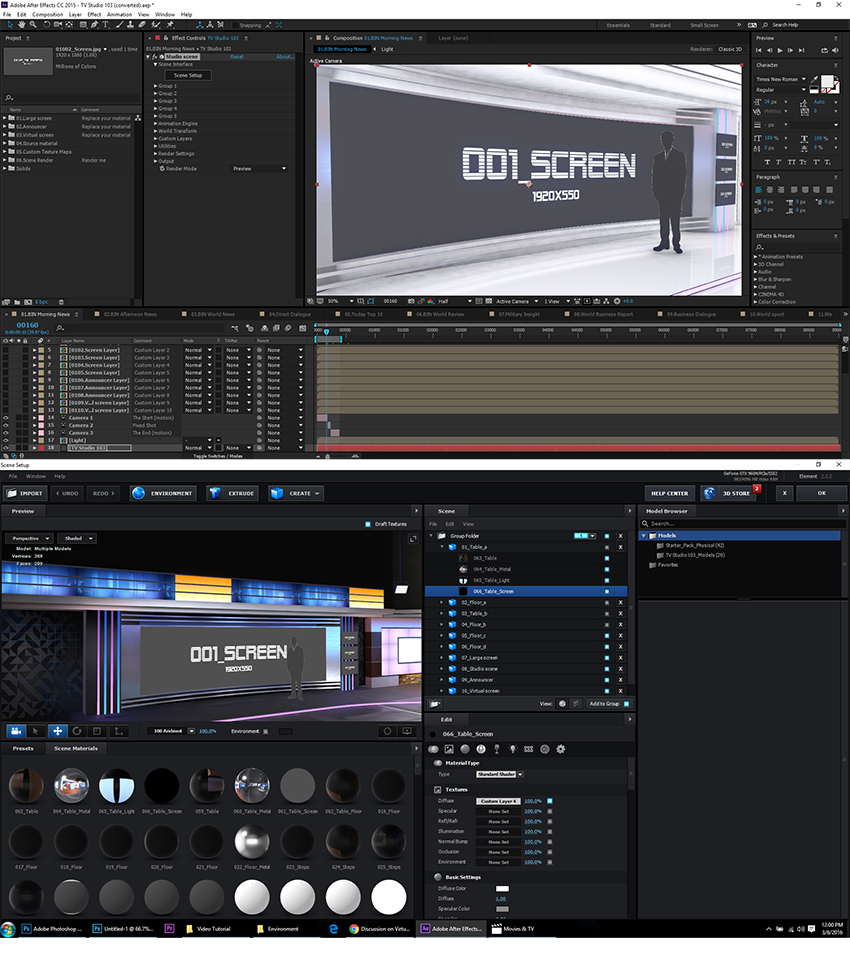
Hello, when i click on scene setup i see this http://imgur.com/3RwE9t7 announcers and screens are color white but i when i go back to after effects everything is there (no white colors) my email is halovelazquez619@hotmail.com
Hi, I have to reply to your mail.
Hi, Great plugin! However we are facing some issues regarding lightning and or reflection. For some reason, when a reflection (on the floor) hits the end of the frame it starts to flicker and it seems to disappear completely when the reflection is out of frame (while there should still be some light visible) It looks like it only renders the reflections when visible in frame, but as soon as it’s out of frame it immediately disappears…
Hi, I have to reply to your mail!
Thanks again for this great studio, we’ve done great things with it. One more question: is it possible to move the announcers separately in 08.World Business Report. I can move 115_Announcer and 116_Announcer together but not separately. I would want the talent in 116 to move close to the desk. Thanks again.
Please email me. Thank you!
I have the same problem as ‘Gormville321’ and ‘nikopakosuo’. My email is ewcarter3@gmail.com
Hi, I have to reply to your mail.
Hi, I have the same issue as user ‘fadilrosli’ when keying the presenter, looks great in the comp, but sharply cut in the final output. Please help.
Sorry i meant user ‘nikopakosuo’ when he wrote How do you anti-Alias the announcer so she is not so edgy against the background? Key looks different in full render vs. Composition
Please email me or tell me your email address.
I’ve downloaded and installed Element v2.2 but the project is still black in my AE browser… Any suggestion?
Please email me or tell me your email address.
Hi, I have to reply to your mail.
Quick question: When I’m looking at the studio in AE, it all appears white. But when I click through to Element3D, the colors are all there.
How do I get the studio to show up with colors in AE? You help video shows the colors while in AE, but I don’t see them.
1.Please make sure you have an external graphics card, Element 3D needs to support the independent video card.
2.please make sure that the version of Element 3D: Element V2.0.7 or Element V2.2.0
3.please refer to the video tutorial 1, copy the models and the maps file to my document.
“How do I get the studio to show up with colors in AE? You help video shows the colors while in AE, but I don’t see them.” This is only used as a video preview, and is not included in the.
1. I’m using a laptop which has a graphics card supported by Element3d (on their site)
2. I’m running the latest version of Element 3D
3. I copied the folders from step 1.
I can see all of the models in AE, but they just don’t show the colors until I click on the ‘Scene Setup’ button. When I click that, I can see the studio in color, but in AE timeline, the walls just appear white – no colors.
Screen shot of the difference. Please let me know what’s wrong: http://firebugwebdesign.com/screenshot.jpg
Please email me or tell me your email address.
Hi, huge work, amazing idea, great gain of time, everything’s fine but when finished to fill a scene, I add it to the render queue, but no way to export it, it stays blocked and no sign of rendering.Can you help please?
Hi Check your video clips and try to separately render each layer .
I’ve found what, it was the 2048 setting enable into the 3D Element preferences, my Mac just work with 1024.Done, it works, thank for your help.
First off, great product I am really impressed.
My question is regarding texturing. When I open the “World Review” composition I noticed my screen looked like your demo video in the first 5 seconds before the textures were added. So details like the wood grain on the floor are missing and a black floor in place. Was that just an example in the video and I am supposed to texture myself or am I missing something?
Thank you for your time and once again great work!
Hi, The “World Review” composition does not need to add the wood grain on the floor , because it will affect the front of the virtual screen display, you only need to cancel the “01_Table_a” and”02_Floor_a” display in Element 3D scene setup. If you don’t understand, please send me an email. Thank you very much!
That makes perfect sense and the organization is very well done. I almost have everything customized and I am quite impressed with how much time this has saved me.
I also forgot to switch the ambient light down which was making it difficult to see the details. I have this figured out now and thank you for the quick response. I have purchased a few studio broadcast packs and this one is by far the best.
Sincere greetings, thanks again!
Hi.. can i run this template on after effect cc.tq
Of course, but you need the plug-in: Element 3D v2.0.7/Element 3D v2.2.0
How do you anti-Alias the announcer so she is not so edgy against the background? Key looks different in full render vs. Composition
The final Keying results of the announcer depend on a lot of factors such as lighting, green background, the announcer’s clothing and hairdo. If those are ready, please change the announcer’s parameters in Element. Please email me.
Thanks I sent you screenshots via mail so you can look at it. It looks fine within AE but inside 3D Elements the edges of the announcer are too sharply cut – looking for some kind of feathering or anti-alias to smoothen out the announcer inside the studio. Many thanks for your advice!
Please email me,I will tell you the solution in Element.
I’ve sent you an e-mail,if you have solved this problem, please reply.
Thanks Anbin for the very quick and good reply. It did indeed smoothen out the announcer, although still not enough to my taste. Do you think shooting the announcer in 4K could further improve the result?
This resolution is more suitable for full HD,in the future work I will consider 4K.Thanks!
Why does the video tutorial has NO AUDIO?
Yes, but the subtitles are included.
Hi, When I open this in After Effects, I just get black screen. Someone help please?
Please make sure that the version of Element 3D: Element V2.0.7 or Element V2.2.0
Hi, Please notify me concerning the issue of the E3d needing the support of independent video cards. If so does this need to be purchased for the template to operate. Also where can I purchase it.
Please make sure that your “Element 3D v2.0.7/v2.2.0” can run normally, and can display the built-in scene model.
Hi, Need to ask question before purchase. Does this template allow live content from Webcam or skype. Also can live interviews be inserted into this template between host and guests. I am not looking into still images. New to this, so must ask. Thanks
i have a non retina macbook pro with SSD and 16gb RAM (everything else is default)
Would this work for me? Thanks!
Please make sure that your “Element 3D v2.0.7/v2.2.0” can run normally, and can display the built-in scene model.
Ok, how should i do that? I have installed Element 3D V2.2, but im not sure how to confirm its normal functioning.
Thanks for the help!
muito bom mesmo
muito bom
hi .i have bought the studio 103.im using mac .i have 3d element 2.2 .but when i dowloaded ,all the images look similar and grey .Its that normal..im new in using after effect ..please direct me to a tutorial that will help..please email me
Please send a screenshot to my mailbox.
ok
I am trying to send you my sreenshot but i cant .please how can i send it ?is it possible to have you email please ?
Hi,I have replied to your mail.
ok thanks a lot Anbin .. i have also emailed you ..Please check ..Thanks a Lot. i really appreciate